
Download LDPlayer 2026 Free Full Thai Language Android Emulator for playing Android games and mobile apps on your computer. Adjust FPS, keyboard, and run multiple instances. Latest version, direct link.
What is LDPlayer?
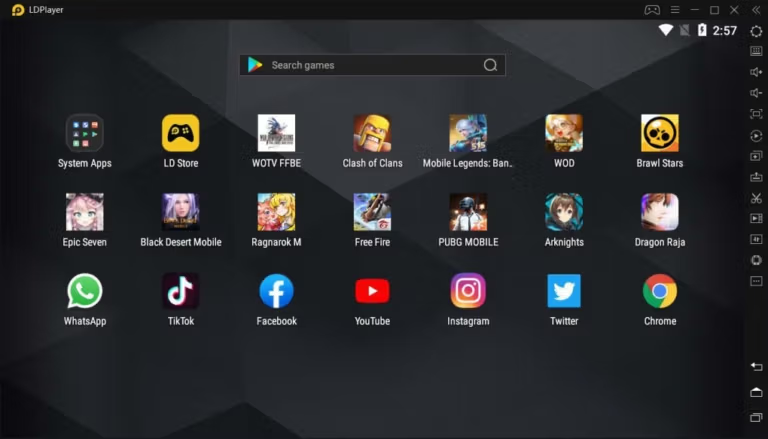
LDPlayer This is a free Android emulator for PCs that allows you to conveniently play mobile games on Windows. It supports multiple Android environments and provides graphics rendering optimized for various game types. In addition to playing games, it also accesses the Google Play Store to install other apps and offers options to emulate device location, resolution settings, core count, and memory to customize the experience for each device.
LDPlayer 14 uses the Android 14 engine, which focuses on compatibility with newer games and apps, more stable frame rates, and more efficient resource utilization. The engine incorporates techniques like AOT and I/O passthrough for faster instance startup, along with process freezing and topology management for more resource-efficient multi-instance tasks. Asynchronous rendering, hardware passthrough, and frame convergence help maintain frame rates during gameplay. For users opening multiple accounts simultaneously, Multi-Instance and Precise Sync support facilitates smoother management of multiple windows.
Compared to mobile phones, LDPlayer offers a display area and controls more suitable for gamers, making it easier to play Android games thanks to keyboard mapping, multi-instance synchronization, virtual positioning, higher FPS, and gamepad support. It also allows for web browsing while playing games. Opera GX You can control the browser's RAM and CPU usage from the sidebar.
Key Features
- Uses the Android 14 engine to improve compatibility with newer games and apps.
- Instant Launch uses AOT and I/O passthrough to reduce instance startup time.
- Ultra-Low Load uses process freezing and topology management to minimize performance loss when multiple instances are open.
- Stable High Frame Rate uses asynchronous rendering, hardware passthrough, and frame convergence to maintain a smoother frame rate.
- Cloud Preset Keymapping provides a set of pre-made keymaps for faster game startup.
- Full Controller Support allows direct connection of game controllers and switching between them with multiple game types.
- Script Recording & Auto Click allows you to record repeated commands and automate tasks for the same combos or steps.
- Unlimited Multi-Instance allows you to open multiple instances with memory compression technology to reduce machine load.
- Precise Sync synchronizes commands between multiple windows with millisecond-level response.
- It supports Hyper-V and Windows virtualization to help reduce conflicts in virtualized environments.
What's new?
LDPlayer 14.0.25.2 — 2026-08-28 - Fixed an issue where the emulator would occasionally fail to start. - Improved the version update experience and fixed multiple bugs for a better overall experience.
System Requirements
- Windows 10 64-bit or Windows 11
- At least an Intel Core i3-8100 or AMD Ryzen 3 3300X CPU with VT enabled.
- At least 8 GB of RAM
- A graphics card with more than 2 GB of VRAM, such as a GeForce GTX 1050 or Radeon RX 550 or higher.
- We recommend an SSD, with more than 10 GB of free space on the installed drive and more than 2 GB on the system drive.
File Information
- Operating System: Windows 11 / 10 (64-bit)
- Developer: LDPLAYER.NET
- License: Free
- Language: Multilingual
- Size: 927.6 MB
- File type: *.exe
- Updated: 9/9/2026
- Required Reading: Download Guide





