🩸🩸Due to current issues with hosting and domain name renewal costs, we need to temporarily increase advertising to keep the website up and running. We recommend clicking on the pop-up ads that appear approximately 7-8 times when you first visit the site. After that, you should be able to access posts for several hours without being bothered by intrusive ads.
❤️💕To support us through this time, you can donate to us via this Donate page:
😊After donating. Please fill out the form to submit your donation amount, transaction time, and email address. We will send you a thank-you email and a special account as a token of our appreciation 😊
1. Understand Risk Level
Using cracked or pirated software carries risks. Cracking involves modifying code to unlock copyrights. This process requires expertise and may involve the embedding of unwanted code. While this website attempts at initial verification, we cannot guarantee 100% security. 100%
Therefore, the website has established risk level labels based on the type of crack file and scan results from global antivirus programs (VirusTotal) to assist users in making informed decisions, as follows:
- 🟢 Safe: The file is 100% secure and can be used immediately without any risk.
- 🟡Low Risk The file is relatively secure, but cannot be verified 100%.
- 🟠Medium Risk There is a moderate risk (most cases are classified at this level).
- 🔴High Risk : The file has low credibility or has received an unusually high number of warnings from antivirus software (even if these are false positives). If you need to use this file, it is recommended to test it in a virtual environment (Sandbox) or use it only temporarily and delete it immediately for security purposes.
Note: Risk Level indicates only the risk level of the crack file and is not related to the security of the program itself in any way.
💡🟢 It will be noticeable that the cracks from our website are significantly safer than those found on other websites (confirmed by VirusTotal scan results). This is because we have processed the files in the most secure format possible, and if any file poses a high risk that cannot be handled manually, we write a script to automatically open it in a sandbox, greatly increasing security.
2. Download Methods (Divided by Tools Used)
Method 1: Use the IDM program or download via your browser.
💡🔽 We have developed a download system. Direct link (Fast⚡) This makes downloading via IDM or a web browser more convenient and secure. Currently, it supports file hosting websites such as pixeldrain, mediafire, fuckingfast, and bzzhr (gofile is not supported).

1) Click the “Download Here” button.”
- Scroll down to the bottom of the article and press the button. “Download here” (An advertisement window will pop up 1-3 times; you can close it.)
- Press “Confirm (click again) 👈” Then you will enter the page. MAWTO Link Generator
2) MAWTO Link Generator page
This page displays the actual download links from various file-hosting websites. Once you reach this page, wait for the 10-second countdown. Then, two types of download buttons will appear:
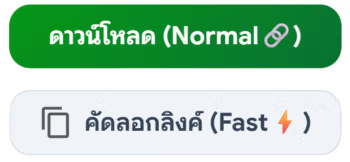
- Download (Normal🔗) – Clicking this download button will take you to the file hosting website where you can download the file yourself.
- Download (Fast⚡) / Copy link (Fast⚡) – A direct download button that allows you to download the file directly without having to go to a file hosting website.
Method 2: Use a program JDownloader 2
This method reduces steps, saves time, and lowers the risk of viruses or adware that come with the normal download process using a single button. Download (Normal🔗) Works well (can be used with Gofile which currently doesn't support this type of loading). (Fast⚡) (On our website)
If you want to read detailed instructions on how to use JDownloader,You can read it here.
1) MAWTO Link Generator page
Once you're on the Link Generator page and there's a download button... (Normal🔗) It's being displayed now.
- give Right-click. Select that button. Copy link address
- Program JDownloader 2 It will automatically capture the link and start downloading the file immediately.
3. Things to know
- Password for extracting the file: All files on this website use the same password:
mawto - Recommended Programs:
- Internet Download Manager (IDM) Or JDownloader 2 To help speed up the download.
- WinRAR Or Nanazip (recommend) Latest version for file extraction (to prevent issues with corrupted files or failed extraction)
- Advertising System: The website uses 1-3 layers of pop-up ads. Therefore, clicking the load button the first 1-3 times will often redirect you to another website. Close the ad and click again.
- (Additional) How to Download Google Drive
- Safety precautions before opening files:
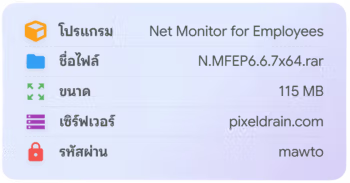
- Check File Name, File size And File extension Check if the downloaded file matches what is specified in the file info box.
- For example: The website states the file size is 115 MB, but the downloaded file is only 3 MB. This indicates a fake or junk file. Delete it and then download the correct file again.