

Download JDownloader 2.0.50639.0 for free (Adware-free, No Ads) Full Thai Version. This program helps you download files from various file-sharing websites with just one click, eliminating the need to download manually.
What is JDownloader 2?
JDownloader 2 It is a highly popular, free, open-source download manager program. The main capability of this program is to download files from various file-sharing websites without needing to open links or visit the download page. Simply copy the link you want, and the program will automatically download the file for you. It will bypass CAPTCHA and ads from file-sharing websites quickly without requiring any action from you.
Unlike IDM, which requires us to open those links first before we can download the files we want, this method often exposes us to numerous ads and CAPTCHAs (verification that we're not robots). This significantly increases the time spent downloading files and also poses a risk of accidentally downloading potentially harmful files onto our devices.
JDownloader 2 is an excellent program for downloading files. It is user-friendly, free of ads and viruses, and supports almost all popular file hosting websites, including Google Drive, Mega, Gofile, Qiwi, and Mediafire. Additionally, it allows you to use premium accounts on various file hosting sites and is compatible with Premium Link Generator services. alldebrid.com Or real-debrid.com The Cat-O-Way is also used here.
Key Features
- Automatic Link Detection: Features a prominent ability to detect the clipboard when a link is copied. The program will process and automatically load the file from that link.
- A variety of settings: You can customize various settings to your liking, such as enabling automatic file downloads, toggling clipboard detection, adjusting download speed, and more.
- Multi-Website Support: Supports downloads from numerous file hosting websites.
- Managing multiple files simultaneously: You can download multiple files simultaneously and arrange the download order as desired.
- Automatic File Extraction: Supports automatic file extraction for compressed files such as RAR and ZIP.
- CAPTCHA Recognition System: There is an automatic CAPTCHA entry assistance system, which helps reduce the hassle of downloading from certain websites.
- Support for plugins and extensions: Additional features can be added by installing plugins or various extensions.
- Bandwidth Management: You can set the download speed, which makes the download speed no different from IDM.
- Connecting to a User Account: Supports connection to a Premium account to increase download speed and limits.
- Multi-platform support: Works on Windows, macOS, and Linux
Is JDownloader any good?
From the capabilities and qualifications mentioned above, it can be confirmed that this program is excellent and worth downloading. To provide a clearer picture, we will outline the advantages and disadvantages of this program when compared to the IDM program as follows:
Advantages:
- Free and open source: It can be downloaded and used for free without any charges, unlike IDM which requires payment for a genuine license.
- Multi-platform support: Can be used on Windows, macOS, and Linux, unlike IDM which is only available on Windows.
- Plugin Support: Flexibility to add features through extensions is available, but IDM does not offer this feature.
- Automatic Link Management: Can efficiently detect links in the clipboard from multiple sources.
- Automatic CAPTCHA Management System: Helps make downloads from websites protected by CAPTCHA smooth and seamless.
- Download efficiency: Download speed comparable to IDM is only available in certain situations and may not be as fast.
- Supports almost all file upload websites: You can download files from any file-sharing website. This differs from IDM, which currently often has issues detecting download links on certain websites, such as Gofile.io.
- Supports video downloads: Supports downloading videos from YouTube, including full videos, playlists, audio, subtitles, and video thumbnails. You can also customize which elements to download.
- Safe, ad-free, and virus-free. Since there is no need to download anything, there is no need to worry about these issues. This is different from IDM, which requires you to download files directly from file-sharing websites, making it riskier.
- Strong User Community: There is development and support from a global user community.
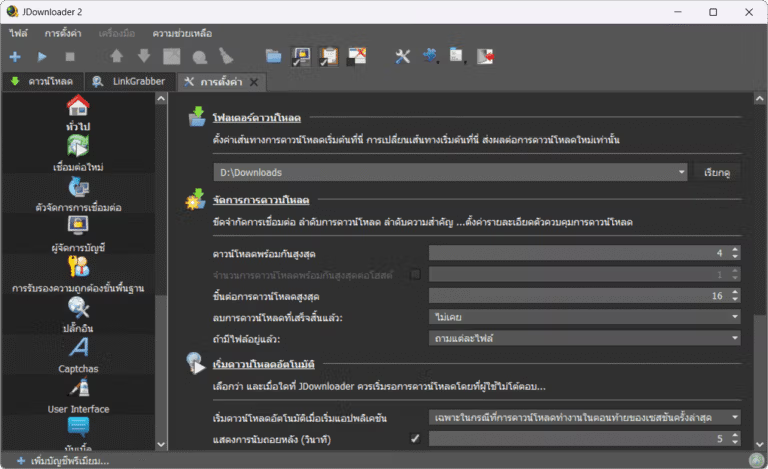
Disadvantages
- Interface that may be complex: It may seem complicated for new users compared to IDM, which appears simpler and more user-friendly.
- Browser Integration: There is no deep integration with the browser like IDM to automatically capture downloads, but instead, it uses a clipboard detection method.
- Detecting files downloaded by the browser: Another key feature available in IDM but not in this program is the inability to capture file links generated by directly clicking “Download,” as IDM can do. Instead, you must copy the link from the download button or from the “Download” page in the web browser.
- There is no video download panel in the browser. Unlike IDM, which displays a blue download panel when you watch a video, allowing you to click and download directly, this method requires you to copy the URL of the webpage where the video is playing. It will then scan for videos, audio, images, and subtitles, which many websites do not support by default. You will need to install additional extensions for those specific websites within the program, making it significantly more complicated than using IDM.
Considering the advantages and disadvantages mentioned, it can be concluded that both JDownloader and IDM have their own strengths and weaknesses. In actual use, it has been found that using both programs together is excellent. Since both can effectively compensate for each other's weaknesses, if we encounter a situation where one program cannot download a file, we simply switch to the other program.
How to Use JDownloader 2
- Open the program.
- Enable “Clipboard Monitoring”
- Copy the link you want to download, such as: https://gofile.io/d/G6MucN
- The program will automatically download the files without requiring you to visit those links.
This is just a basic example of how to use the program. If you have any questions, please read the instructions.How to Use JDownloader 2 Sure thing!
What is JDownloader Pack?
JDownloader Pack (by mawto) is a small tool developed by mawto itself. It comes with pre-configured settings within the program to make it easier and more convenient for new users.
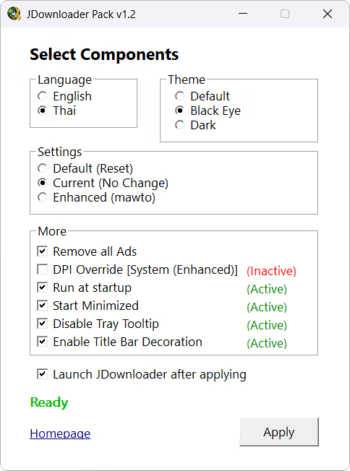
- Language Settings: You can set the language to English or Thai. Normally, this program does not support Thai.
- Default Settings (Reset): Reset the program settings to their default values without losing any download items.
- Current Settings: Keep the current program settings and change only the selected parts, such as language or remove ads.
- Enhanced (mawto) Settings: This is a setting based on the Mato style, with the main features being:
- Add support for displaying non-English characters that normally appear as foreign language characters.
- Simplify the menu panel to resemble the IDM program for easier use and increased functionality.
- The file will be verified and downloaded automatically when you copy the URL. There is no need to confirm again later.
- Close unnecessary menus and add-ons.
- Disable ad display
- Others:
- Remove Ads: You can disable various advertisements within the program, making it cleaner and more user-friendly.
- DPI Override: High-resolution screen compatibility can be enabled by setting to System (Enhanced).
- Dark Theme: For those who prefer dark themes, we offer two options. Feel free to choose whichever you like.
- Run at StartupOpen the program automatically when the computer starts up.
- Start MinimizedThe program will minimize to the Tray when opened.
- Disable Tray Tooltip: Hide tooltips that appear when the mouse hovers over the system tray.
- Enable Title Bar Decoration: For displaying the title bar decoration according to the selected theme
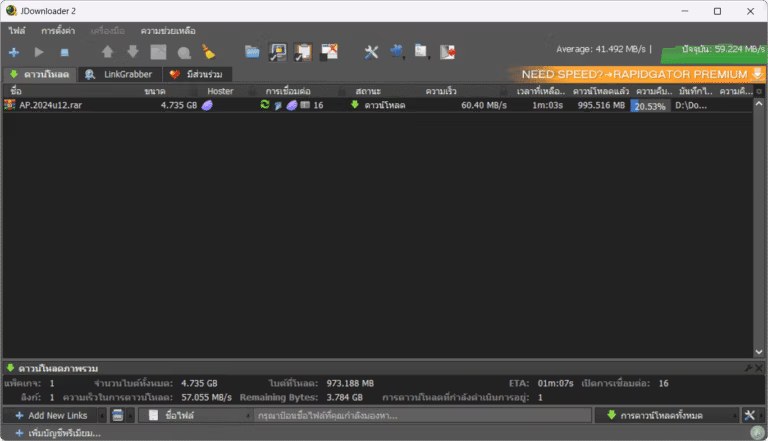
File Information
- Operating System: Windows 7 / 8.1 / Windows 10 / 11
- License: Freeware
- Language: English / Thai
- Size: 70 MB / 3 MB
- File type: *.exe / rar
- Password: mawto
- Updated on: January 23, 2026
- Required Reading: Download Guide
Download (Adware-free, No Ads)
You can also read more articles about new features in JDownloader Pack is available here.
==== Download JDownloader Pack v1.2 ====





