
Download Desktop Calendar 3 for free in Thai language for Windows 11 and 10. This calendar program displays schedules and notes on the desktop, helping you plan your tasks simply and organized. Latest version.
What is Desktop Calendar
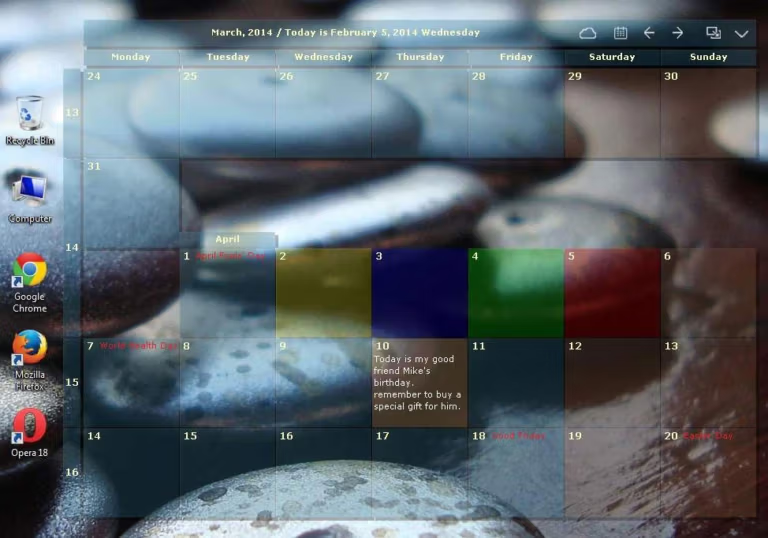
Desktop Calendar This is a calendar application that overlays itself onto your computer's wallpaper, allowing you to see your entire month's schedule and appointments at all times when your computer is on, without having to open the app repeatedly. It solves a very common problem: our appointments and reminders are often scattered across multiple locations—some written on the phone, some remembered in our heads—leading to forgotten dates. On busy days, repeatedly checking the schedule by opening and closing the app can be annoying. This application brings all your schedules directly to your screen, visible from the moment you turn on your computer until you turn it off. And it's free to download and use immediately.
Using it is straightforward. Just double-click the designated space on the day you want to jot something down and type in your notes. This can be important appointments or short notes. You can then color-code important dates—for example, one color for meetings, another for anniversaries—making it easy to distinguish them when scanning your entire month's schedule without having to read every single space. Another difference from typical calendars is that data automatically syncs to the developer's cloud. Your saved schedules are always backed up and ready to restore, and you can access them from your mobile device or other computers because the developers have created multi-platform versions for use with multiple devices.
This is ideal for professionals who need to manage multiple projects simultaneously, students with busy exam and assignment schedules, and anyone who wants a clear overview of the month without needing to open anything extra. Bonus features include public holidays and festivals, information on popular anniversaries, and the ability to print the entire month's calendar for display on a board or distribution at meetings. For those who want to organize their workspace, both schedules and program windows, try... Microsoft PowerToys They go together quite well.
Why is it called CalendarTask?
If you see the name CalendarTask mixed in with Desktop Calendar, don't be surprised. It's the same program; the developer has simply rebranded it as CalendarTask. All the core features are the same; only the website and new documentation refer to it as CalendarTask. The installation file is still named xdiarys-setup-v3.exe, as you can see in the download button below.
Key features
- Double-click to take a note. You can directly write down appointments or to-do lists in the date field without having to open a new window, saving time.
- Color the important days. Color the background for each day to categorize them, so you can see how important each day is at first glance.
- Holidays and festivals included. Annual holidays and festivals are displayed right from the moment they're installed, including popular anniversaries.
- Automatic cloud synchronization. All schedules are backed up to the developer's cloud. Data is not lost and can be easily restored when changing devices.
- Compatible with multiple devices. Transfer data between devices using built-in tools, and there's a mobile version that synchronizes data in real time.
- Print it out on paper. Order a printed calendar for the entire month with your current wallpaper now!
- Highly customizable. Easily customize the calendar's size, font, and color to match your screen style.
- It's free to use. Manage your calendar, schedule, and reminders for free. Download and use it now.
If you want to organize windows and access tools on Windows more efficiently, along with managing tasks, you can use... Microsoft PowerToys Help organize your workspace and keyboard shortcuts more efficiently.
File Information
- Operating System: Windows 11 / 10 / 8.1 / 7
- Developer: Beijing Xiaowei Cloud Inc.
- License: Freeware
- Language: Thai / Multilingual
- Size: 6.70 MB
- File type: EXE
- Status: Tested
- Updated: September 28, 2026
- Required Reading: Download Guide





