

Download Adobe Camera Raw 18 for processing and adjusting RAW photos in Photoshop. It supports color correction, masking, noise reduction, object removal, and managing files from various camera models, making it ideal for professional photography.
What is Adobe Camera Raw?
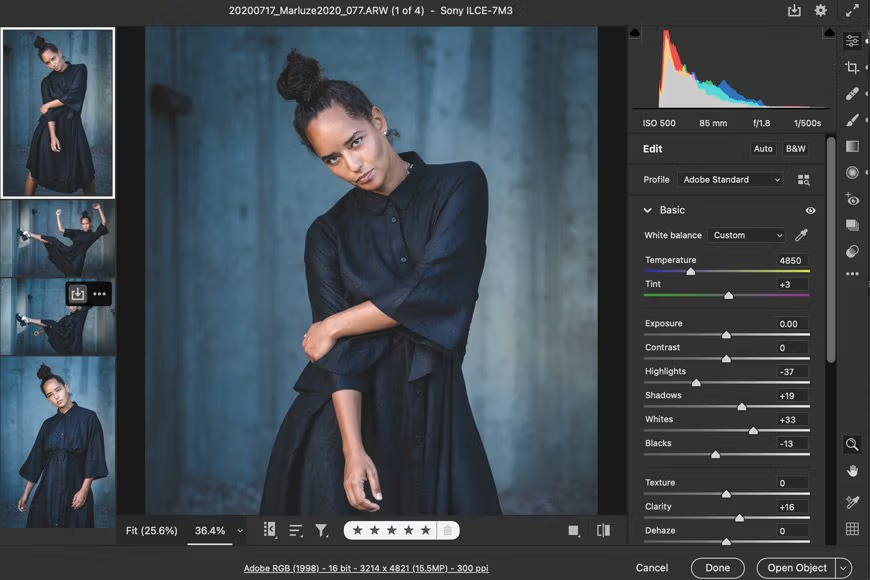
Adobe Camera Raw This is an Adobe plugin for opening and processing RAW image files from digital cameras before further editing in Photoshop. It reads data from the camera's sensor and displays an image with more detailed adjustments than starting from a JPEG file. The built-in tools help manage exposure balance, color temperature, contrast, highlights, shadows, sharpness, and saturation in a single step. It supports files from many camera brands and formats, allowing you to manage the original image without destroying important data from the beginning.
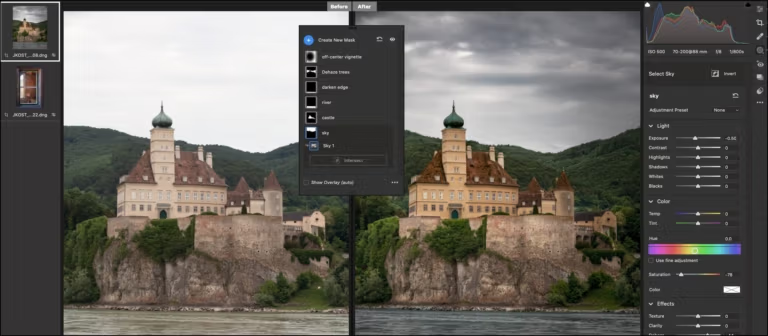
The highlight of Camera Raw is its non-destructive editing capabilities. Edited values are saved as image composition commands, allowing you to later alter lighting, color, or details without overwriting the RAW file. The Masking tool allows you to select skies, subjects, backgrounds, or areas with similar color and brightness levels. Denoise reduces noise from images shot in low light, while Super Resolution enhances detail and image size when necessary. Additionally, it offers lens correction, camera profile adjustments, cropping, rotating, and syncing settings across multiple images to save time in batch workflows.
Once image adjustments are complete, Camera Raw can transfer images to Photoshop for further retouching and composition, or open them via Bridge for systematic selection of multiple files. It supports reading EXIF data, defining color profiles, and storing settings appropriately within the file. For files recorded in model-specific formats, they can be converted to DNG. Adobe DNG Converter Before being able to open them again in Camera Raw, it's suitable for editing individual images, studio work, and large batches of photographs that require consistent results.
Key Features
- Open and process RAW files from various camera brands.
- Adjust the balance of light, color temperature, exposure, and contrast.
- Control highlights, shadows, sharpness, and saturation.
- Create masking for the sky, subject, background, and specific areas.
- Reduce noise in low-light images using the Denoise tool.
- Enhance image detail and size with Super Resolution.
- Remove objects or distractions using the Remove tool.
- Adjust the lens and select the camera's color profile.
- Crop, rotate, and adjust the image viewpoint.
- Non-destructive image processing for original RAW files.
- Sync settings with multiple images at once.
- Read EXIF data and manage image color profiles.
- Send the image to Photoshop and Adobe's file management tools.
- Supports DNG files created from camera RAW files.
- Save the settings for later editing.
File Information
- Operating System: Windows 11 / Windows 10 / 8.1 / 7
- Developer: Adobe
- License: Freeware
- Language: English
- Size: 1.70 GB
- File type: *.exe
- Password: mawto
- Updated: 26/8/2026
- Required Reading: Download Guide





