
Download FluentCleaner 26 for free. This open-source Windows junk file cleaner features a modern WinUI 3 design, is portable (no installation required), and is ad-free. It's the latest version and comes with updates.
What is FluentCleaner?
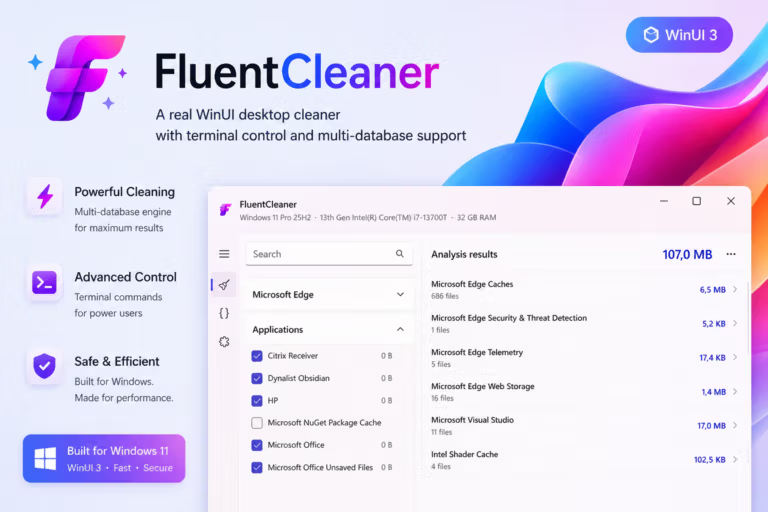
FluentCleaner It's an open-source Windows cleaning program developed by Builtbybel, inspired by the era when... CCleaner It's also a simple and practical program, unlike most modern junk file cleaners that tend to become increasingly resource-intensive due to unnecessary features, ads, and subscription systems. FluentCleaner chooses to go against the trend, focusing on doing one thing well: transparently and safely deleting junk files without any hidden agendas.
The key to FluentCleaner's comprehensive scanning and management of leftover files lies in its use of a continuously maintained winapp2.ini rule database, collaboratively maintained by the global developer community. This allows it to detect and remove junk files from over 3,700 popular programs, including browser cache, old log files, and temporary application data. Furthermore, users can preview the detected files before deleting them, ensuring that important data isn't accidentally deleted. The rule database can also be customized and expanded as needed.
The program's interface is built with WinUI 3, resulting in a beautiful and seamless design that blends beautifully with the operating system. It's also easy on the eyes. Importantly, the program is portable; simply extract the files and it's ready to use immediately without installation. There's no embedding of data in the registry, no sharing of usage statistics externally, and no intrusive advertisements. This makes it convenient to carry on a flash drive and use to maintain other computers.
Key Features
- Winapp2.ini Database: It uses a community-based cleaning database, supports thousands of applications, covers over 3,700 items, and allows updates directly from within the program.
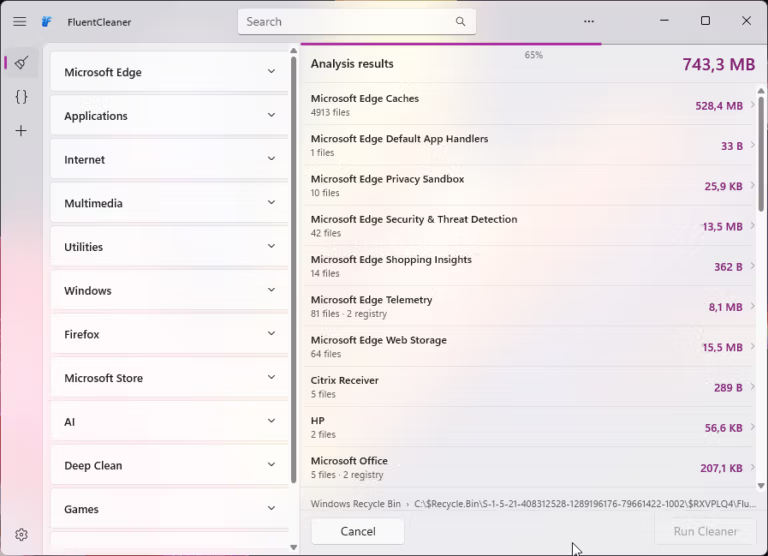
- Category-Based Cleaning: Grouping the cleaning items by category makes it clear which files the system will delete and from which folders before you confirm.
- Custom Database Support: It supports adding winapp2 compatible databases from other sources or you can write your own. Just place the .ini file and select the path in the settings.
- Junk Growth Tracker: The system records each junk file cleanup, including the date, amount of storage recovered, and the number of items deleted, to show the trend of junk file accumulation on the device.
- Portable, no installation required: Just extract the ZIP file and run FCleaner.exe immediately. It doesn't interfere with the Windows Registry and leaves no traces on the system.
- Cancel button mid-process: When you press Start Scan or Clean, the Analyze button will immediately change to a Cancel button, allowing you to stop the process at any time.
- Scan up to 28 times faster: With a new algorithm, we can scan lists with multiple file patterns simultaneously in a single pass, eliminating the need to waste time iterating through each pattern one by one like before.
- AI Explanations via Groq: The system helps explain the items in Winapp2 in simple terms, making it easy to understand where the file being deleted comes from and what its function is. (This function requires a Groq API Key, which can be signed up for for free, and must be enabled manually in the settings menu.)
- Extensions: A collection of popular add-on tools such as Chris Titus Tech Debloat Tool, Clear Icon Cache, Explorer Tweaks, and Remove Windows AI.
- Terminal / AUTO Mode: Supports command line control using the /AUTO parameter for those who want to set up automatic background cleaning without opening the main screen.
What's new?
Version 26.09.01
- Classic: Added a command-line system for batch scripts, PowerShell, and external tools, with the option to select the desired analysis or cleaning category (Cleaner).
- Classic / Modern: Fixes the issue of accidentally not selecting any Cleaner, preventing the program from reappearing automatically after restarting.
- Classic / Modern: Adjust Silent Cleaning and automatic commands to respect empty cleaner selections instead of reverting to defaults.
- Classic / Modern: Adjust the DetectFile setting for 32-bit programs to correctly detect both Program Files and Program Files (x86), including cases where wildcards are used.
- Classic: Adjust Cookie Manager to preserve the position of items after deleting cookies and add "Select all" to the right-click menu for both items, while respecting the current search filters.
- Classic: The Entry column in the analysis results is automatically adjusted to use available space, while the Registry File and Size columns remain compact.
- Classic: The CLI command returns an exit code that can be used in an automated system and saves the results details.
%AppData%\FluentCleaner\auto.log - Classic: Added Azerbaijani language, adjusted "Select all" text, and updated the structure/translations for English, German, Brazilian Portuguese, and French.
File Information
- Operating System Windows 11 / 10 (64-bit only)
- License : Open Source / Freeware (MIT License)
- Developer Builtbybel (GitHub)
- Language : England
- File size 47.6 MB
- File type *.zip (Portable, no installation required)
- Updated: 18/9/2026
- Required Reading: Download Guide
Note: FluentCleaner is primarily developed and distributed via GitHub, without a separate official website. It is recommended to download directly from the GitHub Releases page for security and to ensure you always receive the latest version.