

Download Brave Browser for free. This browser blocks ads and trackers, loads websites faster, saves battery and data, and offers high-level privacy. It supports all platforms and is the latest version.
What is Brave Browser?
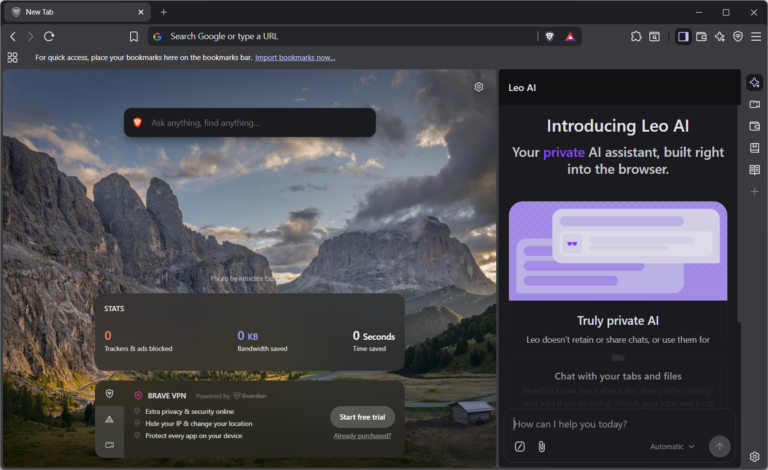
Brave Browser Brave Shields is a Chromium-based web browser designed to protect privacy and speed up data loading. Its primary function is controlled by Brave Shields, which detects and blocks banner ads, cross-site trackers, behavioral scripts, and even browser fingerprinting at the network level before unwanted code is downloaded to the device. Disabling tracking scripts at the source reduces RAM and internet bandwidth usage, resulting in smoother operation of complex web pages or numerous tabs.
The system is built on the latest version of Chromium, making it compatible with modern web standards and allowing for immediate installation of extensions from the Chrome Web Store without modification. Data transfer between computers and smartphones uses Brave Sync, which encrypts data end-to-end using your own local sync code, eliminating the need for a central email account or relying on external servers. Furthermore, security policies can be independently customized for each website, such as disabling JavaScript on high-risk sites or setting exceptions for online banking and payment systems.
In terms of in-depth usability, Brave includes a full suite of specialized tools, including a private browsing window via the Tor network to mask IP addresses, the AI-powered summary of lengthy articles in Brave Leo, and a window organization system with vertical tabs and a split-screen view for simultaneous viewing. If you need a gamer-oriented browser that focuses on limiting hardware resource usage, Brave is a great option. Opera GX This is another option that provides clear control over the machine's operation.
Key features
Core Functions
- Brave Shields blocks ads and trackers. Block banners, pop-ups, and automated behavior monitoring scripts, with real-time statistics on the number of items blocked.
- Transfer data from your old browser. Instantly retrieve bookmarks, browsing history, passwords, and extensions from previously used programs and continue working.
- Search for information using Brave Search. An independent search system that does not record search history and does not share personal data with advertising networks.
- Encrypt data across devices with Brave Sync. Link bookmarks and preferences between your computer and mobile device using a device-specific code without needing an email account.
- Supports extensions from the Chrome Web Store. Install and use extensions for the Chromium platform directly.
Special Features
- Brave Leo Smart Assistant Use the sidebar to summarize web page content, analyze lengthy documents, and answer in-depth questions.
- Browse anonymously via the Tor network. Opens a special private tab that redirects connections through multiple stages to mask the IP address.
- Manage your digital assets with Brave Wallet. A built-in cryptocurrency wallet and Web3 application that runs directly in your browser without needing to install any extensions.
- Save multimedia content with Brave Playlist. Save videos and audio files from web pages for offline viewing.
- Organize your screen with Vertical Tabs and Split View. Displays a vertical tab bar for widescreen displays, allowing you to open two web pages side-by-side in a single window.
- Cross-platform installation and use. It supports Windows, macOS, and Linux operating systems, as well as Android and iOS smartphones.
What's new?
Improvements in version 1.96.59
- Upgrade core Chromium 154.0.8037.58 To enhance the security and processing performance of web pages.
- Add window Preview dialog A preview is displayed instantly when using the Screenshot tool.
- Move tool position Screenshot In the main menu, move the Share option to the Save option for faster image saving.
- Rendering supported. mathematical equation To display the answer from the Brave Leo intelligent assistant system.
- Update the window. VPN onboarding UI Make it easier to set up and start connecting to a private network.
- Add an option to display a list of configured websites. Always keep these sites active On the Memory Settings page.
- Turn off Widevine In the Tor private window, force enable HTTPS from the installation process for advanced security.
- amend Brave Wallet Verify Solana mint addresses before retrieving NFTs and change transaction notifications to a pop-up window.
- Treat the symptoms Renderer crash When UserMediaElement is disabled in the system.
- Correct the display of numbers and formula calculation results in the field. Omnibox Truncate in some cases.
- Fix the power button. Improve search suggestions In the search settings page, save the search status permanently after reopening the browser.
- Fixes an error that prevents editing the start page list. Startup pages Available in the initial settings page.
- Edit the icon of Desktop shortcut The incorrectly displayed icon, which is a Chromium icon, should be changed back to the correct Brave icon.
- Edit display position. Hover card Group of tabs when the vertical tab bar is enabled.
- Correct the illustrations in the news banner. Brave News Render the content instantly on the sidebar without any lag.
File Information
- Operating System Windows 11/10, macOS 12 and above, Linux
- License Freeware / Open Source
- Developer Brave Software, Inc.
- Language Supports multiple languages, including Thai.
- Size 156 / 140 MB
- File type *.exe
- Updated on : 25/9/2026
- Required Reading: Download Guide





