Download eXtreme Karaoke 2026 for free, single file, Thai/English + SoundFont. Free karaoke software for PC Windows 11, genuine version, packed with newly updated songs, latest November 2026. No installation required, extract and play immediately.
Overview of eXtreme Karaoke
eXtreme Karaoke is a computer karaoke software familiar to Thai people for many years. Its selling point is simple yet meets exact demands: open a single computer and instantly have a private karaoke room without needing expensive jukeboxes. The program is specifically designed for Thai users, with all menus in Thai, making it easy to understand from the very first launch. Anyone who has sung karaoke at venues before can pick it up and use it with almost no relearning required.
The main capability of eXtreme Karaoke is supporting a wide variety of karaoke song formats, including MIDI, KAR, EMK, and NCN, which are formats long used in the Thai karaoke industry. People who have old song files stored away can open and play them immediately without converting files. Furthermore, it plays MP3 files and karaoke video files like MP4 or AVI. Whatever type of music you have on your machine, you are ready to sing them all.
What karaoke singers look for the most is adjusting songs to match their voices, and this program provides it completely. Adjust the song key up or down according to the singer's vocal range, adjust the tempo to be slower or faster without losing sound quality. Lyrics are displayed on the screen, perfectly synchronized with the musical rhythm. Adjust font size and color as you like, suitable for both solo singing on a single screen and connecting a second screen for friends to view the lyrics.
Regarding musical sound, the program supports SoundFont which elevates the musical sound from ordinary MIDI files to sound more realistic and dimensional, as if a real band is playing for you. Complete with built-in effects like adjustable Reverb and Echo, it helps vocals blend more harmoniously with the music. In addition, there is a system to search for songs by title, artist name, or album name, create advance playlists, and connect a microphone to sing while recording to listen back later.
With its simplicity, targeted features, and Thai menus that anyone can use, eXtreme Karaoke remains a top choice for Thai people who want a small karaoke corner at home. Whether singing with family on holidays or throwing a party with friends, a single program handles it all.
Features:
Sound and Music Playback
- You can adjust the sound as needed and add new music.
- It has many features such as adjusting guitar tone, reverb, bass, and more.
- You can adjust the vocal track to several levels, such as completely muting the vocals or having the vocals at 100%.
- You can customize the sound settings, including bass, accordion, treble, etc.
- Built-in VSTi support makes musical sound more realistic and dimensional.
- Separate individual music tracks to mix with external audio equipment.
- Equalize the volume levels of MIDI songs across all tracks without having to constantly adjust knobs yourself.
- Play medley songs consecutively without stopping to wait for song changes.
- Includes a rhythm beat that plays alongside the song, allowing tempo changes on the fly while the music is playing.
Search, Management, and Display
- The most popular karaoke program.
- A collection of all old and new songs, including old and new Luk Thung (Thai country music).
- It can play karaoke video files of all file extensions.
- Quickly find songs by song title, album title, or artist name.
- Suitable for all ages and features the ability to select songs in advance.
- Dual-monitor separation: one screen controls the music, while the other displays full-screen lyrics for singers.
- Built-in MIDI file editing directly within the program, no other software required.
Key features of Extreme Karaoke
- Supports multiple music file formats. Extreme Karaoke can play various formats of karaoke music files, whether MIDI, MP3, MP4, AVI, or karaoke files with visuals and lyrics, allowing users to choose and play songs according to their preferences.
- Audio and Tempo Customization Users can adjust the volume and tempo of songs to suit their needs, making the karaoke experience even more enjoyable.
- Playlist Management The program features functions to manage song lists and create playlists, making it easy for users to arrange songs in the desired order.
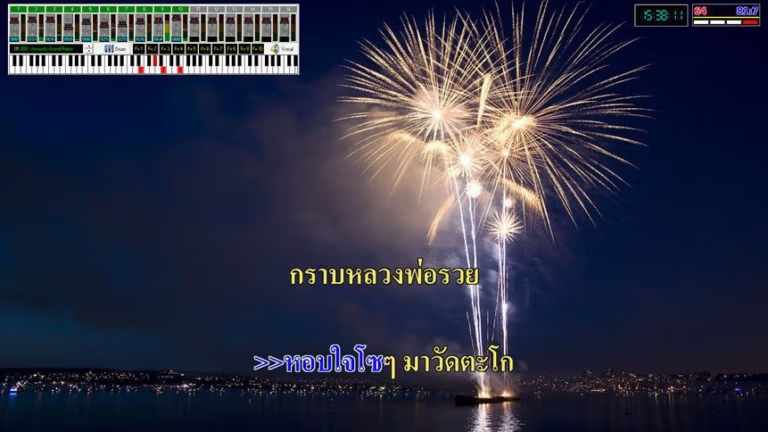
- Lyrics and Background Display Extreme Karaoke features a lyrics display system with customizable background images, making karaoke singing more fun and engaging.
- Audio Recording The program can record karaoke singing, making it easy for users to listen to and improve their singing.
How to use
Using eXtreme Karaoke 2026 is easy. Simply download the file below, extract it, and follow these steps.
- Copy the “eXtreme Karaoke” folder to your desired location, such as the D: drive.
- Open the program using the KaraPlayer.exe file.
- If you encounter problems opening this file, try opening it with another program, such as KaraPlayer_VST.exe.
file information
- Operating System: Windows 11 / Windows 10 / 8.1 / 7 / XP
- Risk Level: Medium
- License : Full
- Language: English, Thai
- Size : 3.42 GB
- File type : *.rar
- Password : mawto
- Installation method: Yes
- Updated: 5/10/2026
- Need to read: Download Guide