How to install/configure SoundFont for eXtreme Karaoke 2024 for better, more realistic, and immersive sound.
How to install SoundFont / Set up SoundFont
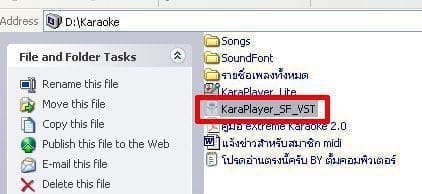
1. First, open the KaraPlayer_SF_VST program. This is eXtreme Karaoke itself.
2. Once the program is open, right-click and select "Options."
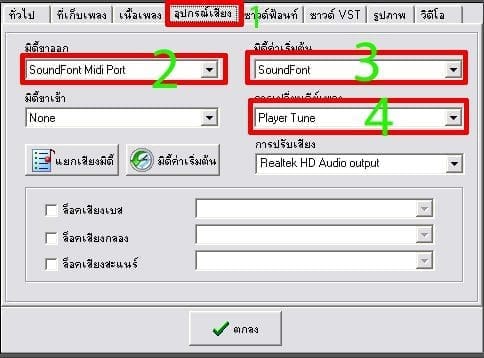
3. Click on the Audio Devices tab > Change MIDI Output and MIDI Default to SoundFont. To change the song key, change it to Player Tuer.
4. Go to the Soundfont tab > and click the ... button.
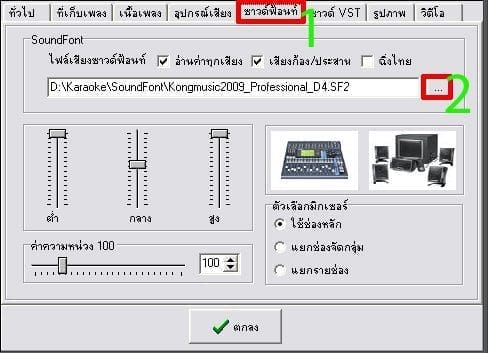
5. Select the SoundFont file you want to use > Once selected, click Open.

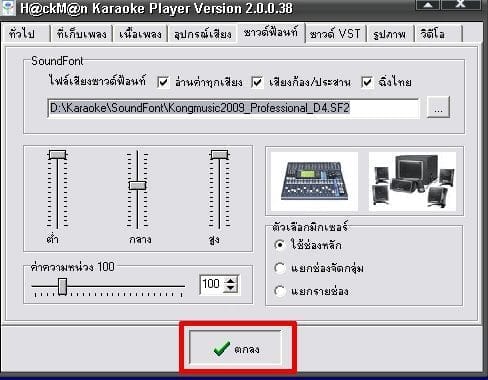
6. Finally, click the OK button.
The eXtreme Karaoke 2024 program and SoundFont can be downloaded from the links below.
Download eXtreme Karaoke 2024
Download SoundFont for eXtreme Karaoke 2024