
Download Mister Download Manager (MDM) for free in Thai, a file download manager created as an IDM alternative with identical interface and features, but also capable of downloading Torrents. Latest version.
Overview of Mister Download Manager
Mister Download Manager or MDM is a free, open-source download manager designed to replace Internet Download Manager for free. Its interface and usability are designed to mimic IDM, which many people are familiar with, allowing former IDM users to switch immediately without any learning curve. The program takes over from the browser, splitting files into multiple parts and downloading them simultaneously to maximize internet speed and ensure that large downloads won't fail midway and require restarting from scratch.
Unlike built-in browser downloaders, MDM supports pause and resume. If your internet disconnects, power goes out, or your computer shuts down unexpectedly, you can simply reopen the program and resume downloading from where it left off without losing already downloaded data or starting over. It also automatically captures download links from browsers and copied text; once you copy a file link, the program is ready to start downloading immediately. Finished downloads are automatically categorized by type—such as documents, videos, music, images, and archives—making them easy to find without cluttering your download folder.
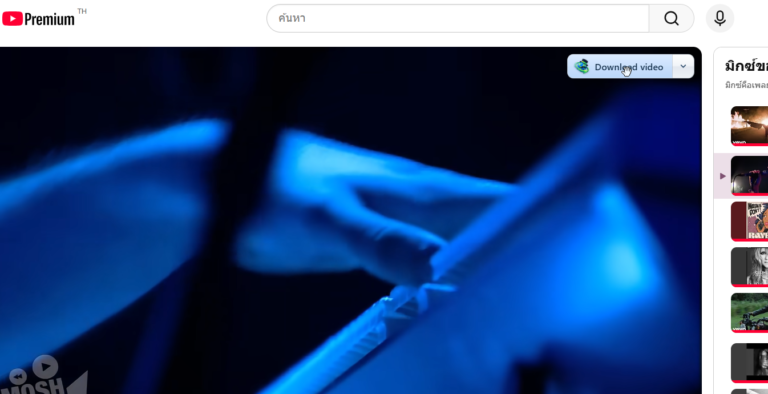
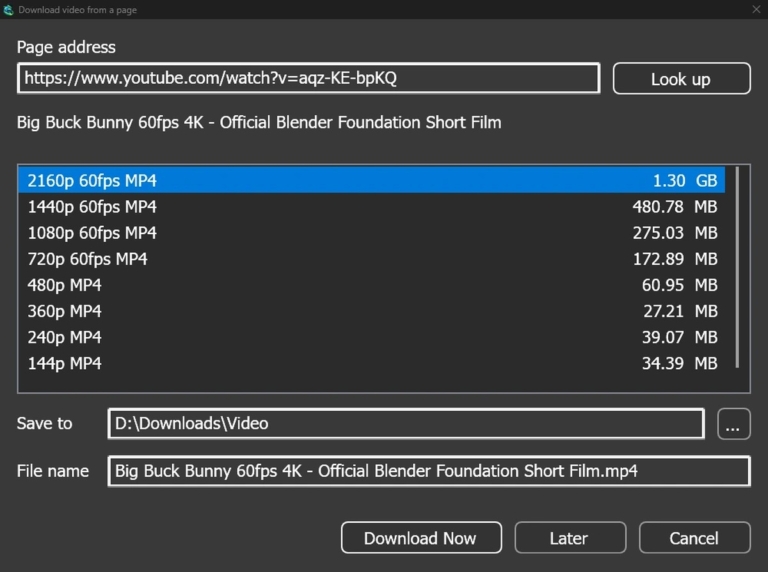
For those who like downloading videos or audio from the web, Mister Download Manager detects playing web videos and offers to save them for offline viewing, letting you select your desired file resolution. Users downloading multiple files simultaneously can queue downloads, limit download speeds to prevent web browsing slowdowns, and schedule start or stop times (e.g., letting downloads run overnight and automatically shutting down the PC upon completion).
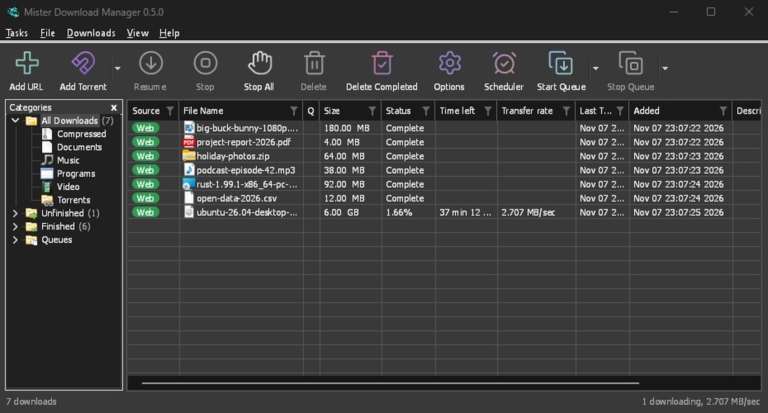
The MDM interface focuses on simplicity and ease of use, displaying active, completed, and paused file lists along with progress bars, speeds, and estimated time remaining, allowing anyone to use it immediately without complex configuration. The program supports HTTP, HTTPS, and FTP downloads, operates lightweight with low system resource usage, and is ideal for downloading work files, installers, games, movies, or music. For frequent downloaders who want organized, fast downloads with resume capabilities upon errors, this is an all-in-one download management solution.
How is MDM different from IDM?
Internet Download Manager is a long-standing download manager sold commercially after a 30-day trial period, whereas Mister Download Manager is completely free with no paid tiers. The program is rewritten from scratch in Rust while maintaining the familiar interface and layout of IDM.
The most distinct differences are the inclusion of torrent and magnet link support—which IDM lacks—and native support for 86 display languages, compared to IDM's approximately 40 languages that require separate downloads.
Developer benchmark tests show a 1 GiB file downloaded in 1.0 seconds, while IDM 6.42 took 5.5 seconds on the same test machine and server. On the other hand, IDM is a mature program refined over many years, whereas Mister Download Manager is newer and still in its early stages.
Key features
Download
- Acceleration and resumption. Splits a single file into up to 32 connections, reallocating the slowest segments until complete, with resume support after program closure or system shutdown.
- Browser extensions. Files clicked in Chrome, Edge, Brave, Opera, Vivaldi, or Firefox are sent directly to the program, including files requiring authentication.
- Video downloading. Download videos from YouTube, Vimeo, TikTok, and over 1,000 other websites with custom quality selection.
- Image gallery. Paste the gallery URL, and the program saves all images into its own folder.
- Torrents. Open Magnet links and .torrent files, queue and schedule them just like other downloads.
- Debrid account. Unlock file host links via Real-Debrid, AllDebrid, or Premiumize, and download them using the program's speed and resume capabilities.
- Link collector. Gather links from web pages, organize them into sets by category, check which links are still working, and automatically extract compressed files upon download completion.
- Batch downloading. A single URL with a wildcard can retrieve a sequence of numbered files, while a text file containing a list of links can add them all at once.
- RSS feeds. Monitor torrent feeds, set rules to automatically add desired new episodes, ensuring each episode is added only once.
Organization
- Scheduler and queues. Set queues to start and stop on a schedule, download a few files at a time, and shut down the computer when finished.
- Speed limiter. Set a global cap for the entire program, limit speed per file, or run at full speed when away from the screen.
- Categories. Automatically sort files by type into their respective folders, with completed and incomplete files viewable in a single click.
- Auto-extraction. ZIP and TAR files are extracted immediately upon arrival, while 7z and RAR files are extracted using 7-Zip, and split archives are extracted once all parts are gathered.
- Check checksum. Paste the checksum announced on the website, and the program directly tells you whether the obtained files match.
- Import lists from IDM. Import download lists from IDM into a single file, with each item including its address, referrer, and cookies.
Network
- Select network adapter. All connections route through the selected adapter; if the connection drops, downloading stops as well.
- DNS and proxy. Use system proxy, custom proxy, SOCKS proxy, or automatic network configuration script.
- Remote control. Paste a link from your mobile device, and your home computer will download it. View and pause from anywhere in the house.
- Server mode. Run the program headless on a NAS in Docker or on Unraid, then feed tasks from your mobile phone or browser.
The app
- System tray. Start with the system and sit in the system tray. The progress window hides there while downloading.
- Themes. Available in 9 light and dark variants, ranging from Classic to Aqua, or write your own theme as a text file.
- Crash reports. If the program crashes or freezes, it opens a report for you to read before choosing whether or not to send it to GitHub.
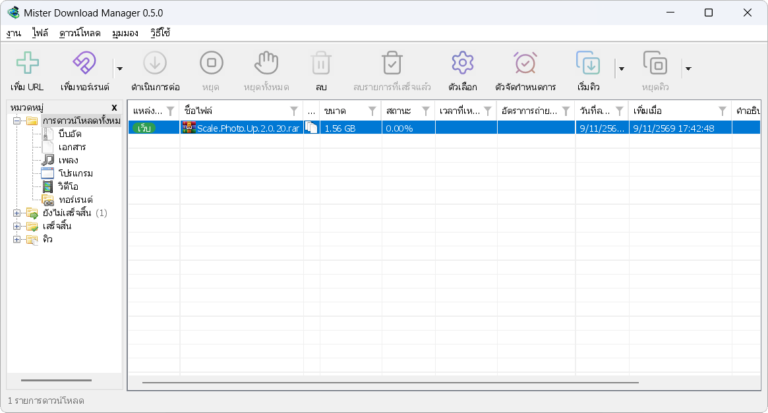
- 86 languages. Includes all display languages available in Windows 11, selectable by national flags. Arabic, Hebrew, and Persian are read from right to left.
- Windows, Mac, and Linux. Runs stably on both Windows 10 and 11 in both installer and portable versions, while Linux and macOS have files available for all versions.
- Accessibility. Compatible with Narrator and NVDA; everything can be controlled via the keyboard, menus, and dialog boxes.
- Command line. Supports IDM command-line switches, features a terminal-based loader that outputs to JSON, and provides a local API for other programs to use.
- Assistant AI. Claude, Cursor, VS Code, and other MCP assistants can view the list, add, pause, and resume downloads.
What's new
Version 0.5.2 – Nov 9, 2026
- View files in torrent. เปิดรายการไฟล์ของทอร์เรนต์ได้จากเมนู Torrent → Files… เลือกไฟล์ที่จะโหลดทีละไฟล์ ทั้งทอร์เรนต์ที่กำลังโหลด หยุดอยู่ หรือโหลดเสร็จแล้ว
- New columns for torrents. The download list features a Peers column showing the number of connected users, and a Share ratio column indicating the ratio of uploaded data to downloaded data.
- Name media according to web pages. The "Prefix media file names with the page title" option allows the "Media on this page" extension to name files after the web page title.
- Capture more files from browsers. Significantly more file types are captured by default, including AI model files, datasets, 3D and CAD files, camera RAW files, ebooks, Office files, disk images, and split archive files.
- Safari extension. The Safari extension is now included with the Mac app. Click or right-click file links, video buttons, and "Media on this page" to work just like other browsers.
- Antivirus help page. Added recommendations when antivirus software or VirusTotal triggers a warning, and how to verify if downloaded files are authentic.
- Date column based on system clock. The Last Try Date and Added columns display time according to the system's 12-hour or 24-hour clock.
- Closing the window does not make the program disappear. Closing or minimizing the main window keeps the program in the taskbar and continues downloading, without hiding itself beyond recall.
- File info window does not freeze. The Download File Info window no longer hangs invisibly, causing subsequent downloads to wait in the background.
- Filenames in other languages are not corrupted. Filenames sent in UTF-8 format from Firefox and related browsers display correctly instead of turning into unreadable symbols.
- Links from browsers are not rejected. Links rejected by the server because the User-Agent is not a browser are retried by the program using its own User-Agent instead.
- Video button avoids occupied corners. The video download button shifts to an empty corner, preventing it from obstructing webpage buttons like Watch Later.
- Slow disk downloads without stuttering. Full-speed downloads no longer pause periodically on slow disks, because writing resume status no longer forces frequent cache flushing to disk as before.
- Proxy applies to videos as well. Proxy settings now apply to yt-dlp and gallery-dl; videos no longer bypass the proxy when one is configured.
- YouTube playlists open as a video window. Playlist links entered via Add URL open a video window with the video list, instead of saving the web page as a file named playlist.
- YouTube videos show a complete quality list. The search page could not find video formats due to logged-in cookies. The program searches again without cookies and then displays the quality options.
- Provides a reason when there is audio only. The video download window informs you when only audio is displayed because ffmpeg is not installed.
- The window does not freeze while waiting to watch the clipboard. The program does not freeze when waiting for the clipboard from another frozen program, or when slowly deleting files of canceled downloads on the disk.
- Fixed multiple crash points. No longer crashes when Direct3D fails to initialize upon opening a window, or when disconnecting, closing, or rearranging monitors during use.
file information
- Operating System: Windows 10 / 11 (64-bit)
- License : Open Source (GPL-3.0)
- Developer: anefzaoui
- Languages: 86 languages including Thai
- Size: 17.1 MB / 19.9 MB
- File Type: .exe / .zip
- Updated on: 11/10/2026
- Need to read: Download Guide
==== Setup ====
==== Portable ====