
Download Concat Video Editor for free, an alternative video editing software to replace CapCut. Easily join multiple video clips into a single video, trim unwanted parts, add transitions, adjust colors and audio, and export files ready for immediate sharing.
About Concat Video Editor
Concat Video Editor is a free, user-friendly video editing software designed as a free alternative to CapCut. It offers a complete set of features ranging from auto-captions, voiceovers, and background removal to 4K video export, with no annoying conditions like typical editing software. There are no watermarks upon export, no account registration required, no need to upload files to the internet, and everything is processed locally on your device from start to finish.
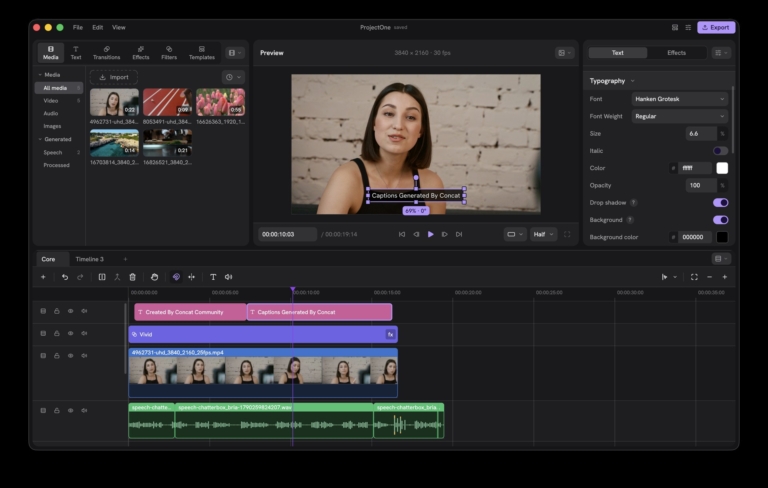
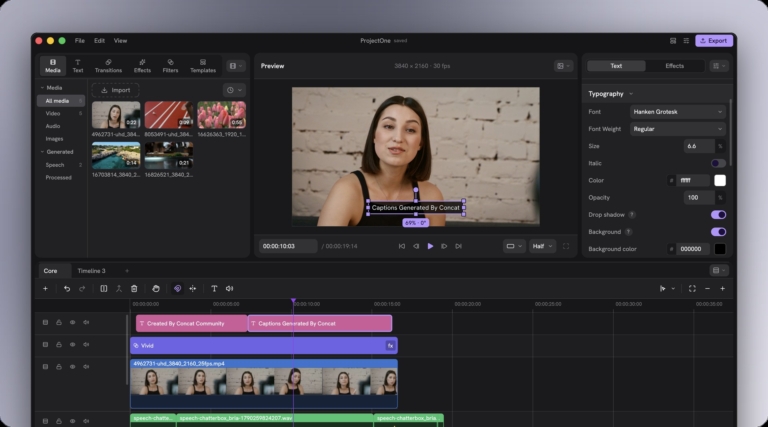
The core of Concat is its multi-track timeline that allows video clips, audio, text, and images to be layered on top of each other. You can drag and drop clips into order, trim unwanted parts, detach audio from video, or sync clips directly on the timeline. This provides a single-page overview of the entire project showing what plays and when, allowing you to click on any clip to make immediate edits.
The tools in Concat significantly reduce tedious work. The auto-caption system listens to speech in the clip and converts it into on-screen text, perfect for tutorial or storytelling videos where viewers can read along without turning on the sound. For text-to-speech, simply type the text and let the program generate a voiceover narration without needing to record your own voice. It also features a background removal tool that separates a person from their background to place them onto a new scene without needing a green screen.
Users can also decorate videos with effects and text, including titles, annotations, color and lighting adjustments to make clips from various sources look cohesive, and transitions between clips for smoother scene changes, with instant preview on screen before actual export.
Once editing is complete, the program exports videos in crisp quality up to 4K, making it suitable for both social media clips and projects requiring high-quality files for further use. Whether you are a short-form content creator, a teacher creating educational media, or someone wanting to combine clips from multiple sources into a single professional-looking video without relying on expensive software, requiring accounts, watermarks, or uploading files to the internet.
Who is this program suitable for?
Creators of short-form videos for TikTok, Reels, or Shorts benefit the most because these tasks require fast auto-captions and titles without paying a monthly subscription.
YouTubers and educators are also a great fit. Screen recordings and podcast clips can be edited in the same timeline as other work, while those who write scripts or issue commands via AI agents can use the built-in MCP server and JSON-RPC API to control the editing process.
Key features of Concat Video Editor
video editing
- Fast editing. Split clips, trim heads and tails, join clips together, and adjust speed from a magnetic timeline that snaps clips into place.
- Multi-track, multi-timeline. Overlay video, still images, and titles across any number of tracks, create picture-in-picture effects, and edit multiple jobs in a single project. Adjust blend modes, crop images, or flip them as needed.
- Keyframes. Control position, size, rotation, opacity, audio volume, and effect values over time with a built-in curve editor.
- Titles. Choose fonts, add borders, shadows, and text backgrounds, and start right away with provided presets.
Subtitles and audio
- Auto subtitles. Generated locally from the Whisper model with selectable model sizes, delivering subtitles with styling placed on the timeline.
- Text-to-speech and voice cloning. Use free built-in voices or clone voices from just a few seconds of audio samples.
- One-click audio cleanup. Reduce noise, enhance speech clarity, normalize volume levels, and apply audio effects like chipmunk, robot, and telephone voices.
Effects and visuals
- Background removal. Remove people or objects from scenes, or paint masks manually with a brush.
- 100 effects, filters, and transitions. Preview results live while adjusting.
- Full quality export. Supports H.264, HEVC, and AV1 up to 4K 60 fps with 10-bit color.
Works offline and across devices
- No watermark. Exported videos contain no watermarks, and no account registration or additional payment is required.
- Fully local processing. Files are never uploaded anywhere, and it works offline after downloading the AI models for the first time.
- Smooth even with 4K files. Automatic proxy generation program for smooth timeline scrubbing.
- Scriptable control. Built-in MCP server for AI agents like Claude to edit videos, plus a JSON-RPC API for scripting.
- Cross-platform support. Available for macOS, Windows, Linux, and Android, supporting 26 languages including Thai, with cross-machine project file compatibility.
What's new
Version 0.2.9 – Nov 5, 2026
- Transitions become clips on the timeline that can be placed, moved, and trimmed like regular clips; adjust Push direction, Wipe softness, or Whip speed directly on the transition.
- Transparent background projects display a checkerboard pattern under the preview image, allow custom background colors, and support export with an alpha channel as ProRes 4444 or VP9.
- Chroma key with automatic background color detection, eyedropper, Remove Black, and multi-item editing in the inspector.
- Record your own voiceovers, name them, add images and descriptions directly from the Voices layer.
- Speed curves can be custom-drawn, selected from presets, and adjusted as smooth or linear curves from the Speed tab.
- Style individual words within titles separately with color, bold, italic, underline, strikethrough, font size, uppercase/lowercase, and spacing.
- Auto-captions listen only to the selected language, with each caption starting precisely with the spoken words.
- Video and audio effects can be placed as layers on the timeline; drag and drop them to cover everything below.
- 4K export is approximately 2.4x faster, with frames pre-rendered and sent to the encoder as YUV, while the encoder runs on its own thread.
- H.264 and HEVC prioritize system encoders, utilizing the GPU first.
- Immediate thumbnail scrubbing in the timeline to land precisely on the desired frame.
- Up and Down arrow keys jump to the previous and next edit points; new projects include 4:5 and 3:4 aspect ratio options.
- Supports MKV, WebM, FLV, WMV, MTS/M2TS, .ts, .mpg, HDV, and DV files with correct image rendering at any position.
- Kokoro and Pocket TTS voices have been removed; the desktop version now uses Chatterbox for text-to-speech with 4 public domain LibriVox voices.
- Added Azerbaijani, Simplified Chinese, Urdu, and Spanish languages with no leftover English text.
- This version is not yet code-signed. When opening for the first time, SmartScreen will prompt; select More info and then Run anyway.
- Projects from 0.2.8 can be opened in 0.2.9, but once saved in 0.2.9, they can no longer be opened in 0.2.8.
file information
- Operating System: Windows 64-bit
- License : AGPL-3.0-or-later (Open Source)
- Developer: jub0t
- Languages: English and 25 other languages, including Thai
- Size: 80 MB / 100 MB
- File Type: EXE, MSI
- Updated on: November 10, 2026
- Need to read: Download Guide
==== Windows x86_64 (.exe) ====
==== Windows x86_64 (.msi) ====