
Download Adobe DNG Converter x64 version to convert RAW files from your camera to DNG, allowing you to easily open them in Lightroom, Photoshop, and other image editing software. Supports systematic conversion of multiple folders.
What is Adobe DNG Converter?
Adobe DNG Converter This is an Adobe tool for converting RAW files from various camera brands to Digital Negative (DNG) files. DNG is a RAW format with more transparent specifications and wider cross-program compatibility, making it suitable for cases where files from newer camera models cannot be opened in the installed versions of Photoshop or Lightroom.
This is ideal for tasks that require combining files from multiple camera models or sending files to teams using different software and versions. Converting to DNG allows you to choose compatibility with older versions of Camera Raw and Lightroom as needed, while preserving RAW image data for later adjustments to exposure, color, and detail. This reduces the problem of files not opening when changing cameras or moving the image library to another computer, and also makes organizing files from different camera brands easier to manage.
DNG also supports accompanying image information such as EXIF, date and time, camera model, and shooting settings, with the option to embed the original RAW file within the new file as needed. After conversion, the file can be further edited in... Adobe Camera Raw Alternatively, manage your image library in Lightroom without relying solely on the camera's specific RAW format. During conversion, you can select the destination folder and compression format, giving you more control over file size and backup method to suit your project. If you want to keep all the originals in a single file, you can enable the RAW embedding option, but be sure to allow extra storage space based on the original image size.
Key Features
- Convert RAW files from the camera to DNG files.
- Drag and drop files or folders into the program window to start the task.
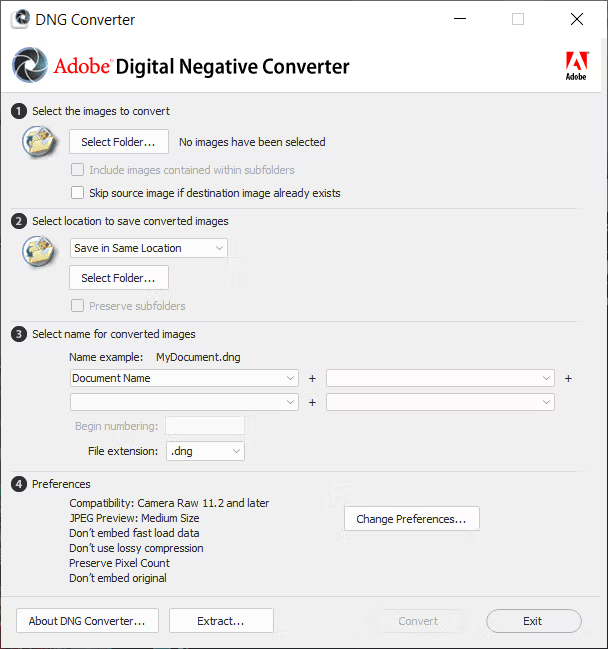
- You can select the source and destination folders separately.
- Convert a large number of files into a single batch.
- Specify the file name format and sequence numbering at the end of the image name.
- Choose whether to use uppercase or lowercase for the DNG file extension.
- Configure compatibility with different versions of Camera Raw and Lightroom.
- Select the DNG version and the data type: Mosaic or Linear.
- Choose to compress the file or save it uncompressed.
- Choose to embed the original RAW files within the DNG file.
- Install the necessary color profiles for image display.
File Information
- Operating System: Windows XP/Vista/Windows 7/Windows 8.1/Windows 10
- Developer: Adobe
- License: Freeware
- Language: English
- Size: 1.69 GB
- File type: *.exe
- Link updated on: 26/8/2026
- Required Reading: Download Guide





