

Download the latest free JDownloader Pack. This includes tools for customizing settings, changing the language to Thai, switching to a dark theme, and disabling ad display in the JDownloader program.
What is JDownloader Pack?
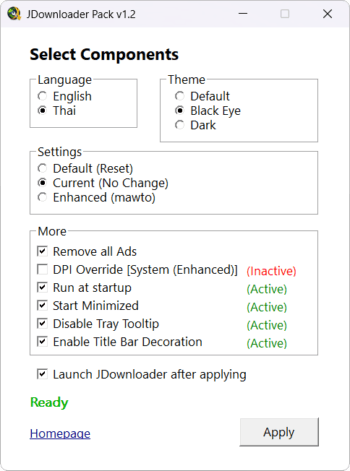
JDownloader Pack This is a small tool developed to help adjust various settings in the JDownloader program. It allows you to configure essential settings within the program to make it easier and more convenient for novice users. This includes changing the language, changing the program's theme, resetting program settings to default, removing advertisements, and more.
Features:
- Language Settings: You can select the language setting asEnglishOrThai languageYes, although this program doesn't normally have a Thai language option.
- Default Settings (Reset): JDownloader Pack can reset the program settings to their default values without losing any downloads.
- Current Settings: For those who want to change other aspects, such as language, or remove ads, but don't want to change other settings they are currently using.
- Enhanced (mawto) Settings: This is a typical Matsumoto-style setup, with the following main features:
- Added support for displaying non-English characters, such as Korean and Thai, which are normally displayed as squares or foreign languages.
- Simplify and improve the usability of the menu panel.
- Modify the download list display format to be similar to the IDM program for ease of use.
- Configure the file to be verified and downloaded automatically when we copy the desired URL, eliminating the need to confirm later.
- Disable some unnecessary menus and add-ons.
- Disable ad display
- Others:
- Remove Ads: You can disable various advertisements within the program, making it cleaner and more user-friendly.
- DPI Override: High-resolution screen compatibility can be enabled by setting to System (Enhanced).
- Dark Theme: For those who prefer dark themes, we offer two options. Feel free to choose whichever you like.
- Run at StartupOpen the program automatically when the computer starts up.
- Start MinimizedThe program will minimize to the Tray when opened.
- Disable Tray Tooltip: Hide tooltips that appear when the mouse hovers over the system tray.
- Enable Title Bar Decoration: For displaying the title bar decoration according to the selected theme
What's new?
Changelog:
v1.2
- Improved internal code and user interface (UI).
- Renamed some options to better reflect their actual functionality.
- Improved text readability in certain rows.
- Separated the Run at startup and Start minimized options.
- Added an option to launch the program immediately after applying settings.
- Added Disable Tray Tooltip option.
- Added Enable Title Bar Decoration option.
- Fixed bugs.
v1.1.1
- Added “Run at startup (minimized)” option. to start JDownloader automatically when Windows starts.
- Improved UI.
v1.1.0
- When “Default (Reset)” is selected, other options will be disabled.
- Renamed “Dark theme 1” and “Dark Theme 2” to their theme name: “Black Eye” and “Dark Theme”.
- Renamed “Custom Settings” to Enhanced (mawto) to reduce confusion.
- Added “Default” Theme option.
- Added “Current (No Change)” option for those who do not want to change their current settings, but want to change the language, dark theme, and disable ads.
- Added ability to use this tool with JDownloader that is not installed in the default location.
- Improved UI.
- Fixed some bugs.
v1.0.0
- First release.
File Information
- Operating System: Windows 11 / 10 / 8.1 / 7
- Language: English
- Size: 3 MB
- File type: *rar
- Password: mawto
- Updated: 24/1/2026
- Required Reading: Download Guide
You can still download the program.JDownloader (Adware-free, No Ads) Free





