

Download AB Download Manager for free in Thai. This open-source download manager supports splitting files into multiple connections, pausing, queuing, scheduling, and seamless browser integration. Latest version.
What is AB Download Manager?
AB Download Manager It's an open-source download manager that consolidates downloads from multiple sources into a single window. Its key feature is opening multiple connections to speed up file downloads, along with queue management, pausing, and resuming downloads in case of internet interruptions. This makes it ideal for installation files, compressed files, videos, or large datasets that you don't want to restart every time.
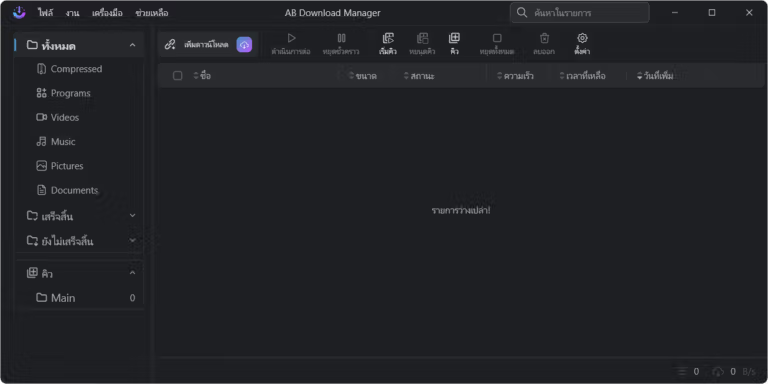
In addition to HTTP and HTTPS, the program supports FTP and integrates with browsers via native messaging for convenient link sharing. Multiple downloads can be grouped and destination folders can be designated for organization. A timer and speed limiter are included to allocate bandwidth to other activities on the machine. A menu for importing links from the clipboard allows for quick start-up without copying each item individually. The list page displays the progress, speed, and remaining time of each task, providing immediate information on which files are being worked on or in the queue, making monitoring easy.
This project is suitable for those who need to store a large number of files and require a transparent tool that allows for code inspection. The interface focuses on easily viewing the list, speed, status, and operation of each file, making it useful for both routine downloads and queuing multiple files. For comparison, another type of program... Free Download Manager They share similar concepts in terms of queuing and sequential downloads, but AB Download Manager emphasizes open source and community customization.
Key Features
- Open multiple connections to speed up the download of large files.
- You can pause and resume the download without restarting the file.
- Queue and download multiple files simultaneously from a single window.
- Receive links from the browser via native messaging and program interface.
- Supports HTTP, HTTPS, and FTP protocols.
- Set a time to start or stop downloads at specified intervals.
- Limit the speed to share bandwidth with other uses.
- Categorize and designate a destination folder for downloaded files.
- Import links from the clipboard via the System Tray menu.
- Choose from multiple interface themes, including dark and black themes.
- It supports multiple platforms, including Windows, Linux, macOS, and Android.
- It is an open-source project that allows the community to help develop and add translations.
What's new?
1.10.4
-This version is a hot-fix for previous version, update to this version instead.

Fixed
-Fixed an issue where some settings, including UI Scale, were not saved properly (#1409)
File Information
- Operating System: Windows (x64/ARM64)
- License: Open Source
- Developer: amir1376
- Language: Multiple languages, including Thai.
- Size: 73 MB / 88 MB
- File type: EXE / ZIP
- Updated: 16/9/2026
- Required Reading: Download Guide
==== Installation Guide ====
==== Portable Model ====





