

Download Process Explorer 17, a free program for detailed process monitoring. It helps you see which programs are running, how much resources they're using, and which files are open in the background. It provides more complete information than Task Manager.
What is Process Explorer?
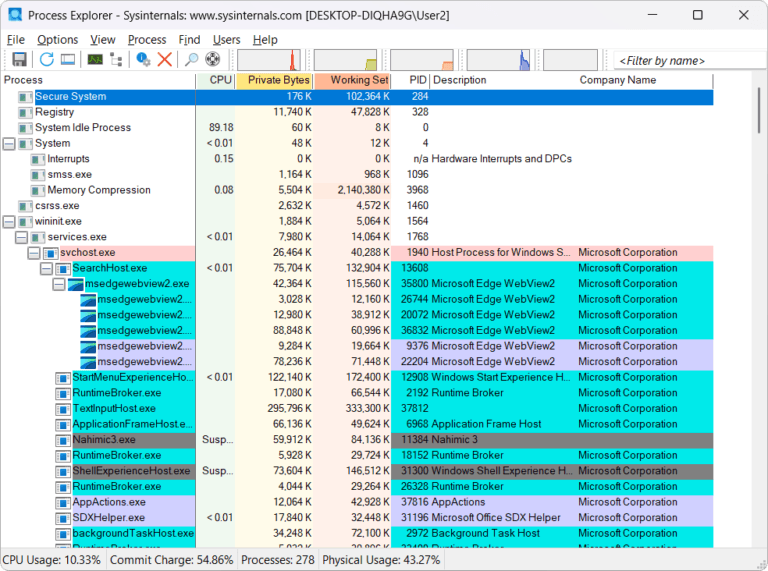
Process Explorer It is a tool in the set. Microsoft Sysinternals The hierarchical process structure display provides a clearer view of the relationship between the main program and subprocesses than a typical task manager window. Each entry allows you to view details of the files being accessed, the user owning the process, and security permissions, thus helping to quickly identify which program is causing high CPU or memory usage.
When a process is selected, we can continuously view graphs of CPU usage, private bytes, working sets, handles, and other operational data, along with a list of associated DLLs, handles, threads, and services. Instant search helps locate open files or windows without having to check each program individually. This information is useful when analyzing slow-opening programs, incorrect library loading, or malfunctioning services.
Process Explorer is also suitable for checking file authentication and trustworthiness because it allows you to view paths, command line information, digital signatures, and user account details. However, its use should only be done on machines and processes you have permission to manage, and caution should be exercised to avoid unintentionally stopping system processes. If your work requires monitoring hardware and sensor data overall, tools like... AIDA64 This will naturally help to supplement the information from another perspective.
Key Features
- This displays the process tree structure, showing the relationships between the main program and subprograms.
- Continuously monitor CPU, Private Bytes, Working Set, Handles, and key performance indicators.
- View the DLLs, handles, threads, and services currently being used by the process.
- Check the path, command line, user account, and security identifier of each process.
- Quickly search for processes by file name, window, or handle.
- Display a graph of resource usage history to help analyze malfunctions.
- Verify the digital signature and developer information to help assess its credibility.
- View and manage the priority, affinity, and even stop processes based on system privileges.
- It supports viewing details of services and processes running under those services.
- It is a portable program; it can be run without installing a large software package.
What's new?
Process Explorer 17
- Continuing the improvement approach of the Process Explorer 17 line, this version focuses on compatibility with current Windows versions and reliable process detail display.
- Improve the validation of process structure, DLL, handles, and permission information to better suit the analysis of more complex systems.
- It retains search tools, resource graphs, and digital signature verification features for troubleshooting programs and inspecting unfamiliar files.
Read more from... Details:
File Information
- Operating system: Windows
- Developer: Microsoft Sysinternals
- License: Freeware
- File size: 3 MB
- Version: 17.13
- File type: *.zip
- Date updated: 14/8/2026
- Required Reading: Download Guide





