
Download Calibre 9 (64-bit) for free. This eBook management program reads EPUB files, converts files, organizes libraries, and sends books to digital readers on Windows, with a full set of editing tools.
What is Calibre?
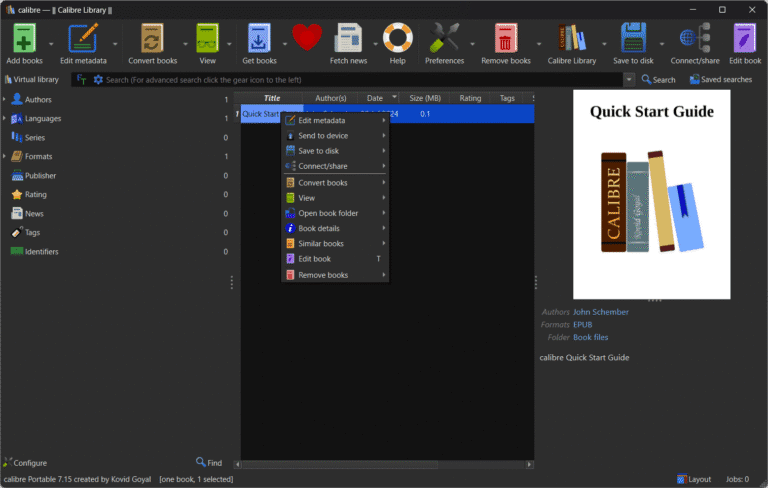
Calibre This is an eBook library management program that integrates reading, editing, and converting eBooks into a single suite. We use it to add books with metadata such as title, author, cover, and tags, and then group collections for systematic searching. The program supports conversion between EPUB, MOBI, AZW3, PDF, and other formats, allowing you to select font size, style, table of contents, and page layout optimized for the target device, thus preparing files for convenient reading on e-readers, tablets, or computers.
Calibre is a free, open-source, cross-platform software, making it ideal for both individuals with large book collections and teams needing to review file formats before publication. Its built-in reader allows for word searching, bookmarking, and display adjustments, while the eBook editor checks HTML, CSS, and table of contents. Synchronization with Kindle, Kobo, and other devices allows for direct file transfer to readers, and the content server provides a web-based library on the network. The news download system can convert articles into books for later reading.
Another highlight is the ability to manage large amounts of data without having to edit files one by one. We can edit multiple metadata items simultaneously, retrieve cover and detail information from online sources, back up the library, and export books according to a defined folder structure. The background task window displays the conversion or export queue, making it easy to plan ongoing tasks. Plugin support allows for adding file formats or connecting specialized services, such as those storing PDFs that require a separate reader. Foxit PDF Reader This is another option for opening and checking documents without having to import them into Calibre first.
Key Features
- Library ManagementCalibre enables efficient management of book collections by allowing users to add, edit, and organize book metadata such as title, author, cover, and description. Books can also be grouped by categories or tags for easier searching.
- E-book ConversionThis software supports converting book files into various formats such as EPUB, MOBI, AZW3, PDF, and others, allowing for convenient reading on different devices. The conversion also supports customization, such as adjusting font size and optimizing the e-book's appearance.
- Device SyncingIt can connect and sync books with various e-readers such as Kindle, Nook, and Kobo, making it easy to transfer book files.
- Editing and Reading E-booksCalibre provides tools for reading and editing e-books. We can use Calibre to open e-books or use the editing tools to improve the content or format of the book.
- News Downloading and ManagementYou can configure the system to download news from various websites and convert it into e-books for later reading. Additionally, the downloaded news is categorized for easier reading.
- Multi-Platform SupportCalibre is compatible with multiple operating systems, including Windows, macOS, and Linux, allowing for convenient access and use regardless of the operating system used.
- Data backup and restoration.Users can back up their library's books to prevent data loss and easily recover data in case of problems.
- Extensions and Support (Plugins and Support)Supports the installation of plugins that add various capabilities and features. Users can search for and install additional plugins as needed.
- eBook editing toolsEdit HTML, CSS, images, and the book's table of contents all in one program.
- Content serverAccess the web-based library to read or download books from devices on the network.
- Search and filterSearch by name, author, tag, or metadata, and save the search set for reuse.
- Supports online news.Automatically pulls news from specified sources and converts it into an eBook.
File Information
- Operating System: Windows 11 / 10 (x64)
- License: Freeware
- Developer: Kovid Goyal
- Language: Multilingual
- Size: 212 / 192 MB
- File type: msi / exe
- Updated: 18/9/2026
- Required Reading: Download Guide





