
Download Wise Disk Cleaner 11 for free. This program cleans junk files, helps free up storage space, and organizes unnecessary data in Windows.
What is Wise Disk Cleaner?
Wise Disk Cleaner This program is designed to find and delete junk files accumulated on your computer. It helps manage temporary files, cache, usage logs, and data left behind by various programs after they finish working. As these files accumulate, storage space decreases and data retrieval may slow down. Therefore, the program is suitable for those who want to periodically organize their computer, allowing them to select only the items they want to delete.
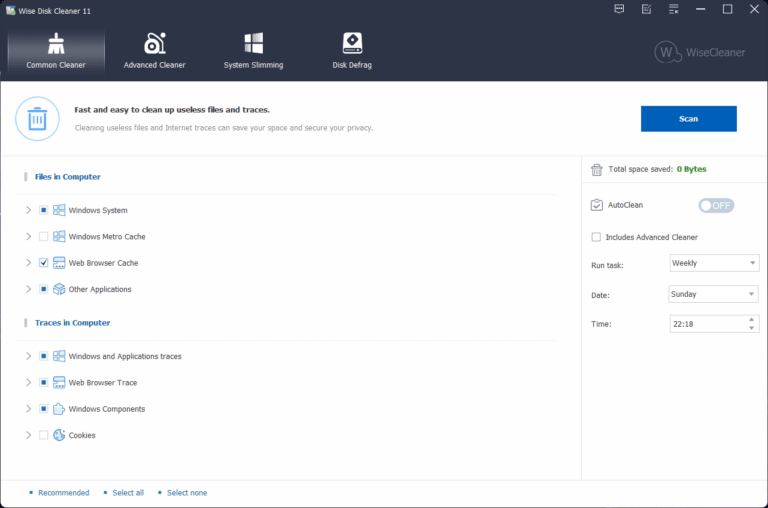
The process is divided into scanning general system files and performing a more detailed check of files from various programs. After the scan is complete, a list of files with their sizes is displayed, allowing you to view details before confirming deletion. In addition to cleaning junk files, it also includes a disk defragmentation tool, automatic cleaning scheduling, and a shortcut for one-click cleaning, making it suitable for both personal computer maintenance and managing multiple computers. The categorized screen allows for faster browsing of scan results and reduces the chance of accidentally deleting important files.
Wise Disk Cleaner operates using minimal system resources and offers a portable version for use without installation. Scheduling daily, weekly, or monthly file cleaning reduces repetitive tasks. The Disk Defrag function can analyze drives and organize data on the hard disk and compatible external storage devices. Always check the list before deleting data, especially files in the Downloads folder or work files you still need. Close any running programs before starting the process to ensure smooth scanning and defragmentation.
Key Features
- Scan and delete unnecessary Windows temporary files that are not needed for operation.
- Scan for junk files from various programs and clean up accumulated data after use.
- Manage the cache, history, and browsing history of your web browser.
- The file list, including their sizes, is displayed before the deletion process begins, allowing for easy review of each file.
- It has a general cleaning mode and a deep file scan mode.
- You can schedule automatic file cleaning to be done daily, weekly, or monthly.
- Create a one-click file clear shortcut on your desktop.
- There is a Disk Defrag tool for analyzing and organizing data on the hard disk.
- Supports checking and organizing compatible external storage devices.
- It operates using minimal CPU resources during scanning and cleaning.
- There is a portable version that can be activated without installing it on a computer.
- Improve the junk file search rules to better cover newer programs and browsers.
What's new?
Wise Disk Cleaner keeps on its improvements, and the newly released notes are as follows:

1. Added cleaning support for: Iridium browser, Epic Privacy browser, CapCut, QuickFix, DuckDuckGo, LibreWolf browser, VSCodium, GOG Galaxy, Heroic Games Launcher, and Ubisoft Connect.
2. Enhanced cleaning rules for WavePad Sound Editor, TeamViewer, Kimi, and QQ.
3. Fixed minor bugs reported from previous versions.
File Information
- Operating System: Windows XP/ Vista / 7 / 8 and 8.1 / Windows 10/11
- Developer: WiseCleaner
- License: Freeware
- Language: Multilingual
- Size: 11 MB
- File type: *.exe
- Password: mawto
- Updated: August 21, 2026
- Required Reading: Download Guide





