Download the latest version of NirLauncher Package 2026, a free program that includes a variety of tools for password recovery, internet settings adjustment, browser password extraction, and much more.
What is NirLauncher?
NirLauncher is a Windows utility suite that bundles all NirSoft tools into a single package, launched via a single launcher without requiring installation. Created by Nir Sofer, an independent developer who has been making small freeware tools for over twenty years, he has created over two hundred tools, each performing a single task—such as viewing passwords previously saved in browsers, checking which programs are opening network ports, or reading error logs when a blue screen occurs. The problem is there are too many tools to download individually, so NirLauncher was created to bundle them all together with a categorized menu for instant searching and launching.
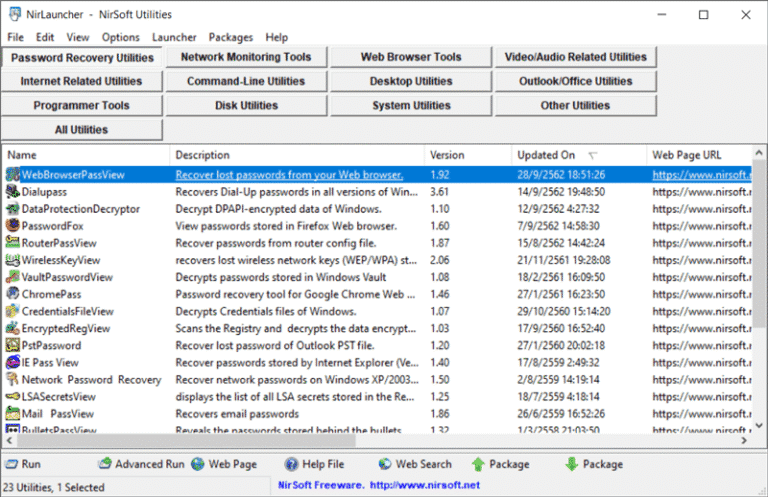
Inside, the tools are divided into major categories covering almost every aspect of computer maintenance. The password recovery category includes tools like Mail PassView, which retrieves email passwords saved in email programs, as well as... WebBrowserPassView To view saved passwords in your browser, the Network category includes CurrPorts, which lists open ports along with process names, and Wireless Network Watcher, which scans for all devices currently connected to Wi-Fi. The System category has BlueScreenView, which reads minidump files when a computer crashes and identifies which driver is causing the problem. The System Information category has tools to retrieve hardware details, a list of installed programs, and Windows product keys. All are single .exe files that can be opened and run without any additional installation.
NirLauncher's strongest point is its portability. Simply extract the zip file and run it immediately. It doesn't write anything to the registry; settings are stored alongside the program itself, allowing you to move the entire folder to a flash drive and use it on any computer. This is ideal for computer technicians or administrators who need to troubleshoot client machines. The launcher also has a search bar; typing the tool name or description will instantly filter the list, eliminating the need to browse categories one by one.
In addition to NirSoft's own tools, NirLauncher allows you to add packages from other developers or shortcuts to frequently used programs to the same menu, becoming a personal portable tool hub. The program automatically checks for updates to each tool when new versions are released on the NirSoft website. Everything is free, ad-free, and has no locked features. For those who work with Windows regularly, NirLauncher is a versatile toolbox that you can have installed for peace of mind.
Things to know about this program.
The password recovery tools included in this package are often flagged as malware by antivirus programs, when in reality these are false positives—a point the developers themselves emphasize. If some files are missing after extraction or remain unresponsive when double-clicked, add the program folder to your antivirus's whitelist first. Don't assume the files are corrupted yet.
Another intention of the developers was that this package only include utilities that were updated after October 1, 2007. Older versions will not be included because some might write values to the system's Registry, compromising its portable nature.
The capabilities of NirLauncher.
- Password Recovery. Tools to recover passwords previously saved in the system and web browsers
- Network Monitoring Tools. Thoroughly inspect ports and network connections
- Web Browser Tools. Manage web browser cache, history, and cookies
- Video/Audio Related Tools. Utilities for managing video and audio files
- Internet Related Utilities. Supplementary tools for internet connection tasks
- Check Domain Name. Check domain name information and IP addresses
- Command Line Utilities. Compiles useful command-line usage commands
- Desktop Utilities. Customize and facilitate desktop screen operations
- OpenViewWith. Conveniently manage the Open With right-click menu
- Outlook / Office Utilities. Helper tools for working with Outlook and Office
- Programmer Tools. A suite of tools for software developers and programmers
- Disk Utilities. Inspect and maintain the health of hard disks and storage drives
- System Utilities. Monitor the system, processes, and blue screen error logs
- Other Utilities. Various other multi-purpose utility tools covering all-around usage
What's new
Version 1.30.27
- Tool updates. Updated the tool packages and utilities within the NirLauncher suite to their latest versions
file information
- Operating System: Windows 11/ 10/ 2000/2003/XP/ Vista / 7 /8.1
- Developer: nirsoft
- License: Freeware
- Language: Multilingual
- Size: 40 MB
- File type: *.zip
- Password: nirsoft9876$
- Updated on : 5/11/2026
- Need to read: Download Guide