Download the WebBrowserPassView program to view passwords on your Windows 11 computer. It can view saved passwords in Google Chrome, Firefox, Opera, and Internet Explorer.
What is WebBrowserPassView?
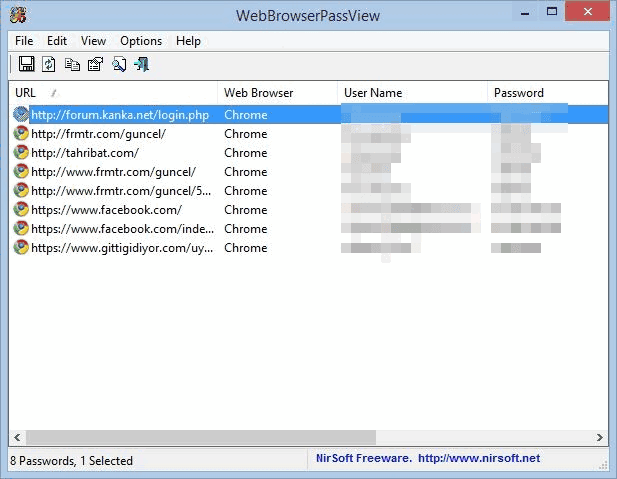
WebBrowserPassView This program can view all passwords saved in various web browsers, including Google Chrome, Firefox, Opera, and Internet Explorer, on your computer (or someone else's^^). It's very useful when you forget a password for a website but need to access it on a phone or another computer, or when you want to save a password but can't remember it. This program can help consolidate all saved passwords. It's a small, lightweight program that doesn't require installation and quickly retrieves all passwords. If you're looking for a program with these features, you can download it now.
This password recovery tool reveals passwords stored by the following web browsers: Internet Explorer (versions 4.0 – 11.0), Mozilla Firefox (all versions), Google Chrome, Safari, and Opera. This tool can be used to recover lost/forgotten passwords for any website, including popular sites like Facebook, Yahoo, Google, and GMail, as long as your web browser stores the password. After recovering the lost password, you can save it to a text/html/csv/xml file using the 'Save Selected Items' option (Ctrl+S).
How to Use
Simply open the program, and all the codes saved in your browser will be displayed. To save all the codes, highlight the entire program and select Export to save as a text file.
Version 2.18:
- Updated to decrypt the passwords for the encryption change of Firefox 144.
- Fixed a problem with getting the passwords of Opera.
File Information
- Operating System: Windows XP/ Vista/ 7/ Windows 8 and 8.1/10/11
- Developer: NirSoft
- License: Freeware
- Language: English
- Size: 283 KB
- File type: Zip
- Password: wbpv28821@
- Updated: 4/11/2025