Download Advanced Renamer Commercial 2026 (Full) for free. This full, permanent version of the program allows you to rename multiple files and folders simultaneously, sets various rules, previews before renaming, and fully supports metadata tags and batch processing.
What is Advanced Renamer?
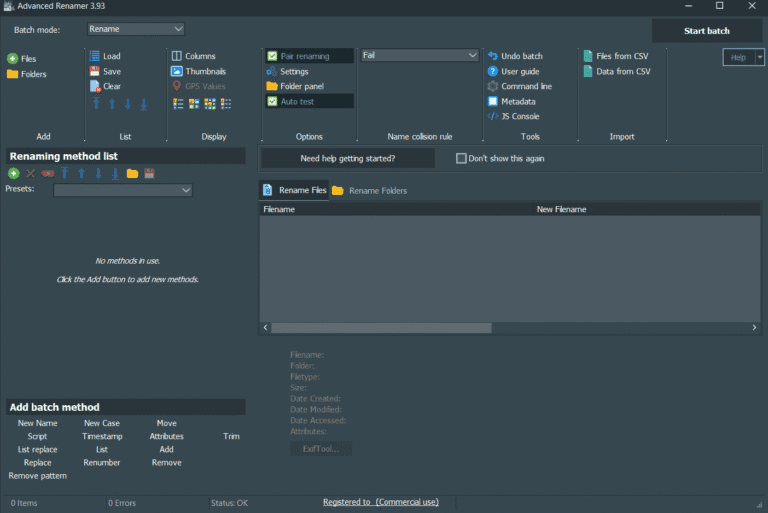
Advanced Renamer This program is for renaming multiple files and folders simultaneously, eliminating the need to manually rename each file individually. A single task can create multiple rules, such as adding or deleting text, replacing words, changing case, moving characters, adding numbered sequences, or creating new names from tags and metadata. Before renaming, the program displays a list of the new names, allowing you to see the effect of your settings. Furthermore, you can revert previously renamed files if necessary.
Work with photos, music, videos, or document files that have disorganized names can benefit greatly from tags. For example, EXIF data from images, music information, or values from the original name can be combined to create a new name using the same format. If you need another tool for renaming large numbers of files, there are others available. Bulk Rename Utility These are similar alternatives, but Advanced Renamer excels at concatenating multiple methods into a single set and provides a preview of the results while adjusting rules, making it easier to organize complex file names.
If your task requires selecting files based on conditions, the program provides tools for Mark, Unmark, and Remove by condition, as well as Regular Expressions for more specific tasks. The Thumbnail Grid mode allows you to view images and filenames on a single screen, while the Script Method lets you write JavaScript to handle cases where built-in rules can't reach. This allows you to start with simple tasks like adding page numbers and then gradually add more detailed rules without switching tools midway.

Key Features
Optional features
- Reverse Function
- Real-time file name change preview
- Changing MP3/ID3 File Names
- Using Regular Expressions
- Rename images while preserving EXIF data
- Thumbnail View
- Supports both files and folders.
- Multiple Methods for Changing Names
- Use multiple methods simultaneously.
- Tag Name Change
Methods for renaming
- New name with tag
- Changing the Font
- Remove / Delete
- Replace
- Add/Insert
- Move
- List
- File attributes
- Change the file time.
What's new?
Version 4.25 features redesigned interface and tools for managing multiple files, along with added tags and conditional statements for more granular batch processing.
- Customize the First Use window and remove the separate language selection window for the first time the program is launched.
- Add an option to move the Main Toolbar via the toolbar's right-click menu.
- Adding files using Regular Expressions is case-insensitive.
- Add the "Mark by condition," "Unmark by condition," and "Remove by condition" commands to the right-click menu of the list.
- Added Thumbnail Grid mode for viewing file lists as thumbnails.
- Add tags To extract words by counting backward from the end of the text.
- Tags and You can specify your own word separator without using system settings.
- The right-click menu for Tags displays tag categories to help you find the tags you need.
- The Methods Panel displays initial suggestions when no method is currently listed.
- Super Compact mode displays Pair Renaming status and Name Collision rules more clearly.
- Move some commands from the Tools section of the Main Toolbar to a drop-down menu.
- Add a Help button to each Method Panel to open the explanation from where you are currently configuring it.
- Reposition panels more quickly from the right-click menu in the main window.
- When using Pair Renaming and the main file has no metadata, the program will search for metadata in other files in the pair.
- The header of the currently active Method displays a slightly different color to make its status easier to see.
- The pre-batch execution window displays more supporting information before confirming the actual operation.
- Some icons have been updated to be more visible when using Dark Mode.
- Several UI details have been adjusted to make using the main window smoother.
File Information
- Operating System: Windows 11 / Windows 10 / 8.1 (x64)
- Risk Level: 🟢 Safe
- License: Full
- Size: 12.29 MB
- File type: *.rar
- Password: mawto
- Installation Method: Available
- Updated: 4/9/2026
- Required Reading: Download Guide
Download the latest version v4
Download v4.17.0
Download v3.95