
Download Subtitle Edit 2026 for free. This professional software creates, edits, and manages video subtitles. Edit SRT subtitles, adjust timing accurately, and includes built-in AI tools. This is the latest version.
What is Subtitle Edit?
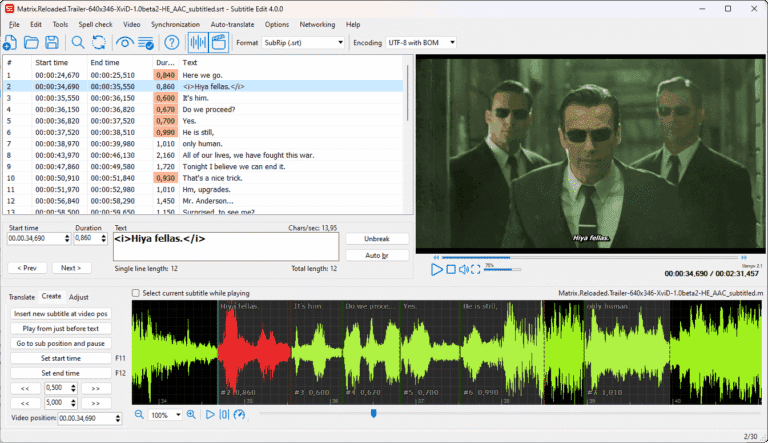
Subtitle Edit This program is for editing and creating subtitle files for videos, especially suitable for synchronized subtitles with audio or video. It supports various subtitle file formats such as SRT, ASS, and SUB, allowing easy opening and adjustment of timing, content, and format. Additionally, it includes tools for language translation and subtitle error checking, such as spelling errors or timing discrepancies.
This program stands out with features that simplify subtitling work, such as syncing subtitles with audio via waveform and spectrogram, which allows for more precise timing adjustments. It also offers tools for converting subtitle files from one format to another, or even merging multiple subtitle files. This is useful if you need to edit or prepare clips before adding subtitles. It can also be used in conjunction with other programs such as… ShotCut This will help to complete the production of videos with subtitles more smoothly.
Subtitle Edit is ideal for anyone working with video, whether it's creating subtitles for educational purposes, translating movies, or customizing captions for personal channels. The program is free and open-source, allowing for immediate download and use without any cost. It features AI-powered audio-to-text conversion and error checking that works quickly, saving you considerable time.
Key Features
- Subtitle Editing: Open and edit subtitle files in various formats such as SRT, SUB, ASS, VTT, with real-time video preview.
- Subtitle Timing Adjustment: Accurately synchronize subtitle timing with speech via waveform and spectrogram.
- Creating new subtitles: Create a new subtitle file from scratch, with tools to easily set the start and end times.
- AI-powered speech-to-text conversion: Supports speech-to-text transcription via the WhisperX model and internal system.
- Text-to-speech system: Supports Text to Speech with a variety of speech synthesis engines.
- Automatic subtitle translation: Connects translation services and AI LLM to help translate subtitles and adjust text tone.
- Subtitle checking and repair: Includes Spell Check and Fix Common Errors functions to repair damaged subtitle errors.
- File format conversion: Freely convert subtitle files across different formats, including studio-grade formats like EBU-TT.
- OCR system for extracting text from images: Extracts subtitles from image files or DVD/Blu-ray using the Paddle OCR and CrispEmbed engines.
- Advanced customization: Fine-tune font, color, size, and position effects of subtitles.
- The interface supports the Thai language: it's easy to use and the layout can be customized in many ways to suit your preference.
What's new in Subtitle Edit 5.2.0?
- Subtitle split and move assist system: Features Assisted Split and Assisted Move commands to suggest cut points and automatically adjust timing with a single click.
- Chapter and forced narration management tools: Added a Chapter Editor for Matroska, MP4, and OGM files, and allows for quick and easy management of forced narration subtitle lines.
- Parallel editing of original subtitles: Adjust the original subtitle text directly in the table, open the comparison file in read-only mode, and display the original subtitle bar on the waveform.
- Error checking system and statistics dashboard: Instantly export error lists to Excel or HTML web pages, along with a dashboard summarizing CPS (Counter-Performance) read speed statistics.
- Intelligent Waveform and Timecode Adjustment: Predicts start and end times from audio waveforms, adjusts position based on camera angle changes, and the Beautify Time Codes function smooths the times to match the actual video frame rate.
- Bringing back popular features from Subtitle Edit 4: Support for Train nOCR, WebVTT Style Manager, importing the original Settings.xml file, and the Layout 10 window below the Waveform.
- Enhancing translation and AI capabilities: Adding advanced LLM engines, including llama.cpp and Ollama, supporting prompt-based translation, connecting to the Gemma 4 model, and featuring AI Review functionality for verification.
- Speech-to-text system: Enhanced with the standalone WhisperX engine (no Python installation required), Google Cloud STT v2, and the Voxtral engine for improved accuracy.
- Voice synthesis and cloning system: Added a variety of new voice synthesis engines and supports directly cloning character voices from original videos.
- Advanced image transcription: Supports modern OCR engines including Paddle OCR, CrispEmbed, and DeepSeek-OCR, and features improved video OCR technology for efficient extraction of subtitles embedded in videos.
- Studio-grade file format and export support: Supports new formats such as EBU-TT, DVB Teletext, markers for DaVinci Resolve and Premiere, and exporting to Final Cut Pro XML files.
- Advanced visual effects and processing: Export subtitles as images with color and dimensional effects, support hardware encoders for burn-in, and improve the performance of batch conversion tools.
File Information
- Operating System: Windows 11 / 10 / 8.1 / 7
- License: Freeware
- Language: Multilingual
- Size: 54 / 106 MB
- File types: *exe / *zip
- Version: 5.2.0
- Updated: September 11, 2026
- Required Reading: Download Guide
==== Installable version (.exe) ====
==== Portable Version (.zip) ====