
Download ShotCut 26 for free. This open-source video editing software supports high-resolution editing, effects, filters, and various multimedia file formats. The latest version is easy to use.
Get to know ShotCut.
ShotCut ShotCut is a free, open-source video editing program designed to solve a straightforward problem: high-quality video editing shouldn't be expensive or tied to a specific operating system. It offers all features without a monthly subscription fee, no watermarks on exported projects, and doesn't require an account. Anyone who has used free software before and encountered annoying limitations, such as low-resolution export, locked features behind a paywall, or forced upgrades, will immediately notice the significant difference in freedom ShotCut provides from the moment they launch it.
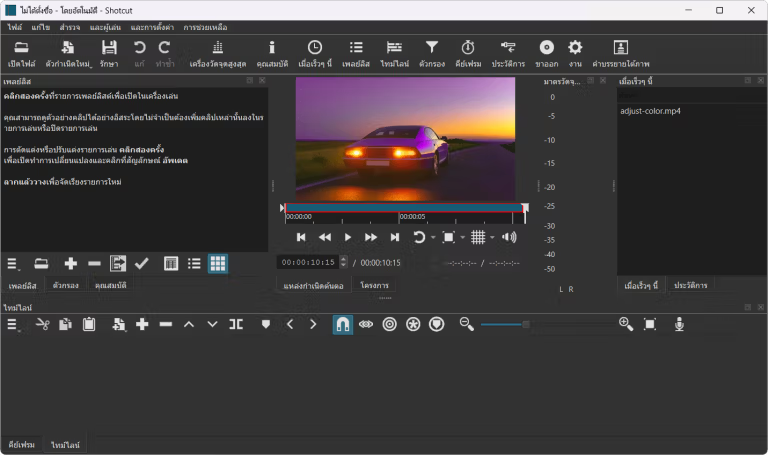
Behind the scenes, this app is built on the MLT multimedia framework and uses FFmpeg as the file decoder, allowing it to open almost any video, audio, still image, or even online stream file format without prior conversion. A key difference from many free video editing apps is its multi-format timeline, which allows clips of different resolutions and frame rates to coexist in a single project without needing to synchronize the project with the original files beforehand. It also features multi-track editing tools, a large collection of audio and video filters, and color grading features typically only found in paid apps. For those who want to start with a simpler interface, this is a good option. OpenShot Video Editor It's another open-source alternative worth trying, but if you need precise control over filters, colors, and sound step-by-step, this one would be a better choice.
So who would benefit from this? From YouTubers who edit their own videos weekly, to teachers creating educational materials, to professionals who want a backup editing tool without paying extra. Beyond its core features, it also includes unexpected freebies like automatic subtitle generation with speech-to-text, camera and device capture via SDI and HDMI, a proxy system for smoother 4K editing on lower-spec machines, and batch export of multiple files. It's a portable editing studio that requires no investment other than initial learning curve.
Key Features
- Free and open-source. All features are available on Windows, macOS, and Linux without payment or account registration.
- FFmpeg can open almost any file format, including video, audio, still images, and online streaming files, without needing to convert them before importing.
- Multi-format Timeline. Combine clips of different resolutions and frame rates into a single project.
- Full multi-track editing. Supports trim, ripple, cross-fade, transitions, and multi-layer overlay.
- A comprehensive set of image and sound filters. Adjust colors with a 3-way color wheel, stabilize blurry images, add text, blur, glow, and normalize audio.
- Automatic Audio Ducking (New in 26.9). Automatically reduces background music when speech is present in a track. This setting can be accessed from the audio track's Properties.
- Adjustment Clip (New in 26.9). A blank clip from the Timeline > Generate menu that allows you to apply a filter once and it will affect the overall appearance of all video tracks below.
- 32-bit float audio quality (new in 26.9). No more converting to 16-bit integers during processing; maintain the signal at 32-bit float throughout the stream.
- Automatically create subtitles with Speech-to-Text. Using Whisper technology, it converts spoken audio in clips into text without requiring manual typing.
- Capture and stream from external devices. Supports SDI, HDMI, webcams, and IP streams, with batch export in multiple formats.
What's new?
Version 26.9.27 – Sep 27, 2026
Regarding security, the developers recommend that all users upgrade because this version patches several vulnerabilities in network downloads, including cases where HTTPS fetching fails and is switched to plain HTTP, bypassing certificate errors, accepting upgrade links from hosts other than shotcut.org, storing the Whisper model even when the SHA-256 value doesn't match, and loading downloaded description files as QML. A security notice has been published on GitHub, and CVEs will follow.
This version's new look starts with a new logo and a more modern interface with rounded corners in several areas. Audio improvements include Automatic Audio Ducking in the track properties on the timeline, automatically reducing background noise during speech. Volume controls and a level gauge have been added to the track header, allowing the track header column to function like a mixer without needing to open a new panel. A gain filter has also been added to support keyframes. Audio quality has been improved by discontinuing 16-bit integer conversion and maintaining a consistent 32-bit float signal. Adjusting the gain of a clip by dragging the audio line now requires holding down Ctrl+Alt to prevent accidental changes while selecting or dragging a clip.
On the timeline side, a new menu item, Timeline > Generate > Adjustment Clip, has been added. This creates an empty clip without its own image, but the filters applied will affect the overall look of all video tracks below. The speed of moving clips across tracks, zooming, and performing multiple undo operations has also been improved. Other settings have been updated; Settings > Leave Safe Mode has been changed to allow external plugins, which are now always displayed and disabled by default. This prevents some VST2 plugins from preventing the program from opening or closing. A system now automatically detects and disables external plugins left open. A Copy menu has been added to the Missing Files and View > Resources windows, and FFmpeg has been upgraded to version 9.0.
This version fixes several bugs, including: the Mask: Draw (Glaxnimate) filter, Subtract mode issues on 8-bit processing, using Size, Position & Rotate with Mask: Apply, LV2 plugins that wouldn't load on Windows, the VA-API HEVC encoder on Linux, importing subtitles from files on Windows, incorrect subtitle duration display, audio corruption during copy-paste transitions, exports reporting failures despite complete files, and the disappearance of the window title bar on Linux when using Vulkan display.
System Requirements
- Windows 10 64-bit build 1809 or later, or Windows 11.
- Intel or AMD x86-64 CPU: 1 core 2 GHz for SD, 4 cores for HD, and 8 cores for 4K.
- At least 4 GB of RAM for SD, 8 GB for HD, and 16 GB for 4K.
- Graphics that support Direct3D 11 on Windows.
File Information
- Operating system: Windows 11 / 10 build 1809 or later (x64)
- License: Freeware
- Developer: Meltytech, LLC
- Language: English / Thai
- Size: 146 MB
- File types: *exe, *zip
- Updated: 28/9/2026
- Required Reading: Download Guide