
Download OpenShot Video Editor 4 for free. This easy-to-use open-source video editing software allows you to cut clips, add transitions, effects, text, titles, animations, and export videos without watermarks.
About OpenShot Video Editor
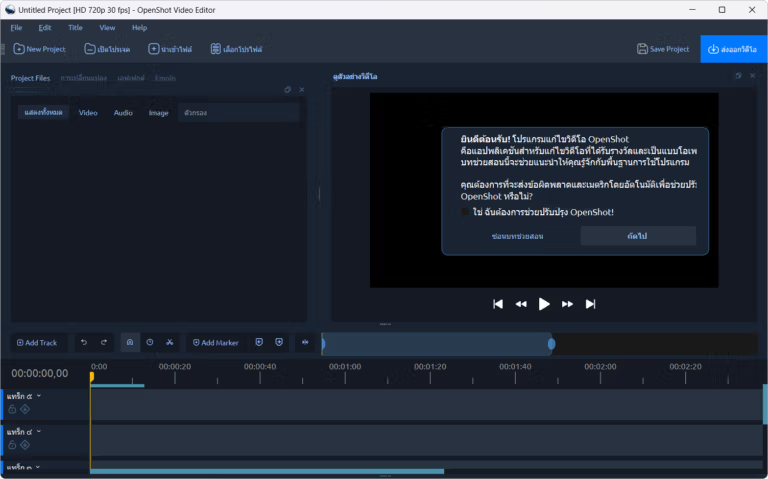
OpenShot Video Editor Qt is an open-source video editing tool that solves the problem for those who want to create high-quality video clips but don't want to pay monthly subscription fees or have watermarks on their work. It's available for free on Windows, macOS, and Linux, and the same project can be ported across operating systems. The process starts with dragging video, audio, and image files onto the timeline, trimming unwanted sections, splitting clips into segments, and arranging them on multiple tracks. All adjustments are immediately displayed in the preview, allowing you to see the result before making decisions. More complex tasks are supported, including keyframe animation, multi-layer stacking, and detailed effect adjustments without needing additional software. Unlike previous versions where the timeline was a web component, version 4.x uses native Qt, resulting in smoother zooming, more consistent clip and keyframe rendering, and faster command response, even in projects with many clips.
We think this app is ideal for those who edit tutorial videos, mobile videos, presentations, and online content, both for personal use and classroom teaching. Beyond basic editing, it offers numerous features, including Color View for adjusting colors with color wheels and curves, Recording View for screen recording with microphone audio, and an AI-powered modeler to separate subjects from backgrounds. Title options include ready-to-use 2D templates and 3D title rendering via Blender. Exporting files in various formats via FFmpeg is unlimited, and the interface supports Thai language. A user manual is regularly updated, making it easy for beginners to follow. Once you're proficient, you can try another similar app with a different menu and interface. ShotCut That's another option.
Who is this suitable for, and should you update to version 4.0.1?
If you're a beginner looking for a free, watermark-free video editing program, we think OpenShot is a great choice from the moment you open it. The menus are clearly categorized, and all basic tasks are on the timeline. Version 4.0.1 is a maintenance release that fixes lingering issues from version 4.0.0, including preview, recording, snapping, and the locking system. If you're already using 4.0.0 and haven't encountered any problems, updating isn't urgent. However, if you're experiencing distorted previews, synchronized audio recordings, or the program not opening on Macs without Homebrew, this version fixes all of those issues.
Key features of OpenShot Video Editor
- Adjust colors using color wheels, curves, and LUT files, and preview the results live via waveform, histogram, and vectorscope.
- A library of video effects such as chroma key, blur, lens flare, and brightness adjustments, all meticulously keyframed and layered on a single clip.
- Animate using keyframes, adjusting the position, rotation, size, transparency, and speed of the clip. Choose how to connect keyframes.
- Unlimited multi-track timelines use audio thumbnails and waveforms to help position clips for precise cutting.
- Over 400 transitions. Simply overlap the clips to create automatic transitions. Adjust the direction and brightness.
- Interactive video masks allow you to specify the area you want to keep or delete, and preview it before applying it.
- Convert the audio in the clip into graphic images, including bar graphs, pie charts, and waveforms, and adjust the colors and style.
- Over 40 2D title templates and 3D animated title rendering via Blender.
- Record your screen, webcam, and microphone directly from the program, and then paste the resulting file onto your timeline.
- FFmpeg allows you to read common media files, move project files across operating systems, and is free to use without watermarks.
What's new?
Version 4.0.1
- Razor tool upgrade: Preview the original frame before cutting, snap onto clip edges, and automatically close gaps on the same track with a ripple cut.
- Easier timeline navigation: Clip titles and effect controls remain while scrolling; the zoom bar is easier to grasp; thumbnails display consistently.
- Faster color and keyframe corrections; more responsive preview during editing; smoother in-play transform adjustments.
- Fixes the problem of programs not opening on Macs without Homebrew because necessary libraries are not found.
- Improved stability in undo/redo history, project saving, file management, and opening older project versions.
- Restore native file dialogs and improve workflow with Inkscape and Blender, including snap-installed versions.
- A new notification banner that doesn't interrupt editing. Once the update announcement is closed, it won't reappear until the next version.
- Snap is officially supported on Linux, can be installed from the Snap Store, updates automatically, and is available in the desktop menu.
- Improved logging: Better webcam detection on Linux; manages log files on Windows that are locked by other programs.
- Refreshed interface and documentation translations to 25 languages. Tooltips are shortened and use more accurate editing terminology.
File Information
- Operating System: Windows 10 / 11 (64-bit)
- License : Freeware / Open Source (GPL v3)
- Developer: OpenShot Studios, LLC.
- Version: 4.0.1
- Language: Multilingual / Thai
- Size: 216 MB
- File type: *.exe
- Updated: 28/9/2026
- Required Reading: Download Guide