Download Your Uninstaller! 2026 for free. This full, permanent version of the program helps you uninstall programs, removing hidden files and traces completely. It supports deep scanning and uninstalling damaged programs, and includes built-in system maintenance tools. This is the latest version.
What is Your Uninstaller!?
Your Uninstaller! SmartUninstall is a software uninstallation tool developed by URSoft, Inc. It's designed to solve the fundamental problem of uninstalling programs using Add/Remove Programs, which often only partially removes programs, leaving behind numerous files, shortcuts, and registry entries without the user's knowledge. Using SmartUninstall, which analyzes over 67 installation log types, the program identifies the type of installer used for the program and allows for targeted cleaning from the start.
What sets Your Uninstaller! apart from other uninstallation programs is its flexibility in choosing the uninstallation level. From Built-in Mode, which launches the program's uninstaller, to Super Mode, which thoroughly scans the system to find all traces, users can choose whether speed or cleanliness is prioritized. Each time a program is uninstalled, Your Uninstaller! automatically creates a System Restore Point before starting the process, allowing for reverting to previous versions if problems occur.
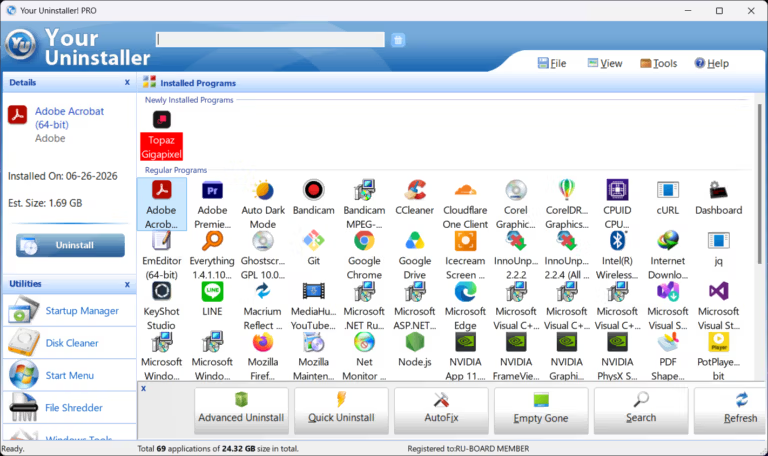
In addition to uninstalling programs, it also comes with built-in system maintenance tools, including Startup Manager, Disk Cleaner, File Shredder, and Trace Eraser, covering Windows maintenance without needing additional programs.
Features:
- SmartUninstall: By analyzing the installer types used by the program from a database of 67 variations, it allows for a more accurate and cleaner uninstallation than using the Windows uninstaller directly.
- 4 uninstall modes: You can choose from Built-in (calls the program's uninstaller), Safe (basic registry check), Normal (deep registry check), and Super Mode (scans the entire system for leftover traces).
- Drag and Uninstall: Simply drag and drop the icon of the program you want to uninstall onto the Your Uninstaller icon! No need to search the list.
- Force Uninstall: Uninstall corrupted or unusable programs using the normal method. Locate and completely delete all related Registry entries.
- Auto System Restore Point: Create an automatic system restore point before uninstalling any program so you can revert immediately if unexpected problems occur.
- Batch Uninstall: Select multiple programs and uninstall them all at once. Save time when you need to perform a major system clear.
- Startup Manager: View and manage the list of programs that start with Windows. Disable unnecessary items to reduce boot time.
- Disk Cleaner: Scan and remove unnecessary junk files from your disk. Receive immediate notifications if any files are locked by other programs.
- File Shredder: Files are permanently deleted by overwriting the data multiple times, preventing recovery by all types of data recovery software.
- Trace Eraser: Delete the traces of usage left by various programs on the system to protect your privacy.
- Detect incomplete installation: Find and manage programs that are left installed in the list but have no actual files. Clean them up in one click.
File Information
- Operating System : Windows 11 / 10 / 8 / 7 / Vista
- Risk Level: 🟢 Safe
- License Commercial
- Developer URSoft, Inc.
- Language Supports multiple languages.
- Installation file size 6.5 MB
- File type *.exe
- Latest version : 7.5.3.1287
- Setup Guide : Available
- Updated on : 28/6/2026
- Required reading. : Download Guide