Download PDF24 Creator / PDF24 Tools for free in Thai. This PDF management program allows you to view, edit, convert, and merge PDF files—a complete, fast, and easy-to-use tool. The latest version is free and offers unlimited features.
What is PDF24 Creator?
PDF24 Creator is a PDF document management program developed by Geek Software from Germany. Its selling point is that it is completely free for both general and business use. Features are fully unlocked, with no watermarks and no page limits. This program has been developed since 2006 and continuously updated to become one of the most popular free PDF programs.
The structure of PDF24 Creator consists of two main tools that work together. The first is PDF24 PDF Printer, a virtual printer driver. When printing a document from any program, whether it's Word, Excel, or a web browser, simply select PDF24 as the printer instead of a physical printer, and the document will be automatically converted to a PDF file. This allows you to create PDFs from almost any program that can print, even if the program doesn't have a "Save as PDF" button. During the process, you can also customize settings such as choosing file quality, setting a password, or compressing the file before saving.
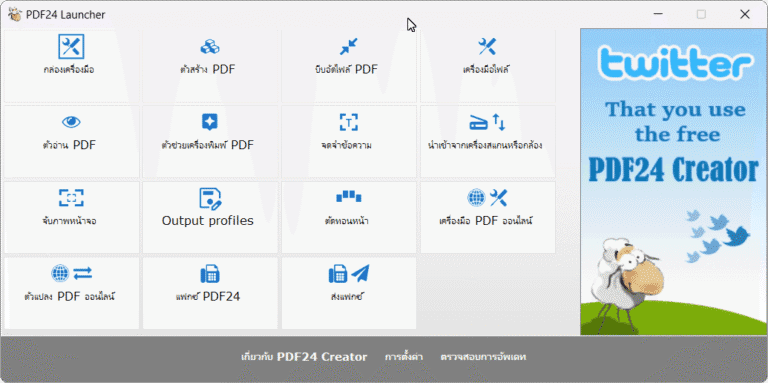
The second part is a PDF file management tool. It can merge multiple PDFs into a single one, split files into smaller sections, delete or rotate unwanted pages, rearrange pages, and compress files before emailing. It can also convert other file types to PDF, such as JPG and PNG images, or convert PDFs back to images and text. The OCR function helps convert scanned PDFs from paper into searchable and copyable text, ideal for office work that stores a large number of scanned files.
In terms of security, PDF24 Creator allows you to set passwords to protect files, encrypt documents, and define permissions such as prohibiting printing, copying, or editing. This is ideal for documents requiring controlled access. Users can also fill out PDF forms, add signatures, and place watermarks directly on documents without needing additional software.
What makes PDF24 Creator different from many free PDF programs is its completely offline operation. Document files are not uploaded to the developer's server, making it suitable for sensitive documents. With no hidden costs and features covering general document tasks, this program is one of the top choices to consider when looking for a PDF management program for your computer, especially if you normally useAdobe Acrobat ReaderThe file is already open because this program complements the file creation and management functions that Reader cannot.
Key Features
- Creating PDF files. Can create PDF files from documents or images such as Word, Excel, or various image files.
- Merging and splitting files. Can merge multiple PDF files together or split a PDF document into multiple files as needed.
- Document file conversion. Can convert various document files to PDF or convert PDF files back to images and text.
- Editing and page management. Includes tools for inserting watermarks, managing text, rotating document pages, and cropping pages.
- File protection and encryption. Can add passwords to protect PDF files and control data access permissions.
- Splitting and rotating pages. Features functions to split or rotate PDF document pages in the desired direction.
- Adding digital signatures. Can add digital signatures to PDF files to verify document authenticity.
- Compression tool for size reduction. Can compress PDF files to reduce file size while maintaining content clarity.
- Scanning documents to PDF. Can connect to a scanner to scan documents and save them directly as PDF files.
- OCR Text Recognition. Convert paper-scanned PDF files into searchable and copyable text.
- Extract images and attachments from PDFs. Save images or files embedded within PDFs for further use under their original filenames.
- Supports Thai menu language. The program supports multiple languages, helping general users get started easily.
What's new
Version 11.33 – 06.11.2026
- PDF24 Right-Click Menu in Windows 11. The PDF24 menu appears directly in the new Windows 11 right-click menu without needing to click "Show more options" first, supporting both multiple files and folders to instantly open the file manager with the selected items listed.
- Overwrite Original File in Reader. Press save and the file is written directly over the currently opened file without needing to choose a new save location every time, while the "Save as" command is separated for saving new files specifically.
- Remember Last Print Settings. The print dialog remembers the previous scale and paper size used, allowing you to print blueprints to scale without having to reconfigure settings every time.
- Smaller PDF Files When Printing Without Drivers. In Windows 11 24H2 and later, Reader sends PDF files directly to the PDF24 printer without using drivers when pages are unmodified, resulting in much smaller file sizes than the previous method.
- Sharper Images and Smaller Files. Screenshots and PNG, BMP, and TIFF files are embedded losslessly when they are not significantly larger than JPEG equivalents; black-and-white and scanned images retain their original color depth, resulting in smaller PDF files.
- Settings Retained After Update. Updating via the EXE installer preserves the program folder, selected components, and Windows service account without resetting them to defaults.
- More Accurate PDF to Word Conversion. Scanned pages with text layers from OCR become editable text, fully lined tables become real tables in Word, while logos, stamps, and signatures remain images.
- Chapter-Divided PDF to EPUB Conversion. The resulting EPUB file is divided into chapters by content instead of splitting files by page, continuous paragraphs across pages are joined, and headers, footers, and page numbers are removed.
- More Understandable Notification Messages. If saving fails because the file is open in another program, the software displays the reason in the user's language with a retry button instead of a brief error code.
file information
- Operating System: Windows 11 / 10 / 8.1 / 7
- Language: Multilingual
- Size: 388 MB / 353 MB
- File type: .exe
- Password : mawto
- Link Updated On: 6/11/2026
- Need to read: Download Guide
Download PDF24 v11 (Win 11 / 10)
Download PDF24 v9.20.0 (Win 7 / 8.1)