Download Movavi Screen Recorder 24 for free, full version, permanent license. This easy-to-use screen recording program starts recording instantly. You can draw lines and add arrows while recording, it reduces noise with AI, and includes a scheduler and scrolling screenshots. This is the latest version.
What is Movavi Screen Recorder?
Movavi Screen Recorder Movavi Screen Recorder is a screen recording program developed by Movavi, a software company founded in 2004 with over 3 million users in 200 countries worldwide. Its main selling point is its simplicity. Unlike many screen recording programs that turn simple tasks into complicated settings, Movavi Screen Recorder is designed so you can open the program, select the area you want to record, check the audio, and start recording immediately. It's ideal for those who want a practical tool that works without requiring a lengthy learning curve.
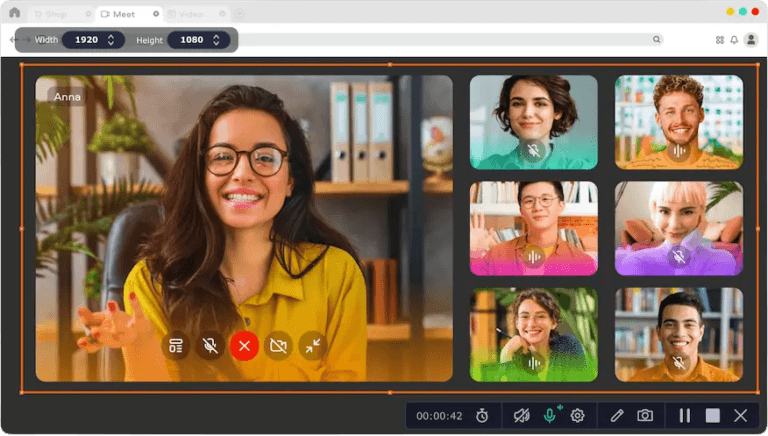
Movavi Screen Recorder supports all screen recording formats, including recording the entire screen, selecting only a specific program window, or defining a custom area by dragging a frame. It records at a maximum resolution of Full HD and a frame rate of 60 fps for clear and smooth video. Audio recording is also flexible, allowing you to choose to record system audio, microphone audio, or both simultaneously. It also features AI noise reduction, which helps eliminate ambient noise during recording without needing post-recording editing.
What makes Movavi Screen Recorder particularly suitable for teaching and presentations is its in-recording tools. Users can highlight the cursor, emphasize clicks and keyboard presses, and draw lines, arrows, and various shapes directly on the video while explaining, making it easier for viewers to understand. It's ideal for creating tutorials, recording webinars, or preparing video presentations.
Features:
- Screen recording in various formats: Choose to record the entire screen, just the program window, or define your own area by dragging a frame. Supports widescreen displays and records at Full HD 60 fps.
- Flexible sound recording: Choose to record system audio, microphone audio, or both simultaneously. Adjust the volume levels during recording, and see the level preview before and during recording.
- Webcam Overlay: Overlay your webcam image onto your screen video. Resize and position it by dragging and dropping it directly onto the recording area. Choose a circular or square frame.
- Highlighting the cursor and keystrokes: The tutorial highlights the cursor, mouse clicks, and keyboard input, and includes mouse click sounds to help viewers follow along more easily.
- Save in multiple formats: Export videos as MP4, AVI, MOV, MKV, MP3, and GIF, or upload directly to YouTube from within the program.
- Draw lines and add shapes while compressing: Draw lines, arrows, and various shapes on your video while recording to highlight important points and draw the viewer's attention to the areas you want to emphasize.
- Reduce noise with AI: The system automatically eliminates ambient noise picked up by the microphone during recording, resulting in clear speech without the need for post-recording editing.
- Scrolling Screenshot: Capture content that extends beyond the screen, such as long web pages or documents, in a single image without needing to combine multiple screenshots.
- Scheduler for recording: Set a date and time to start and stop automatic recording. Ideal for recording webinars or live streams that need to be recorded even when you're not in front of the computer.
- Timer limits the recording time: You can set the maximum recording time in advance or during recording, and choose what the program should do after recording is complete, such as automatically shutting down the machine.
- Hardware Acceleration: Support for Intel and ARM hardware acceleration on Mac enables smoother file compression and conversion with lower resource consumption.
File Information
- Operating System Windows 11 / 10 (64-bit)
- Risk Level 🟠 Medium Risk
- Developer Movavi
- Language Supports multiple languages, including Thai.
- File size 77 MB
- File type *.rar
- Setup Guide : Available
- Link updated when : 11/7/2026
- Required reading. : Download Guide