Download CyberLink Screen Recorder Deluxe full version, a screen recording and game recording program for live streaming to Twitch, YouTube, Facebook, or RTMP, with Chroma Key, Webcam Overlay, and built-in editing tools.
What is CyberLink Screen Recorder Deluxe?
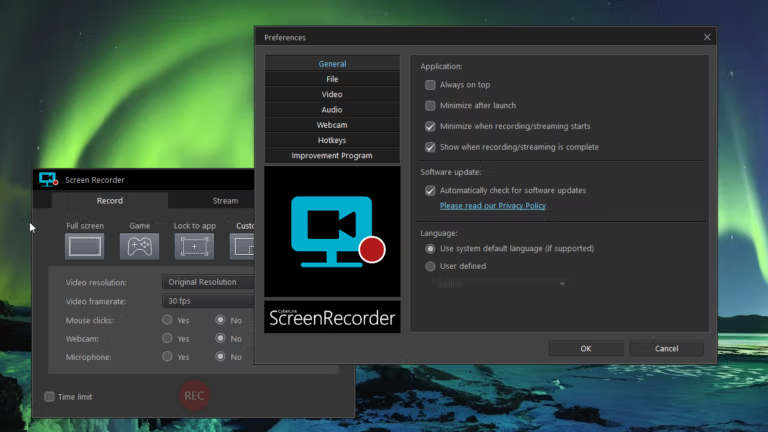
CyberLink Screen Recorder Deluxe It's a screen recording program that combines recording, live streaming, and basic editing into one tool. You can record the entire screen, select specific windows, lock it to an app, or enter Game Mode to capture gameplay directly. If you have a webcam and microphone, you can add your own video and audio simultaneously, eliminating the need to record separately and then combine them later. The program is designed to reduce the load on the CPU and GPU during gaming and streaming. Capture from connected devices is also compatible with game consoles.
The live stream side can connect to Twitch, YouTube, and Facebook directly from the program, or you can add a custom server via RTMP when needing to use other endpoints. Version 4 adds Multistream, allowing you to stream video to up to 5 services simultaneously: Twitch, YouTube, Facebook, and 2 additional custom servers. Webcam footage can be adjusted with Chroma Key to remove the background. You can also place overlays, logos, or images on top of the video. Before recording starts, there's a real-time preview to check the camera and microphone levels, which would be fun if you found the sound was too low during the actual broadcast.
Once recording is complete, there's no need to immediately open another editing program because it includes tools for trimming, titleting, transitions, and audio tracks for easy finishing touches. You can also customize hotkeys for starting, pausing, muting the microphone, or taking screenshots, eliminating the need to frequently switch between menus while playing games. If your work becomes more serious and requires a timeline, effects, or more detailed editing tools, these features will be readily available. CyberLink PowerDirector It can go further, but if the goal is screen recording, streaming, and finishing work quickly, Screen Recorder can do all three simultaneously without having to move files back and forth multiple times.
Key Features
- It can record in Full Screen, Custom Area, Game, Lock to App, and on connected devices.
- Capture gameplay footage from PC, including games running in Exclusive Mode.
- Supports capturing images from game consoles and devices connected to a computer.
- You can live stream to Twitch, YouTube, and Facebook using this program.
- Connect to a custom streaming server via RTMP URL and Stream Key.
- Multistreaming is possible for up to 5 services simultaneously, plus 2 additional custom servers.
- You can overlay webcam footage and microphone audio onto the video you're recording or streaming.
- Chroma Key is used to remove the webcam background and replace it with your desired background.
- You can add overlay objects, logos, illustrations, or watermarks to your video.
- You can set your own hotkeys for recording, pausing, muting, and taking screenshots.
- Real-time Webcam & Mic Preview helps you check the image and sound level before you start recording.
- There are editing tools for trimming, titles, transitions, and adding audio tracks.
What's new in Screen Recorder 4?
Screen Recorder 4 moves beyond a simple screen recording program towards live streaming. This includes simultaneous streaming to multiple services, improved webcam image formatting, and tools to assist with pre-recording preparation. Post-recording also features added basic editing options, allowing for short projects to be completed entirely within the program.
- Custom Streaming Server: Added the ability to send live streams to RTMP-compatible services by manually entering the server URL and stream key; it's not limited to platforms with pre-defined buttons in the program.
- Multistream: You can stream simultaneously to Twitch, YouTube, and Facebook, and add up to 2 more custom servers for a total of 5 streaming channels at once.
- Webcam Integration: Webcam footage works better with Overlay and Chroma Key. You can position the camera over gameplay or the demonstration screen from within the program.
- Chroma Key: Remove the green or specified background from the webcam image during recording and streaming, and replace it instantly with a scene or image from the home screen.
- Overlay Objects: You can add logos, images, or graphics over the video you're recording. This is ideal for adding branding, labels, or information you want to remain visible throughout the clip.
- Customizable Hotkeys: Set your own keyboard shortcuts for Recording, Pausing, Muteing, and Screenshotting. No need to switch back to the on-screen buttons every time you play games or demonstrate software.
- Editing Tools: The post-recording editing tools have been enhanced, including trimming, titles, transitions, and the use of two audio tracks, making it easy to continue working on your project without needing to open separate editing software.
- Real-time Webcam & Mic Preview: You can view the webcam image and check the microphone level before starting to record or go live. This helps you adjust the camera position and audio before pressing start.
System Requirements
- Operating System: Windows 10 / 8.1 / 7 SP1 (Windows 10 64-bit recommended)
- Processor: Intel Core i-series or AMD Phenom II or higher.
- Memory: RAM 2 GB
- Free space: 600 MB for program installation.
- Additional requirements: 1 GB or more GPU VRAM for screen recording / 3 GB or more for game recording, resolution of 1024 x 768 or higher, and an internet connection is required for initial activation.
File Information
- Operating System: Windows 10 / 8.1 / 7 SP1
- Risk Level: Medium
- License: Shareware
- Developer: CyberLink
- Version: 4.4.1.31540
- Language: Multilingual
- Size: 577.52 MB
- File type: *.rar
- Password: mawto
- Installation Method: Available
- Updated: 1/9/2026
- Required Reading: Download Guide