Download PicPick Pro 7 for free, full version, permanent license. This comprehensive screen capture, image editing, and image management program includes pixel measurement, color picker, and file export tools. It's easy to use, has a Thai language menu, and is the latest version.
What is PicPick?
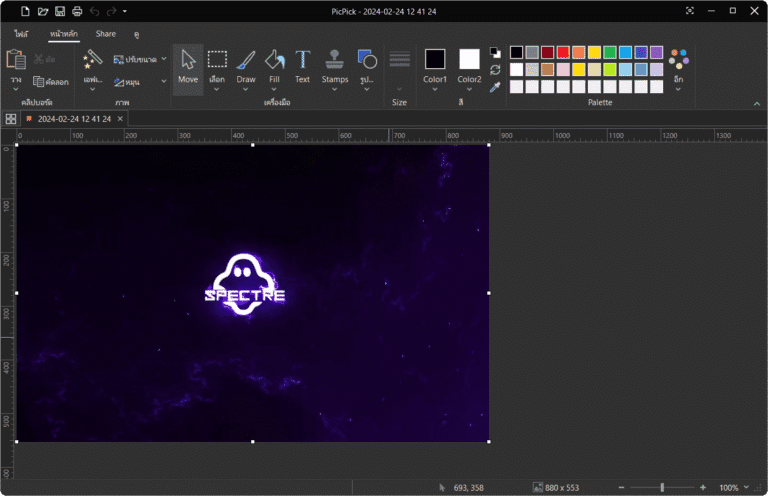
PicPick This is a highly popular, all-in-one screenshot and image editing program. It offers a variety of screenshot tools, including full-screen capture, selecting only the currently open program window, capturing a specific rectangular area based on mouse cursor movement, and even automatic scrolling webpage capture. This allows you to conveniently save long screenshots without having to manually stitch them together. Once captured, the image is immediately sent to the editing window, allowing you to quickly edit, add arrows, highlight important points with circles, or add annotations.
The program also includes a comprehensive set of graphic tools to facilitate user work, such as a Color Picker for extracting color codes from the screen, a Color Palette for mixing and storing color palettes, a Pixel Ruler for measuring pixel sizes on the screen, a Protractor for measuring angles, and a Crosshair for finding coordinates. It's suitable for creating user manuals, teaching materials, and general graphic design work. If you need another small, portable screen capture program, you can choose... FastStone Capture They can be switched depending on the skill level of each task.
In addition, PicPick comes with a screen recorder function that supports recording both video and audio. Users can select the desired recording area and enjoy flexible file export options, allowing them to save as PNG, JPG, or PDF files, or share to other programs such as Word, Excel, and PowerPoint, as well as send files instantly via email and cloud storage. The program fully supports the Thai language menu, making it easy to learn and use.
Features:
- Taking a screenshotYou can capture the entire screen or select a specific area of the screen as needed.
- Image editing toolsUsed to add text, arrows, shapes, and more to images using the latest Ribbon-style editing tools.
- Drawing and writing on pictures.There are tools available to help draw lines, shapes, and write text on images.
- Color and pattern management.There are tools for adjusting colors and tools for creating patterns.
- Adding effectsYou can easily add various effects such as shadows, frames, watermarks, mosaics, brightness control, and more to your images.
- Displaying EXIF data.It can display information about an image such as file structure, size, and other details.
- Opening and saving PDF files.It has the ability to open and save images as PDF files.
- Managing image filesYou can manage image files without opening other image editing programs.
- Supported image file formatsSupports various image file formats such as JPEG, PNG, GIF, BMP, TIFF, ICO, and others.
- Diverse sharingImages can be saved, shared, or sent via the web, email, FTP, Dropbox, Google Drive, SkyDrive, Box, Evernote, Facebook, Twitter, and more.
- graphic equipmentThere are many graphic tools available, such as color pickers, color platforms, pixel lines, angle piles, pointers, enhancers, and whiteboards.
- Customizable settingsThere are advanced settings that can be customized, such as hack keys, file naming, image quality, and more, according to your needs.
What's new?
v7.6.1 (2026-09-16)
- Add a pause and resume button to the screen video recording tool.
- Supports webcam overlay with preview, resizing, and flipping capabilities.
- Add mouse cursor effects, click highlights, and mouse click sounds.
- Add a countdown timer before starting screen recording.
- The video and audio options settings window has been completely redesigned.
- Improved support for and viewing of HEIF/HEIC image files.
- Fixes issues with Window Control window capture in applications expanded to full screen.
- The file renaming system has been improved to support special characters and handle duplicate filenames more accurately.
- Fixed minor errors and improved system stability.


File Information
- Operating System: Windows 11 / Windows 10 / 8.1
- Risk Level: 🟢 Safe
- Developer: NGWIN
- License: Full
- Language: Multilingual / Thai
- Size: 65.70 MB
- File type: *.rar
- Password: mawto
- Installation Method: Available
- Updated: 17/9/2026
- Required Reading: Download Guide