
Download Movavi Video Editor Plus 2026 for free, the full, permanent version. This easy-to-use video editing software allows you to cut clips, add effects, subtitles, music, and includes AI tools for content creation. File information and installation instructions are also included.
What is Movavi Video Editor?
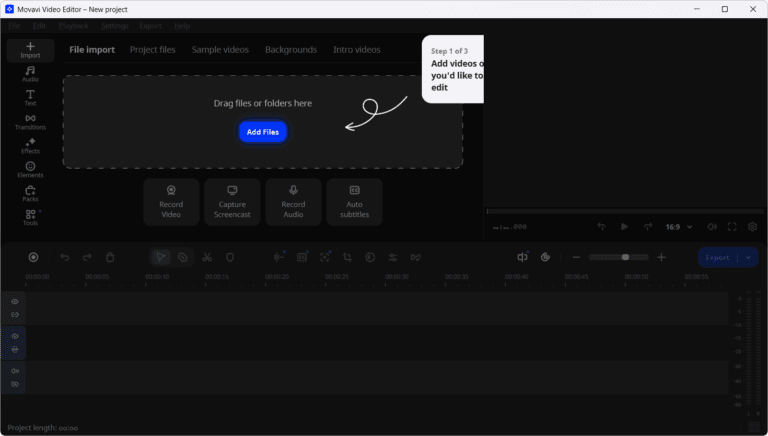
Movavi Video Editor This is a video editing program designed for quick work without needing to memorize complex menus. You can drag clips onto the timeline and cut, split, merge, crop, rotate, adjust color, speed, and add audio all from a single screen. It offers a wide selection of transitions, filters, titles, overlays, and ready-made effects. It's ideal for social media clips, tutorials, presentations, or personal projects where you want to organize visuals and audio without spending hours searching for buttons. The categorized tools allow for quick previews and immediate results when trying out changes to your clip.
AI tools help reduce many tedious tasks, such as auto subtitles for transcribing audio into subtitles, silence removal for removing silent segments, denoise for reducing image noise, and auto crop to properly position subjects in the frame when changing video aspect ratios. Additionally, there's chroma key, motion tracking, audio adjustment, and high-speed control for time-lapse photography. Previewing on the timeline and copying effects between clips also allows for faster experimentation.
Once the timeline is set up, we can configure the export settings to suit the desired resolution and platform, including working with 4K video depending on the system specifications. If you need a suite that also includes file conversion tools, screen recording, and other media tasks, Movavi Video Suite It will cover more than just editing tasks. For those who focus primarily on clip editing, a Video Editor will be more suitable and its interface isn't too cluttered. After saving the project, you can continue editing the timeline later without having to start over.
Key Features
- Cut, split, merge, crop, rotate, and rearrange clips on the timeline.
- Adjust the color, speed, and audio of your clips using the built-in editing tools.
- There are filters, transitions, titles, overlays, and ready-made effects.
- Auto subtitles automatically transcribes spoken audio and creates subtitles.
- There are pre-made subtitle styles with Active Word Highlighting.
- Silence removal quickly detects and removes silent segments from video clips.
- Denoise uses AI to reduce noise in videos while preserving important details.
- Auto crop helps position the subject within the frame when changing the video aspect ratio.
- Supports Chroma key for changing or removing green screen backgrounds.
- Motion tracking is used to track objects for graphics, text, or effects.
- You can quickly copy effects from one clip and apply them to another.
- High video speed adjustment is possible for time-lapse and accelerated clips.
- Supports editing and exporting high-resolution video, including 4K, depending on the system specifications.
What's new in Movavi Video Editor 2026?
AI features / Auto-tools
- It features AI-powered video cropping that automatically tracks the speaker or product to keep it centered in the frame, ideal for converting horizontal clips to vertical.
- The automatic speech-to-text conversion feature allows you to create subtitles in multiple languages. You can choose the font, text color, and position.
- Supports one-click translation of automatically generated subtitles into English, without the need for a dictionary or online service.
- It features an AI-powered background removal tool with blur filters, without the need for a green screen.
- The one-click silence removal feature automatically cuts out unwanted silent segments, or you can adjust the length and volume of the silence yourself.
Subtitles and effects
- There are over 30 new subtitle styles. Customize text in the Styles tab with a single click, and access advanced settings in the Design tab.
- Add over 40 customizable effects such as dust, light leaks, retro and VHS styles. Customize every clip.
Speed and efficiency
- Supports video playback at speeds up to 100x, ideal for time-lapses or watching long clips quickly.
- File export is faster and more stable than before, with quicker previews by hovering the mouse to view media, effects, and transitions without opening the file.
- It features a Timeline hover preview, allowing you to easily find important moments of the video by hovering your mouse over the timeline.
Movavi Video Editor 26.24.1 — September 19, 2026
- Improved performance, fixed common errors, and enhanced stability for video editing.
Movavi Video Editor 26.23.1 — August 31, 2026
- We've refined some features to make editing faster.
System Requirements
- Operating System: Windows 10 / 11 64-bit
- Processor unit: Dual-core 1.5 GHz or higher
- Memory: 4 GB RAM or more
- Empty space: At least 400 MB for installation and 600 MB for operation.
- Installation: You must have administrator privileges.
File Information
- Operating System: Windows 11 / 10
- Risk Level:🟠 Medium Risk
- Developer: Movavi Software Ltd.
- License: Shareware
- language : English
- Architecture: x64
- size : 134.20 MB
- File type: *.rar
- Password: mawto
- Updated on: 19/9/2026
- Required Reading: Download Guide