

Download CapCut PC 9 (x64) in Thai for free. This popular video editing software for laptops is easy to use, features convenient tools, and is all-in-one. Direct link (Offline Installer) for the latest version.
About CapCut PC
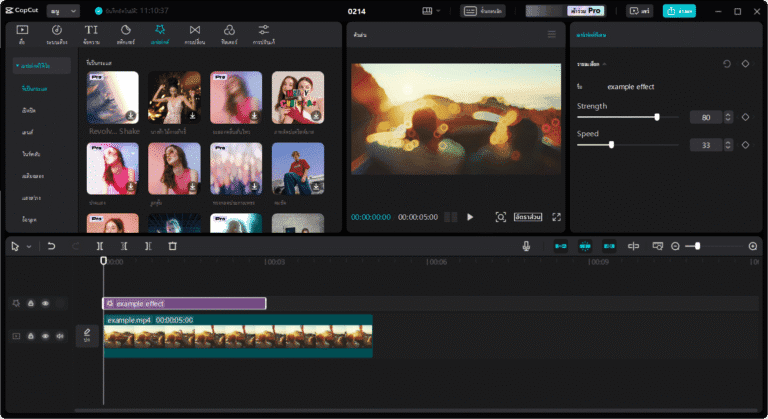
CapCut PC CapCut for PC is a video editing program developed from the widely popular CapCut mobile application. This PC version is designed to provide users with enhanced productivity on computers, enabling them to create visually appealing and professional-looking videos. Furthermore, the PC version improves workflow efficiency and offers convenient control for users experienced in keyboard and mouse interaction. Whether you're an entertainer, creator, or someone interested in creating multimedia content for social media sharing or personal use, CapCut for PC offers comprehensive features and tools for all types of video editing, including basic editing, adding effects, color and lighting adjustments, and more, making it easy and enjoyable to create engaging and stylish videos.
What can CapCut PC do?
- Video editingVideo editing is possible using various flexible tools such as cutting, copying, and pasting video clips, uploading videos in different formats, and creating still images from videos.
- CustomizationIt offers a variety of customization tools, such as adjusting brightness, contrast, and color, adding interesting effects, basic sounds, and accessing audio files within the program.
- Filters and effectsIt features extended filters and effects that allow users to create unique styles, offering a wide range of options to customize the style and presentation of videos.
- TemplateThere are templates available for creating videos, making it quick and easy to get started.
- Keyframe AnimationIt allows you to create engaging animations by defining the position and timing of various keyframes.
- AI BeautifyHelp improve the facial features of people in videos to make them look more beautiful and appealing.
- MultimediaIt features allow users to add basic audio, video clips, and still images directly to their projects.
- Sharing and exportingVideos created can be shared directly on various social media platforms and exported as video files in various formats as needed.
- Working with long video clips.It has the capability to work with long videos without limitations, allowing for efficient cutting and editing of large videos.

Key features of CapCut for PC
- Free and easy to use.This makes it an ideal tool for anyone who wants to work with video, whether they are a student, blogger, or multimedia content creator.
- Ease of use on a computer.Using a PC makes it more efficient and convenient, as the keyboard and mouse can be used to control and work with video effectively.
- Quality and performanceIt offers good quality video editing and image manipulation capabilities, with tools and features that meet all user needs.
- A feature-rich system.This software offers comprehensive features for all aspects of video editing, including image adjustments, various effects, filters, and audio work.
- Flexibility in useIt offers flexibility in use and customization to meet user needs, allowing for the creation of stylish and appealing work.
- Support and updatesIt receives continuous support and updates from the development team, ensuring that you always receive effective support and new features.
Who is CapCut suitable for?
- entertainers and creatorsIt's an ideal tool for entertainers and creators who want to create high-quality video content with a unique style.
- Bloggers and content creatorsThis is for individuals creating content for sharing on social media or blogs, such as video blogs, video campaigns, or online marketing content, as it provides essential tools and features for creating engaging and high-quality content.
- StudentsIt's a great tool for students who want to create complete video projects, with features that cover all aspects of video editing.
- Anyone who wants to create a video.Anyone can use CapCut because it has a user-friendly interface and features that cover all your video editing needs.
File Information
- Operating System: Windows 11 / 10
- License: FreeWare
- Language: English
- Size: 531 MB
- File type: .exe
- Updated: 21/9/2026
- Required Reading: Download Guide





