

Download DuckDuckGo Browser for free. This privacy-focused browser blocks trackers and automatic ads, features a Fire button for one-click data clearing, includes Duck Player, and allows ad-free YouTube viewing. This is the latest version.
What is DuckDuckGo Browser?
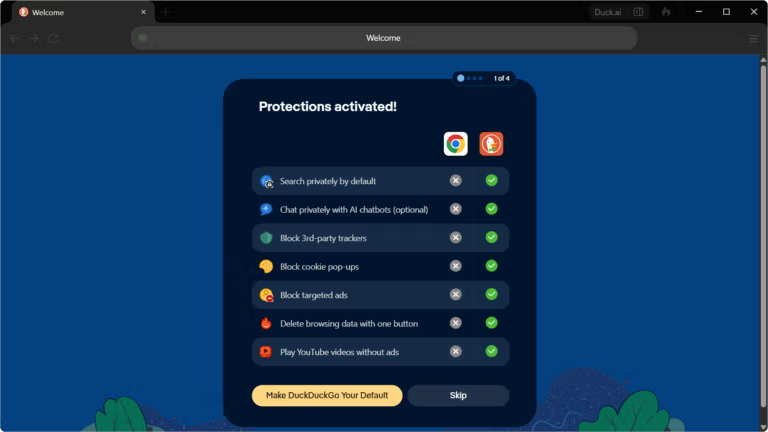
DuckDuckGo Browser DuckDuckGo is a privacy-focused web browser developed by the US-based company. It builds upon the success of their popular search engine, which has long emphasized not collecting user data. The browser's concept is straightforward: protecting user privacy at every stage of browsing, not just during searches. It provides advanced protection out of the box without requiring any additional settings, making it suitable for general users who want a privacy-focused browser that's ready to use right out of the box.
At its core, DuckDuckGo blocks trackers hidden within websites before they load. These trackers are scripts that record user behavior, IP addresses, and device information to create advertising profiles. By blocking these from the outset, browsers achieve not only increased privacy but also faster loading times and lower data usage. The company states that its Windows browser uses approximately 60% less data than Chrome because it avoids loading unnecessary tracking scripts.
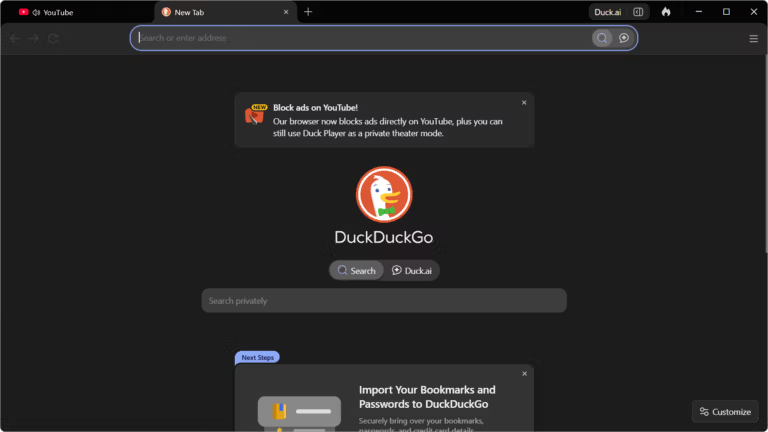
DuckDuckGo Browser features a clean, minimalist design with no ads or unnecessary features. Users migrating from previous browsers can import bookmarks and passwords in a few clicks and start using it immediately with minimal adjustment. The browser supports all basic functions including tabs, bookmarks, password management, and light/dark modes, sufficient for most people's daily use.
Features:
Core Functions
- Block automatic trackers: Using Tracker Radar technology, it detects and blocks trackers hidden on millions of websites before they load, protecting your privacy without needing to install additional extensions.
- The Fire button clears data in one click: Instantly delete all browsing history, open tabs, and cookies with a single button. Perfect for quickly clearing browsing history without navigating complicated settings menus.
- Force HTTPS connection: Automatically upgrade connections from insecure HTTP to HTTPS when the website supports it, encrypting data during transmission, and limiting third-party cookies by default.
- Import data from the original browser: Transfer bookmarks and passwords from your old browser or password manager in just a few clicks. Then you can continue using your old browser.
- Manage website permissions: You can set access permissions for location, camera, or microphone on a website-by-website basis, controlling which websites have access to what.
Special Features
- Duck Player: Play YouTube videos in a behavioral-tracking, ad-free mode that prevents video views from affecting YouTube's video recommendations.
- Built-in password management: Automatically remembers and fills in passwords, and suggests secure passwords when creating a new account. Supports the system's Passkey.
- Sync across devices with encryption: Sync bookmarks and passwords between Windows, macOS, Android, and iOS, encrypting data throughout the sync process.
- Fire Window and Fire Tab: Open separate windows or tabs that don't save browsing history to your device. Close and clear all data simultaneously when you're finished.
- Global Privacy Control (GPC): The system automatically notifies the website that the user does not consent to the sale or sharing of personal data, in accordance with the privacy rights supported by the laws of many countries.
- Duck.ai: A built-in AI assistant that allows for conversational and question-and-answer sessions without being tied to the user's identity. It offers the choice of multiple AI models and can create images from text within defined limitations.
File Information
- Operating System : Windows 11 / 10 / macOS / Android / iOS
- License Freeware
- Developer : DuckDuckGo, Inc.
- Language Supports multiple languages, including Thai.
- Size 12 MB / 1.2 GB
- File type *.exe, *.msixbundle
- Updated on : 12/7/2026
- Required Reading: Download Guide
==== Online Installer (.exe) ====
==== Offline Installer (.msixbundle) ====
Install from the Microsoft Store ====





