Download CrystalDiskInfo 2026 + Portable Full, a free, latest version of a program to check the status and condition of your hard drive, including bad sectors (SSD, HDD), drive temperature, and firmware version. It provides early warning before drive failure, allowing you to back up your data in time.
What is CrystalDiskInfo?
CrystalDiskInfo is a free program for checking the health of hard disks and SSDs, developed by Japanese programmer hiyohiyo. It has been available for free download since 2008. Its working principle is to read SMART values, a self-monitoring system embedded in every disk, and display the results in an easy-to-understand format, rather than requiring interpretation of raw numbers.
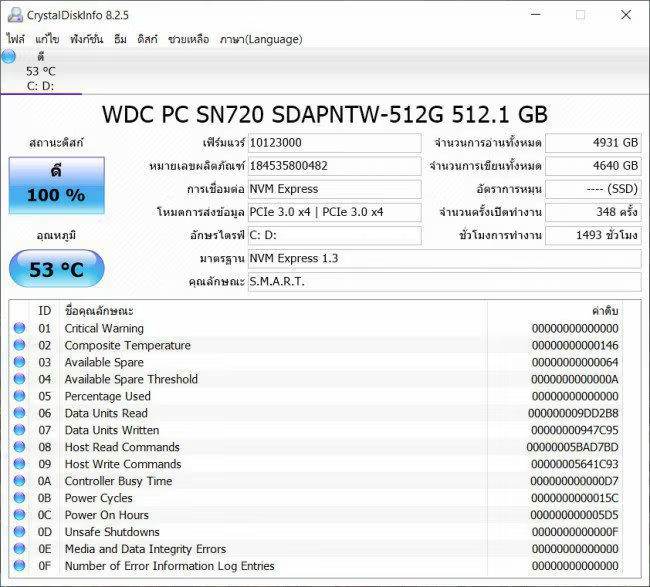
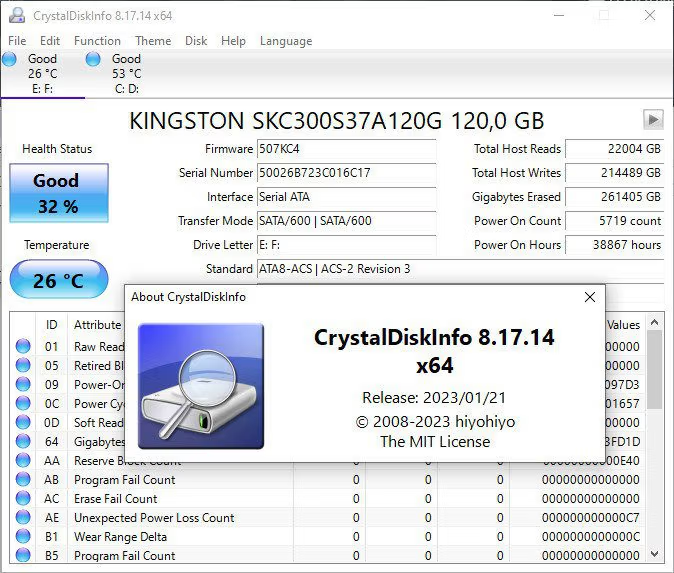
Upon launching the program, you'll see all the disks along with their three health levels: Normal (blue), Caution (yellow), and Poor (red). Early detection of yellow or red indicators is a key value of this program, because most disks don't fail immediately but send early warning signals via SMART indicators; Windows simply doesn't display them to the user.
In addition to health status, the program displays real-time temperature, cumulative usage hours, number of power-on/off cycles, magnetic disk speed, interface, firmware, and total cumulative read/write data. These figures help estimate the remaining lifespan, especially for SSDs which have a limited lifespan based on write volume. Knowing how much has been written compared to the manufacturer's guaranteed TBW allows for planning disk replacement before data loss occurs.
The program supports a wide variety of disk types, including SATA and PATA spinning hard drives, SATA SSDs, NVMe M.2 SSDs, and some external USB drives. For NVMe SSDs, additional metrics are provided, such as remaining usage percentage and controller temperature. Actual read/write speeds are also measured. CrystalDiskMark Sister programs from the same developer.
A key feature is the automatic notification system. It can be configured to send emails when disk health changes or the temperature exceeds a set limit, activate audible alerts, or log data to the Windows Event Log. This is ideal for servers or computers that are left running continuously. Additionally, it includes a graph function that records SMART values for later review, clearly showing trends in disk degradation.
There's a special edition called Shizuku Edition, which features a Japanese anime theme and functions like the standard version. The standard version is available in both installable and portable versions that can be run by extracting the ZIP file. In short, CrystalDiskInfo is a free, lightweight, and reliable disk health checker. Its function isn't to repair disks, but to provide early warnings about disk failure, giving users time to back up their data.
Key features
Perform a detailed drive health check.
- Drive health status. The result is displayed as Good, Caution, or Bad, along with the current temperature of each drive.
- General information about the drive. Model name, serial number, firmware, interface, data transfer mode, operating hours, and cumulative read/write data volume.
- SMART Value Table. View each value individually, along with a graph showing historical trends.
- Counterfeit SSDs seized. Label [FAKE] on Samsung SSDs that falsely claim to be this model.
Warning before the drive fails.
- Receive audio and email notifications. When the health of the drive begins to deteriorate.
- Working behind the scenes. Stay vigilant with the alert system on the taskbar.
- Record the events. Keep a history of drive changes for later review.
Customize and support a wide range of devices.
- Control AAM/APM. Instruct the hard disk to operate more quietly or to save more power.
- Supports multiple drive formats. This includes HDD, SSD, NVMe, external USB drives, and Intel/AMD RAID.
- Copy the information as text. You can copy the data from the drive and paste it into a document or send it to a technician immediately.
Easy to use, portable.
- Portable, no installation required. Extract the ZIP file and open it. You can carry it on a flash drive and check it on other computers.
- Supports the Thai language. Many other languages are also available to choose from.
- You can change the theme/appearance. There are Standard, Aoi, and Shizuku Editions available.
What's new
Version 9.9.4 – 2026/11/03
- Added support for JMS59X RAID mode. Now retrieves detailed disk information in JMicron JMS59X controller RAID mode via the IDENTIFY DEVICE command.
- SATA disks behind SAS HBA. Added support for SATA disks connected behind SAS HBA.
- Hindi language file. Added new Hindi language file.
- Updated language files. Improved Vietnamese and Russian language files.
file information
- Operating System: Windows 11/ Vista / 7 / 8 and 8.1 / Windows 11/10
- License: Freeware
- Language: Multilingual / Thai
- Size: 5.9 MB
- File type: *.exe/zip
- Updated on: 4/11/2026
- Need to read: Download Guide