Download UltraSearch Pro 4 Full version for free, permanently. One of the best file search programs for your computer. Find files quickly and easily. Suitable for anyone who wants to find files on their computer quickly. Latest version.
What is UltraSearch?
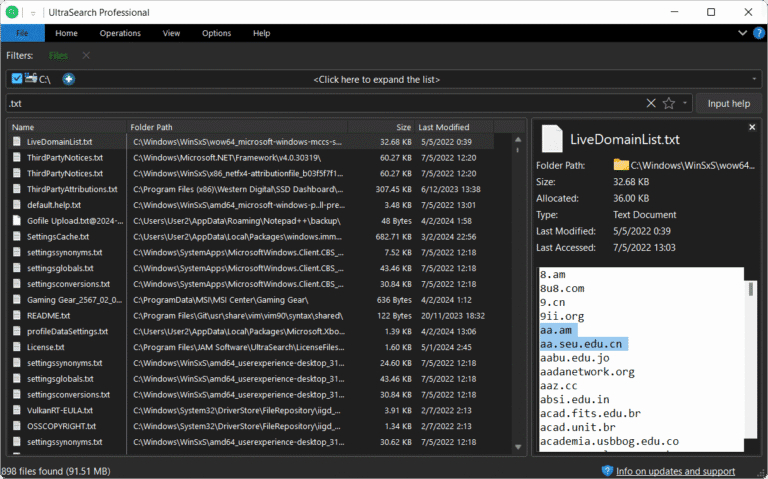
UltraSearch This is a file finder program from JAM Software, designed to solve a tedious problem: not being able to find files on your own computer. Many people have experienced this: remembering where they saved a file, but not remembering the folder or drive it was in. Relying on the system's search function is slow and sometimes inaccurate, especially for those who store work on multiple drives and folders, wasting time opening each location one by one. This program replaces that. Simply type the file name or extension you remember, and the results will appear almost instantly, even if you have hundreds of thousands of files on your computer.
The speed secret lies in its different way of working. This method reads data directly from the Master File Table (MFT) of the NTFS file system, without creating a local index like the old method. The result is always fresh results, it doesn't consume resources when idle, and searches are immediate upon startup. This method differs from... Everything is another file finder program that we've previously recommended. This tool stores its database locally and updates it constantly. If you only remember part of the file name, you can use wildcards or regular expressions to narrow down the results. Beyond filenames, it can also delve into the content within files, supporting Word documents, PDFs, and compressed files like ZIP, with a preview window highlighting found words before opening the actual file.
Anyone can use it, from ordinary people who want to quickly find their documents or work files to IT administrators who have to manage massive amounts of files every day, developers who search for code in projects, or designers who need to dig up old files for reference. For home use, the free version is sufficient for general searching, while the Pro version includes extras for organizations, such as searching through the SpaceObServer DataCentral index and searching directly in Google Drive and SharePoint. The groups that benefit most from this can be summarized as follows:
- Home users who need to quickly and easily find the files, documents, or multimedia content they need.
- IT administrators who need to manage a large number of files and folders on a daily basis.
- Software developers who need an efficient way to find specific code snippets or resources within their projects.
- Graphic designers and artists are looking for quick and convenient ways to find their work files and assets.
Ability
Speed is just the beginning. Besides fast file searching, this device also includes a tool for managing attachments. Once you find the file you need, you can manage it all in one place.
- Search instantly as you type. Read live data from the NTFS drive's MFT each time you search; there's no need to maintain a local index. Results appear almost instantly, even with hundreds of thousands of files.
- You can search for content within files. It supports Word documents, PDFs, source code, and compressed files like ZIP.
- Highlight the words you find. Both in the search results list and in the file content, it's immediately visible where the search term is located.
- You can limit search results by file size or file date range, and set filters to exclude folders or file extensions you don't want to search for.
- Advanced search syntax is supported, including wildcards, regular expressions, and search terms connected with AND or OR, along with keywords such as ext: or content:.
- Save your search with all the settings, and then load it back to use whenever you want.
- Manage the files you find in one place. Rename multiple files simultaneously directly from the results page. You can then move, copy, or compress them into a ZIP file.
- Search results can be exported as text or CSV files in all versions. The Pro version also allows exporting to Excel, PDF, and HTML.
- Pressing 2x Ctrl will instantly launch the program even if you're working on other things. You can also set it to open with the system.
- There's a portable version; just plug it in via USB and run it—no installation required.
UltraSearch vs Everything
Both UltraSearch and Everything are file and folder search programs on Windows that are notable for their significantly faster speeds compared to the default Windows search system. Both use a technique of reading data directly from the Master File Table (MFT) of the NTFS file system, allowing them to find hundreds of thousands of files in just a fraction of a second.
Although fundamentally similar, the two programs have slightly different operating concepts, features, and target audiences. Here are the main differences:
Comparison table of differences
| Features: | Everything (by voidtools) | UltraSearch (by JAM Software) |
| How it works | Create a database stored locally and update it constantly whenever files change. | Read data from the MFT in real-time when a search is performed (no background indexing). |
| Resource utilization | Extremely lightweight, uses very little RAM and CPU. | It's also lightweight, but a more complex UI might consume slightly more resources. |
| Search speed | Very fast (almost instantly) | fast |
| Program interface (UI) | Simple and minimalist (classic Windows style). | More modern, with a Ribbon system similar to File Explorer in Windows 11/10. |
| Searching for content within a file. | can | Yes, it is possible, and there's a content preview system that's quite convenient to use. |
| Advanced features | Supports advanced Regular Expression (Regex) and features file sharing via HTTP/FTP. | Supports Regex, prints/exports results in various formats (Excel, PDF), and works well with TreeSize. |
| Pricing and licensing. | 100% is free (Freeware) for all types of use. | There is a free version (for personal use) and a paid version (Pro) for organizational use and advanced features. |
What's new?
Version 4.9.4 – 09/22/2026
- Fixed a bug that might cause abnormally high memory usage.
- Resolve the issue where the system's right-click menu does not display the UltraSearch item after installing a Windows update.
- Search for content in files on a network drive. Results are displayed immediately upon finding anything, no need to wait minutes for results to appear in batches like before.
- Resolve the issue of finding content in a file that causes the last word of the file to not yield a match.
- Searching for files, folders, and subfolders in Google Drive is now working normally again.
- Resolved Google Drive sign-in issues? Now you can search without signing in again.

File Information
- Operating System: Windows 11 / Windows 10 / 8.1 / 7 (x64)
- Risk Level: 🟡 Low Risk
- Developer: JAM Software.
- License: Full
- Size: 73.10 MB
- File type: *.rar
- Password: mawto
- Installation Method: Available
- Updated: 27/9/2026
- Required Reading: Download Guide