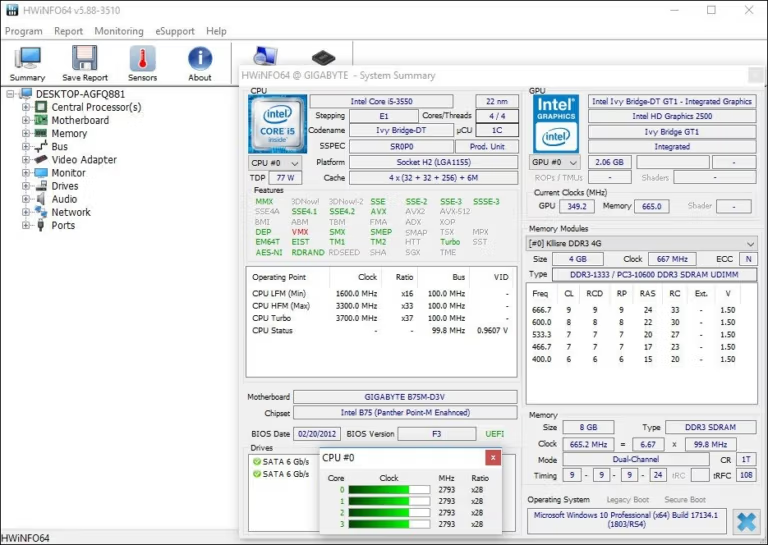
HWiNFO 8.54.6090 (x64) is a free program for checking computer hardware specifications.

Download HWiNFO64 / HWiNFO32 + Portable, a hardware monitoring program that checks detailed computer specifications, displays temperature, voltage, and fan speed in real-time. This is the latest version.

About HWiNFO

HWiNFO This is a free, high-resolution hardware monitoring program that extracts detailed information about every component in your system, from the CPU and graphics card to the motherboard, RAM, hard drive, and even temperature sensors, voltage, and fan speed. What sets it apart from other spec checkers is the depth of detail and the frequency of releases. The development team frequently releases new versions, with support added for many new hardware models even before their official release. If you've just built a new computer and want to check if the shop installed the correct components, or if you're experiencing abnormal overheating and want to identify the culprit, you can use this program to get a complete answer without having to guess each component individually. Furthermore, it has a sensor monitoring system that warns you before actual damage occurs, such as abnormally high temperatures or fan failures, giving you time to fix the problem before data loss occurs.

Usage starts with selecting the overview mode for a quick view of specifications, or you can delve deeper into each device to see chip-level details. For those who want to continuously monitor system performance, there's a separate sensor window that updates various values in real-time, including temperature, power consumption, and clock speed. The display is highly customizable; you can minimize it to a system tray icon, place a floating graph on the screen, or send data to the OSD while playing games via RTSS. Anyone who has used it before... CPU-Z While HWiNFO may feel familiar at first glance, it provides deeper data and historical trend analysis. All reports can be exported as CSV or HTML text files, making them convenient for technicians to diagnose. It's ideal for overclockers who need to monitor temperatures during high-speed operation, repair technicians who need to troubleshoot problems, and general users who simply want to know what's installed in their PC. It's free for non-commercial use and consumes low resources, allowing it to be left on all day without slowing down the system.

Choose between fixed and portable models.

This article offers two download options: an installer file (.exe) for Windows 64-bit only, suitable for frequently used computers; and a portable .zip file, available in both 32-bit and 64-bit versions. Simply extract and run the file without installation. Carry it on a flash drive to check computer specifications on any machine. All settings are stored in the same folder, so you don't need to reconfigure them after transferring to a new computer.

Key features of HWiNFO

  • In-depth hardware information. It provides a simplified overview but also allows you to delve into every individual component. It consistently supports new technologies and standards.
  • Real-time sensor monitoring. Monitor the temperature, voltage, fan speed, and power consumption of all components. The display screen is customizable.
  • Reports can be generated in various formats. Export as CSV, XML, or HTML text files, while saving sensor data as a log for later review. Connect with other programs via add-ons.
  • Reliable. Many large organizations and hardware manufacturers choose to use it because it provides accurate information.
  • Clean and safe. We do not collect users' personal information and do not send any data over the internet.
  • Updated frequently. Frequent releases of new versions are in place to support the latest components, and many hardware models are compatible even before their official release.

What's new?

Version 8.54.6090, Sep-30-2026

  • Display the process name in the RTSS sensor header. You can immediately tell which process is being monitored.
  • Fixes NVML freezing during driver update. Add a method to avoid crashes while updating NVIDIA graphics card drivers.
  • Fixes compatibility issues with NZXT Kraken Elite V2. This water cooling system is reading the values correctly.
  • Fixing abnormally negative temperatures of NVIDIA memory chips. The incorrectly reported negative value has been corrected.
  • The OSD can display multiple values on a single line. Combine multiple values onto a single line on the OSD (On-Screen Display).
  • Fixes PCH power reporting issues on Intel Panther Lake and above.
  • Thermal Grizzly WireView Pro II Fan Duty Report. You can see the fan speed as a percentage from the power meter.
  • You can include notes in the JSON sensor log. Add an option to insert your own notes into the log file.
  • Improved support for Nova Lake QS. Fix the SA VID pressure reporting issue simultaneously.
  • The monitor sensor on the ASUS X870 MAX motherboard has improved.
  • Fixed a bug that allowed the censor list to be moved down. Moving the item to the bottom is now working normally.
  • Report on supported NVMe power status. You can view the power state of the SSD.
  • Report on Dolby Vision support. You can check if your monitor is compatible.
  • Modify the custom user sensor in HKLM. The user-defined sensors in the registry are working correctly.
  • Resolve issues with accessing PCIe extended space on older systems. Older machines like XP could read all the data.

What's new?

File Information

  • Operating System: Windows XP/ Vista / 7 / 8 and 8.1 / Windows 10 / 11
  • License: Freeware
  • Language: Multilingual
  • Size: 15 MB
  • File types: *.exe / *.zip
  • Updated: 1/10/2569
  • Required Reading: Download Guide

==== Installation Package (64-bit only) ====

==== Portable Version (32 / 64-bit) ====