

Download CPU-Z Portable 3, a hardware diagnostic program that displays detailed information about the CPU, motherboard, and memory in an organized manner. Available in both installable and portable versions.
What is CPU-Z?
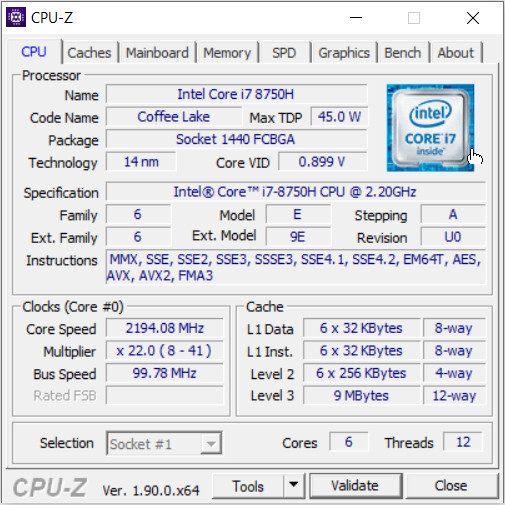
CPU-Z This is a small utility program for viewing detailed computer hardware information. It collects the CPU model name, architecture code, number of cores, number of threads, clock speed, and cache memory and displays them in a single window. This information helps computer assemblers verify components against purchased lists, repair technicians compare parts before replacing them, and computer shops create system specifications without having to open the case or record values from multiple screens. When a computer is slow or malfunctioning, viewing basic values makes it easier to identify the root cause. It can also be used to check the installed CPU model, its speed, and whether its specifications match the manufacturer's information.
In addition to CPU information, CPU-Z can read complete information about the motherboard, chipset, BIOS, and each memory module, including RAM type, capacity, frequency, timings, and SPD data included with the RAM module. This makes it ideal for those upgrading systems, maintaining multiple computer systems, hardware testers, and anyone who wants to keep a record of specifications for later comparison. The program includes Benchmark and Stress Test pages for viewing scores and performing basic checks, as well as the ability to save reports as text files or web documents. The portable version can be opened directly from a folder or flash drive without installation, making it convenient to test other computers. For more graphical information, please see the details below. GPU-Z Continue
Key Features
- Check the model name, architecture code, number of cores, number of threads, and clock speed of the CPU.
- Displays the size and specifications of all levels of cache memory within the processor.
- Retrievate the manufacturer, model, chipset, and BIOS information of the currently used motherboard.
- Displays the type, capacity, frequency, and timing of the RAM in each slot.
- Read the SPD profile information for each row of memory modules.
- There are benchmarks for comparing CPU performance.
- There is a stress test to continuously monitor the CPU's performance.
- Save the hardware information report as a text file or HTML document.
- Supports portable mode, allowing access from a folder without installation.
- Works in conjunction with CPU-Z Validator V3 for checking and sharing system information.
- Help detect new CPU and chipset models that have additional information.
CPU-Z Capabilities
- Check which CPU our machine is currently using and what details it has. It will also display an icon of that CPU for us to see.
- Check how much L1, L2, and L3 cache our CPU has.
- Check which model of Mainboard our device uses.
- Check how much RAM your computer has, what type of RAM it is, and how many slots it has.
- Check the model of the graphics card we are using.
What's new?
CPU-Z Validator V3 (more information *at that address*).
File Information
- Operating System: Windows 8.1/ 7 / Windows 10 / Windows 11
- Developer: CPUID
- License: Freeware
- Language: English
- Size: 5 MB
- File type: *.exe
- Updated: August 21, 2026
- Required Reading: Download Guide
==== Installation Package ====
==== Portable, No Installation Required ====





