Download StartAllBack for free, the full, permanent version. This program customizes the Start Menu and Taskbar to resemble Windows 7/10, and helps to more precisely organize the menu and File Explorer on Windows 11.
What is StartAllBack?
StartAllBack This program customizes the appearance of Windows 11, restoring it to the familiar old style. It covers everything from the Start Menu and Taskbar to File Explorer, the right-click menu, and various dialog boxes. If you've upgraded and find the new Start Menu awkward, the taskbar tied to the bottom edge, or the file browser search bar behaving differently than before, this program fills those gaps by restoring the behavior of Windows 7 and 10. For example, it moves the taskbar to the top, left, or right edge, displays icon labels, and allows drag-and-drop functionality without modifying any other system settings.
The difference with StartAllBack is that it delves directly into Explorer, not just superficially applying a theme. You can choose to customize only the Start Menu, only the taskbar, or both simultaneously. For File Explorer, you can choose between the traditional Ribbon or the redesigned Command Bar with a translucent effect, moving the details panel to the bottom, bringing back the old-style search box that actually finds results, and enabling a dark mode for dialog boxes that the system doesn't yet fully support. The right-click menu has been redesigned with a curved, acrylic look, opens quickly, and supports touchscreens. It also addresses small details that affect daily use, such as dividing the taskbar into segments, using dynamic translucency, separating corner icons with an old-school UI, and automatically hiding the taskbar when a window expands to full screen and obscures it. All of this is very lightweight; the added processes are barely noticeable.
Computers that are frequently switched between locations, such as personal laptops and office computers, will have the same menu layout every time they are turned on, saving time on readjustment. Those who work with the same menus and windows all day will immediately notice the reduced number of clicks and more consistent command placement. The installer comes with a trial period to test before purchase, receives regular minor updates, and offers additional styles from third-party developers. For a comparison with another approach that focused on restoring the Start Menu to older system versions, see this article. Stardock Start10 This is another option worth trying.
Key Features
- You can customize the Start Menu to resemble the design of Windows 7 or Windows 10.
- You can move the taskbar to the top, left, or right, and resize icons and margins.
- Display a label on the taskbar icon and separate the Start button from the centered icons.
- Supports drag and drop of items onto the taskbar and frequently used menus.
- You can customize the taskbar by segmenting it and using dynamic translucency.
- Customize File Explorer to use the familiar Ribbon or Command Bar.
- Move the Details Pane to the bottom and use the traditional search box in File Explorer.
- Add Dark Mode to dialog boxes and Win32 sections that Windows still displays inconsistently.
- Restore the responsive Context Menu with Acrylic style and touchscreen options.
- Customize the colors and styles of the Start Menu, Taskbar, and UI components to create a cohesive look.
- There is an option to Auto-hide Taskbar when a maximized window blocks the workspace.
- It performs light tasks, using less RAM and processes compared to installing a large shell.
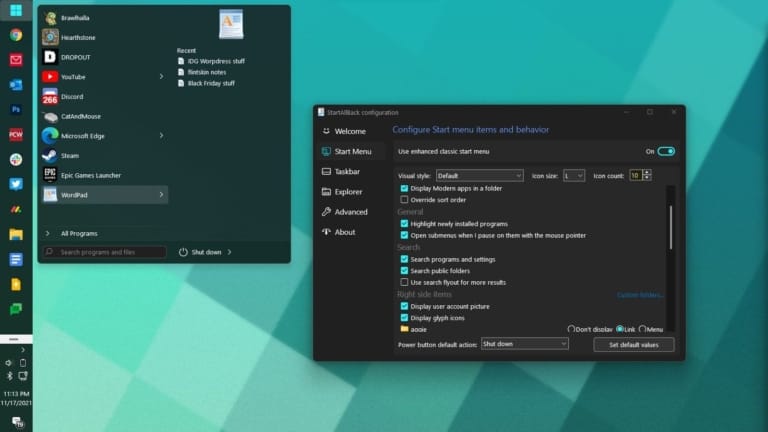
Restore and improve the taskbar.
• Display the name tag on the taskbar icon.
• Adjust icon size and margins.
• Move the taskbar to the top, left, or right edge.
• Drag and drop items onto the taskbar.
• Center the icons, but place the Start button on the left.
• Divide the taskbar into segments and use dynamic transparency.
• Separate corner icons with a Windows 7/10 UI.
• Automatically hides the taskbar when the window expands to full screen and obscures it.
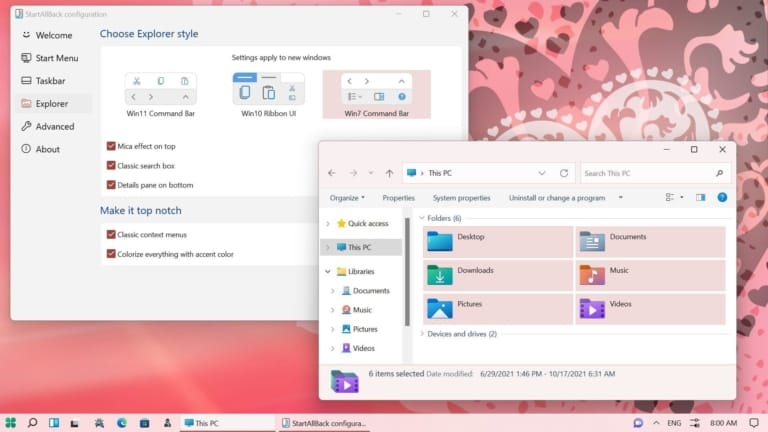
Restore and improve the UI of File Explorer and Control Panel.
• Redesigned Ribbon and Command Bar with translucent effects.
• Move the details panel down.
• The old-style search box that actually found the desired results.
• Supports dark mode for additional dialog boxes.
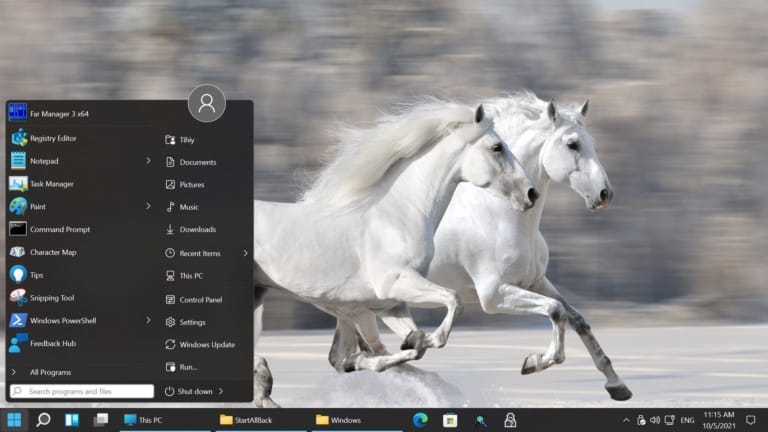
Restore and improve the right-click menu.
• A whole new look with a curved acrylic menu.
• A fast and responsive taskbar menu.
• New font with improved touch responsiveness.
Restore and improve the Start Menu.
• Open the app and navigate to different system locations with a single click.
• Navigate the drop-down menu smoothly.
• Fast and reliable search.
Finally, a light style and UI consistency.
• Use the taskbar and Start menu styles of Windows 7, Windows 8, and third-party developers.
• Fix UI inconsistencies in Win32 apps.
• You can change the UI color in all apps as you like; it doesn't have to be blue.
• Uses fewer resources, less RAM, fewer processes, faster boot time.
What's new?
Version 3.9.26.5395 – 21 Sep 2026
- Officially supports Windows 11 version 26H2.
- Minor improvements and other bug fixes.
File Information
- Operating system: Windows 11
- Risk Level: 🟡 Low Risk
- Developer: www.startallback.com
- License: Full
- Size: 3.05 MB
- File type: *.rar
- Password: mawto
- Updated: 27/9/2026
- Required Reading: Download Guide