Download Stardock Start11 for free, the full, permanent version. This program customizes the Start Menu and Taskbar for Windows 10/11, restoring the classic menu style, adding layout options, and making the desktop more user-friendly. Latest version.
What is Stardock Start11?
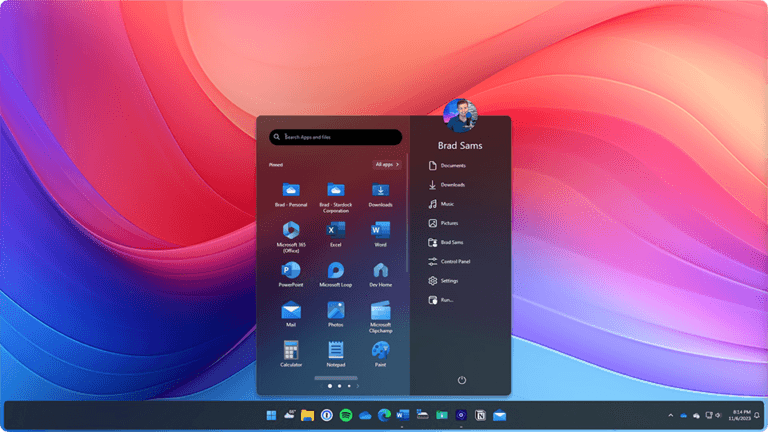
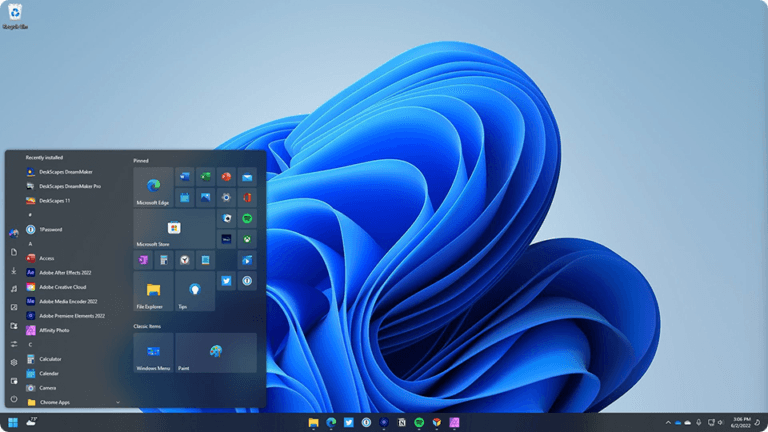
Stardock Start11 This is a program from Stardock that allows you to customize the Start Menu and Taskbar on Windows 10 and Windows 11 in more detail than the standard system options. It's ideal for those who dislike the new Start Menu look, want to bring back the familiar look of older Windows versions, or want to design their desktop to suit their work style. You can choose from many menu styles, from Windows 7, Windows 10, Windows 11, Modern, to Pro and Launcher styles, and then customize each element without reinstalling Windows. Therefore, the program doesn't just change the appearance, but also repositions commands, shortcuts, and frequently used items to more easily accessible locations.
The program offers options to change the color, texture, transparency, spacing, alignment, size of icons, and the Start button image, as well as add or remove various menu elements as needed. You can create tabs or groups to separate programs, pin files, folders, internal drives, and network drives to easily access frequently used content without having to search through File Explorer multiple times. The taskbar can be adjusted to float, have rounded corners, center icons, move to the top or side, and the full right-click menu can be restored. For users who work with multiple programs simultaneously, these features significantly reduce time spent searching for icons or switching windows and make the workspace noticeably more organized.
In terms of search, Start11 reduces unnecessary web content or advertisements, prioritizing frequently used files, programs, and items. It also supports integration with Everything Search for faster information retrieval on your computer. When used with Microsoft Edge, it can display open tabs in search results. If you have multiple computers, Start11 helps to create a more consistent desktop experience between Windows 10 and Windows 11, eliminating the need to adjust to new menu layouts every time. For comparisons with similar tools that focus on restoring the classic Windows look, please see... StartAllBack More can be added.
Key Features
- Choose from several Start Menu styles. Such as Windows 7, Windows 10, Windows 11, Modern, Pro, Launcher, and full-screen mode.
- You can structure the menu freely. By adding or removing sections, creating tabs, grouping, and sorting, we can create items that suit our needs.
- Detailed appearance adjustments. All aspects, including color, texture, transparency, spacing, alignment, and size of the icons.
- Change the Start button icon. Use the available templates or the images we've prepared to create your own desktop in your own style.
- Adjust the taskbar to be floating or have rounded corners. You can also change the color and texture to match your desktop theme.
- Move the taskbar. You can move it to the top, bottom, or vertically to the side of the screen, depending on your working style.
- Disable window merging on the taskbar. This allows you to see each window separately and switch tasks more easily.
- Restore the full right-click menu to the Taskbar. Help me access commands that Windows 11 has reduced or hidden.
- Pin files, folders, and drives. Accessible both locally and from the network, the menu or taskbar can be placed for quick access.
- Create a folder menu on the taskbar. This allows you to view the contents of a folder without opening File Explorer first.
- Improve the search function on your device. Make frequently opened items appear higher and reduce intrusive web results or ads.
- Supports Everything Search. To increase the speed and comprehensiveness of file searching within the computer.
- Find the tabs that are open in Microsoft Edge. This will return you to the currently active webpage from the search box.
- Create a consistent desktop layout. Switching between Windows 10 and Windows 11 helps users who use multiple computers avoid having to change their habits.
- Backup and restore Start11 settings. To easily move the arranged layout or revert to the original settings.
What's new?
Version
UI: 2.74
File Version: 2.7.4.0

Changes
Fixes an issue with pinning to the taskbar for pinned menus etc on newer versions of Windows

Addresses hover-over preview issue with some monitor and taskbar combinations (in version 2.73).
File Information
- Operating System: Windows 11 / 10
- Risk Level: Medium
- Developer: Stardock Corporation
- License: Shareware
- Language: Multilingual
- Size: 36 MB
- File type: *.rar
- Password: mawto
- Status: Tested
- Updated: 3/8/2026
- Required Reading: Download Guide