

Download Ventoy + Live CD, a program for creating bootable USB drives for easy Windows installation without formatting the flash drive. Simply copy/drag ISO files to the flash drive for free.
What is Ventoy?
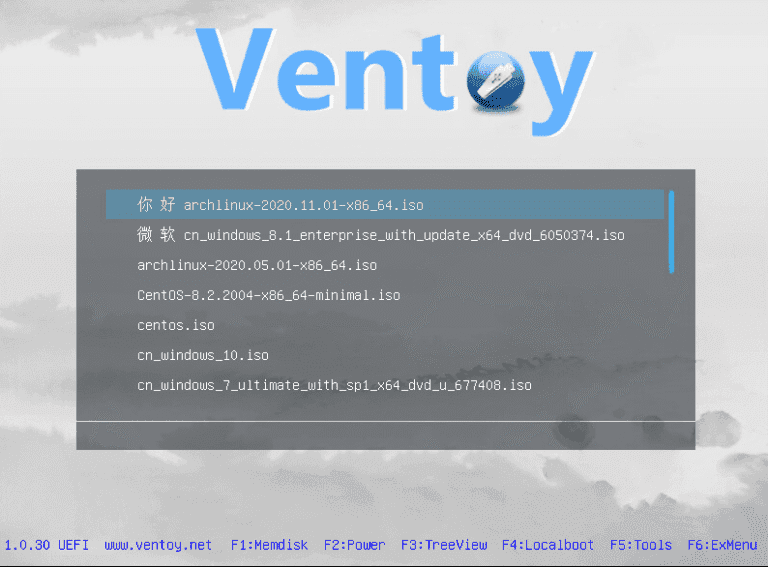
Ventoy This program creates a bootable USB drive for installing Windows without formatting the flash drive. Simply copy or drag the ISO file to the flash drive, and it will boot immediately. You can also add .ISO files can be combined to create a USB Multiboot without operating system limitations. You can include Windows 11/10, Windows 8.1, Windows 7, or even Linux, Ubuntu on a single flash drive.
What is Ventoy used for?
- Easy to use
- Boot directly from the ISO file without formatting the USB.
- The flash drive will be formatted only once when this program is installed.
- You can continue to use USB as usual.
- You can update to a newer version on the flash drive without formatting.
- Supports Legacy/BIOS and UEFI Secure Boot
- Supports ISO files larger than 4GB
- Supports bootable WIM files
- You can add multiple ISO files to the same flash drive, and they will appear as options in the boot menu.
- Ready to use for Windows, including Debian/Ubuntu, CentOS, RHEL, and ALT Linux.
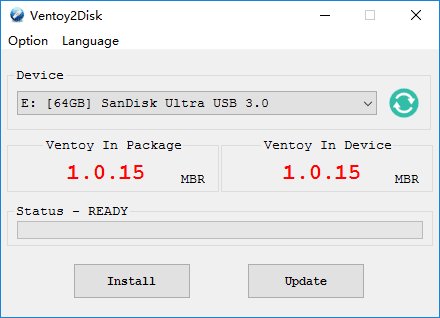
How to Use Ventoy
- Extract the zip file.
- Run the Ventoy2Disk.exe file.
- Click on the box below the word "Device," then select the USB flash drive you want.
- Click Install.
- All data will be deleted/formatted.
- Go to This PC (File Explorer) and you will see a new drive.
- Copy or drag the .iso file you want to boot into that drive.
- Once finished, you can boot directly from the USB.
- In the future, if you want to install any version of Windows, simply copy the .iso file and add it, or you can delete the existing one without any issues.
File Information
- Operating System: Windows 7 / 8.1 /Windows 11/10 (x64)
- Developer: ventoy.net
- License: Freeware
- Language: English
- Size: 15 MB / 186 MB
- File type: *.zip
- Updated: 24/7/2026
- Required Reading: Download Guide





