Download PhotoCraft, a free image editing program that works like Photoshop. Rewritten in Rust, it supports opening layered PSD files and offers non-destructive editing, complete with layers, color adjustments, brushes, vectors, and filters.
About PhotoCraft
PhotoCraft is free image editing software designed as an alternative to Adobe Photoshop without monthly subscriptions, account registration, or an internet connection requirement. Part of the ArtCraft Crafting Apps suite, it is developed by the ArtCraft team and the GitHub developer community. It was rewritten from scratch in Rust by studying public specifications and Photoshop's behavior without using any Adobe code. Therefore, it is open for anyone to use, modify, or use commercially under the MIT or Apache-2.0 licenses.
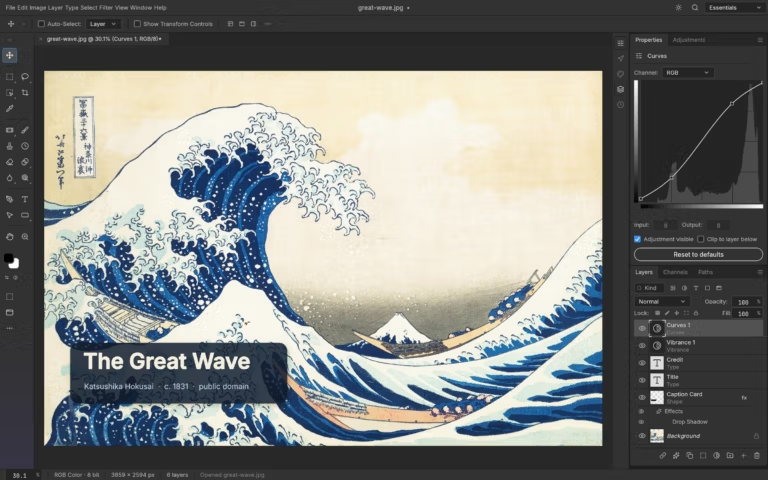
The interface and functionality of PhotoCraft intentionally mimic Photoshop, allowing former Photoshop users to start using it immediately with almost no learning curve. The toolbar is on the left, while color panels, adjustments, layers, channels, and paths are on the right. Its primary function is layer-based image editing, capable of opening, editing, and saving actual PSD files. It features layers and layer groups, pixel and vector masks, clipping masks, adjustment layers, layer styles, smart objects, editable text, paths with the pen tool, and brush tips that support pressure and tilt. Dozens of tools are available, ranging from selection and background removal to color adjustment, filters, and photo retouching.
Another highlight is its performance; the program is fast because it is written as a native app rather than being wrapped in a browser. The canvas is rendered directly via GPU, allowing large PSD files to be opened, scrolled, zoomed, and previewed with smooth effects on standard computers. It supports Windows, macOS, Linux, and FreeBSD in both installable and portable versions, and there is also a web version that can be opened in a browser without installation.
However, PhotoCraft is still in early alpha. The development team states that it cannot yet fully replace Photoshop for daily professional work. Core features like layers, masks, adjustments, text, and filters are functional, but bugs remain, some tools are unfinished, and it lacks AI image generation and third-party plugins. For those wanting a familiar-looking free tool or a layer-based image editor without a subscription, PhotoCraft is an option worth watching. But for critical client work, you should keep your primary software for important tasks or use GIMP a more stable alternative for now.
Who is this program suitable for?
Those who have used Photoshop and want a free alternative that can open old project files will find it familiar quickly, as menus, shortcuts, and tool panels are placed in familiar positions. For those who prefer offline image editing without relying on accounts or the internet, they can open the program and start working immediately.
Interesting features
Layers and Non-Destructive Editing
- Non-destructive layers allow adjustments to be reversed at any step without damaging the original pixels.
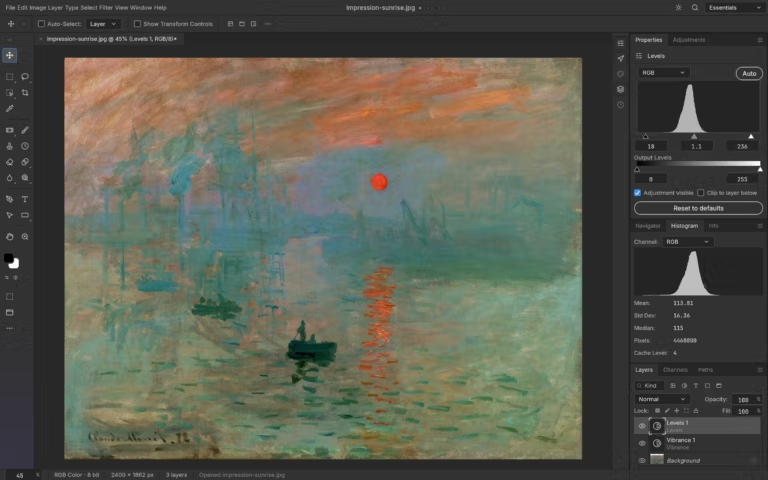
- 16 types of adjustment layers, such as Curves, Levels, Vibrance, and Hue/Saturation, with a live Histogram.
- A full set of Layer styles, including Drop Shadow, Inner Shadow, Outer Glow, Bevel & Emboss, Satin, Stroke, and Overlay.
- Multiple mask types, including pixel mask, vector mask, clipping mask, and Quick Mask.
Drawing and Design Tools
- Authentic brush engine supporting pen pressure with detailed adjustments for Shape Dynamics, Scattering, Texture, and Smoothing.
- Vector shapes and Pen tool for drawing precise shapes, curves, and paths, saved as shape layers that can be scaled without losing quality.
- Color Sampler to capture color values from multiple points on the image simultaneously to compare colors between different sections.
- Type tool allows typing text directly on images with full adjustments for font, size, line spacing, and alignment.
Filters and Image Transformations
- Over 70 filters with live preview on the image before confirmation, including Blur, Sharpen, Distort, Pixelate, Stylize, and Render.
- Comprehensive Transforms including Free Transform, rotation, flipping, skewing, and Perspective.
Broad file compatibility
- True support for opening and saving layered PSD and PSB files.
- Supports PDN, ORA, XCF, and KRA files, as well as common image formats such as PNG, JPEG, TIFF, WebP, and GIF.
Automated workflows
- Headless CLI for executing commands via command line without opening the program window.
- Control protocol to control the program from scripts or agents via JSON channels.
What's new
Version 0.23.1
- Color Sampler maintains the eyedropper cursor while dragging.
- Custom angle degrees are rounded to 64-bit floating-point decimals and retain that value.
- Resetting the brush tool now properly reverts to its default settings.
- Fixed incorrect error notifications on fully locked pixel layers.
- Pressing Undo after finishing a path with the Pen tool now returns to the Pen tool instead of making the path disappear.
- The Place command rejects sizes that cause images to exceed the rendering pixel limit.
file information
- Operating System : Windows 10 / 11 / macOS
- License : MIT / Apache-2.0
- Developer: Storytold
- English
- Size : 112.94 MB / 136.50 MB / 106.43 MB / 216 MB
- File type : *.msi, *.zip, *.dmg
- Updated on: November 16, 2026
- Need to read: Download Guide
==== Windows x64 (.msi) ====
==== Windows x64 Portable (.zip) ====
==== Windows ARM64 (.msi) ====
==== macOS (.dmg) ====