Download ArtCraft for free, an AI creative program that combines image, video, audio, and 3D work in one place. Set scenes, place characters, and set up cameras before generating. Select AI models for images, videos, audio, and 3D models.
Getting to know ArtCraft
ArtCraft is a hub for creating images, videos, audio, and 3D works with AI in a single program, changing the workflow from typing prompts and hoping for results to setting the scene first before generating. The program describes itself as an IDE for artists because it includes image creation tools, image and video editing tools, audio creation tools, and a 3D stage for precise scene setting. Users can place characters, arrange cameras, and choose the right model for their work before clicking generate. The results are more controllable and reproducible, rather than random images that require repeated rerolling. Its concept is "Show, Don’t Tell"—artists must be able to control the composition, character identity, and camera position first, rather than just typing commands and waiting for results.
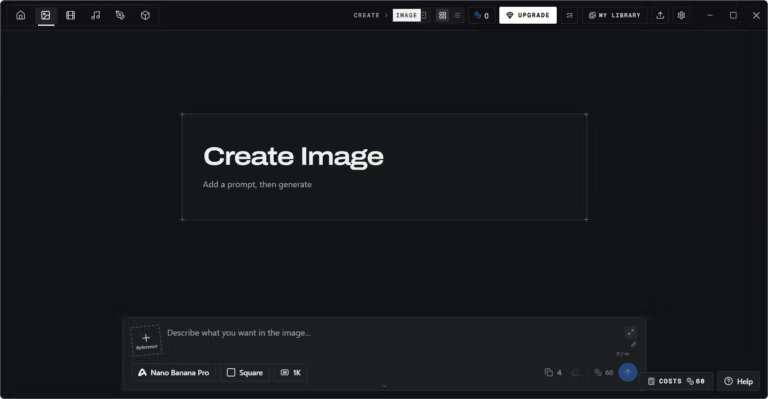
Its core is structured image creation, starting with writing short prompts to explore ideas, then using the canvas and scene-setting tools to adjust them as desired. You can place virtual actors in the same scene to shoot multiple consecutive shots, separate images into layers, remove backgrounds, or convert images into 3D models and rotate them to set camera angles. The canvas tool allows for drawing, masking, and inpainting to specify exactly where the image should change.
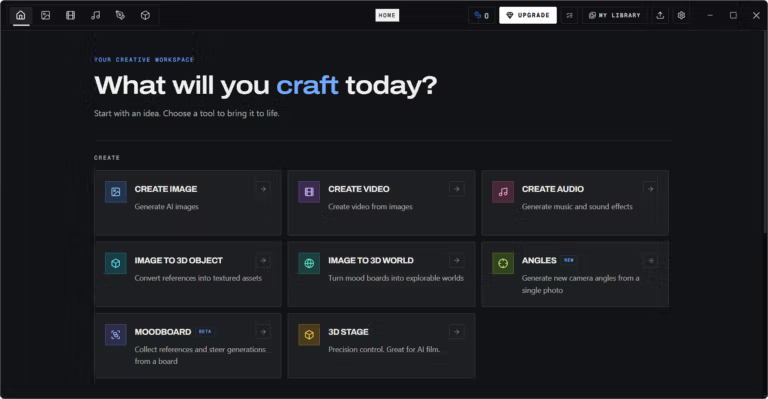
The tools in the program are divided into creation and editing categories. The creation category includes image, video, and audio generation, converting images into 3D objects or worlds, creating new camera angles from a single image, and a mood board for gathering references to direct the work. The editing category includes image editing, video editing, extracting frames from video, and background removal. There are 62 models to choose from, covering images, videos, audio, music, 3D models, and virtual worlds like Gaussian splat. Supported models include Nano Banana, GPT Image, FLUX, Seedream, Kling, Veo, Sora, Suno, and Hunyuan 3D, while connected providers include ArtCraft itself, Grok, Midjourney, Sora, and World Labs.
Those who benefit most are illustrators, storyboard artists, and short video creators who want to control visuals exactly as imagined without relying on the luck of random prompts. The output can be further developed into still images, videos, audio, and 3D work because the model catalog covers all five types of work. It is also suitable for artists looking for a free drawing program for general use. Krita Studio That's another option.
Basic usage instructions
Open the program and start with a short prompt to explore the desired idea. Then use the canvas and scene-setting tools to adjust the image. You can place characters, set up cameras, or choose other models before generating. Once you have an image you like, you can proceed to create a video or edit the image with descriptions directly within the same program.
What makes ArtCraft interesting?
Set scenes before generating
- Image to Location. Place virtual actors in the same scene and plan multiple shots in the same room
- 3D Image Compositing. Overlay backgrounds, foregounds, and props as 3D layers to give the image depth
- 2D Image Compositing. Arrange compositions with layers, background removal, and drawing tools
- Image to 3D Mesh. Convert images into 3D objects that can be placed, rotated, and framed precisely
- Character Posing. Pose characters and set up cameras before generating the final image
- Scene Blocking with Kitbashing. Mix 3D asset sets to control camera angles, object positions, and depth
- Character Identity Transfer. Use posed mannequins as guides for character positions and poses
- Background Removal. Separate subjects from backgrounds to use as props, layers, or backgrounds in 2D and 3D scenes
- Mixed Asset Crafting. Blend edge-cut images, virtual worlds, and 3D meshes in a single scene
Start from a prompt
- Text to Image. Explore ideas with text prompts across multiple image models
- Prompted Image Editing. Edit images using text descriptions, supporting models like Nano Banana Pro and GPT Image
- Canvas Image Editing. Use drawing, masking, and inpainting tools to define where the image changes
- Image to Video. Animate still images by choosing video models and generation control settings
Models and providers
- 62 models. A catalog featuring 16 image models, 25 video models, 5 audio and music models, 11 3D mesh models, and 5 virtual world models
- Images. Nano Banana, GPT Image, FLUX, and Seedream
- Video. Seedance, Kling, Veo, Sora, Vidu, MiniMax, and Flux
- Audio and music. Suno and Seed Audio
- 3D models. Hunyuan 3D, Tripo3D, Meshy, and Rodin
- Virtual worlds. Marble and TripoSplat
- Providers. Connect with multiple providers including ArtCraft itself, Grok, Midjourney, Sora, and World Labs
Creation and editing tool
- Create Audio. Generate music and sound effects from text prompts with customizable styles using the Suno Music model, with options for vocals or instrumental only.
- Image to 3D World. Turn mood boards into explorable 3D worlds.
- Angles. Generate new camera angles from a single image.
- Moodboard. Combine references on a single board to guide image generation.
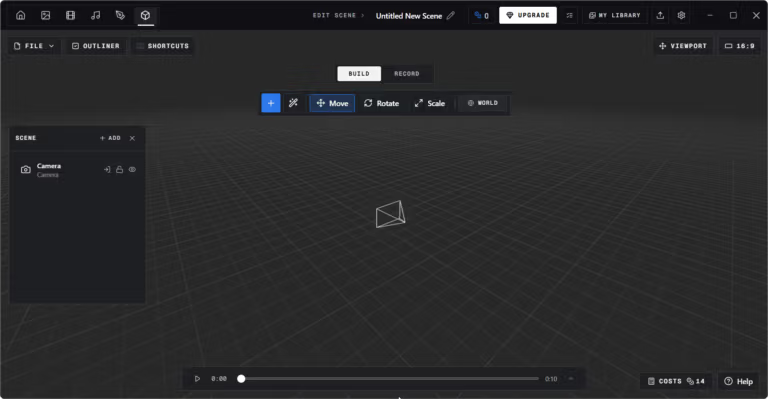
- 3D Stage. 3D stage for precise scene arrangement, ideal for AI filmmaking.
- Video Frame Extractor. Extract still frames from videos.
- Video Editor. Edit and assemble videos on a timeline.
- Image Editor. Simple image editing, ideal for graphic design work.
- Video Watermark Remover. Remove watermarks from videos.
- Image Watermark Remover. Remove watermarks from images.
file information
- Operating System : Windows 10 / 11 / macOS
- License : MIT / Apache-2.0
- Developer: Storytold
- English
- Size: 40.05 MB / 90 MB
- File type: *.exe, *.msi
- Updated on: November 16, 2026
- Need to read: Download Guide
==== Windows x64 (.exe) ====
==== macOS (.dmg) ====