

Download IObit Unlocker 2026 for free. This program shows you how to delete undeleteable files in Windows 11 (compatible with both 64-bit and 32-bit systems). It's the latest version of the program for removing stubborn files, and includes instructions on how to use it.
What is IObit Unlocker?
IObit Unlocker Unlocker is a program for deleting files or folders that cannot be deleted by normal methods. This is because the file may be currently being used by another program. Even if you close that program or file, you cannot delete it. Unlocker can stop the operation of these files, allowing them to be deleted. IObit Unlocker works similarly to the old Unlocker program and is fully compatible with Windows 10, 8.1, and 7.
Additional information: In the past, we used a program called Unlocker to help delete undeletable files. However, Unlocker has stopped receiving updates since version 1.9.2 and is incompatible with newer Windows versions, causing various malfunctions. Therefore, anyone looking to download Unlocker 1.9.2 should download IObit Unlocker instead.
How to use Unlocker
- Right-click the file or folder you want to delete, move, or rename.
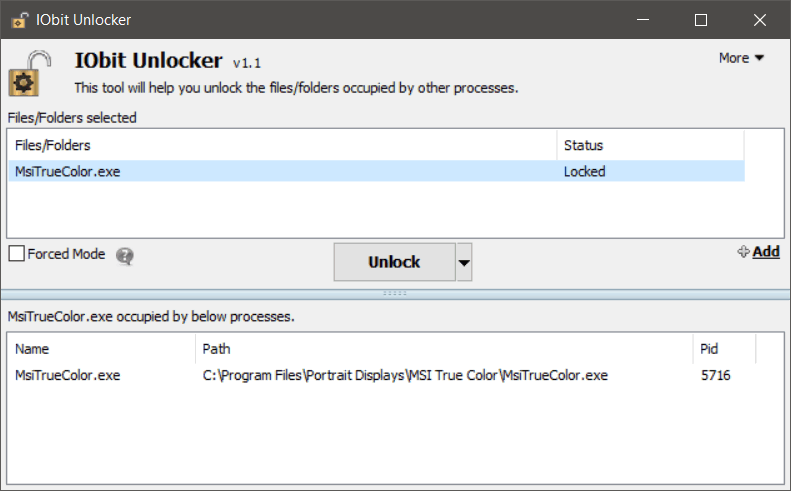
- Select IObit Unlocker, and a list will appear showing which file is preventing deletion.
- Select the file and press Unlock to unlock it, allowing you to delete, move, or rename it.
- Or press Unlock & Delete if you want the program to delete those files as well.
File Information
- Operating System: Windows XP/ Vista / 7 / 8 and 8.1 / Windows 11/10
- Developer: Iobit
- License: Freeware
- Language: Eng
- Size: 2 MB
- File type: *.exe
- Installation Method: Available
- Updated on: 4/30/2026





