

Download FastCopy Pro 5 x64 for free. This high-speed file copying program is ideal for moving large amounts of data and includes features for checking, filtering files, and working with internal and external drives. Suitable for data backup tasks.
What is FastCopy?
FastCopy This is a file copying and moving program designed to maximize data transfer efficiency of the device by selecting the optimal read and write method for operation on the same hard disk or different drives. It supports Unicode file paths and paths longer than the default Windows limitations, making it suitable for work folders with Thai names, long file names, or a large number of files in the same folder. The main window displays the source, destination, speed, and status for easy monitoring.
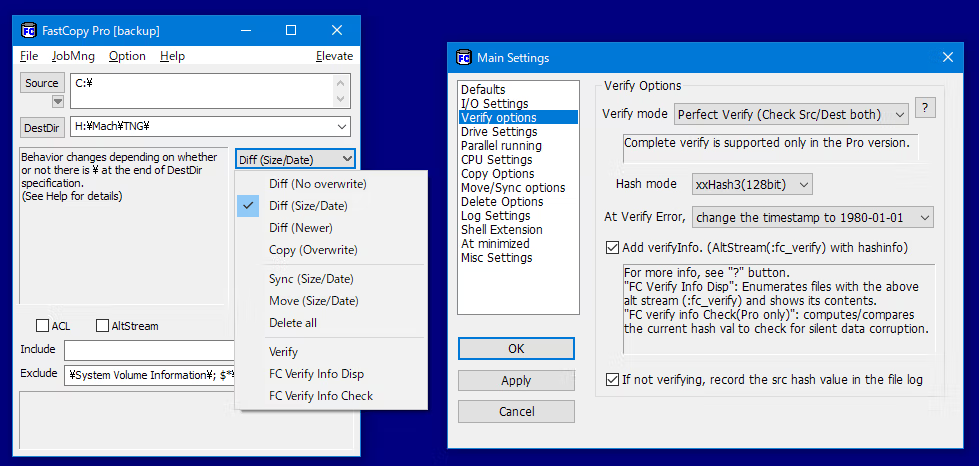
FastCopy's key feature is its use of asynchronous and bulk I/O without relying excessively on the OS cache. It adapts read/write behavior based on device type and connection, allowing for efficient data copying between HDDs, SSDs, USBs, and network drives. A UNIX wildcard Include/Exclude filter selects only desired files, while the Diff, Copy, Sync, Move, Delete, and Verify modes allow for detailed customization of behavior when encountering duplicate files or target files.
FastCopy also features a work history, file time reservation option, post-copy verification, and result saving mode, making it ideal for backing up personal data, moving large folders, and organizing files before continuing work on another machine. The Pro version adds capabilities such as Perfect Verify, silent data corruption detection, and on-site usage subject to license terms. For a comparison of other tools, see... TeraCopy Which focuses on copying files through an easy-to-understand user interface.
Features:
- Copy and back up data using async I/O and bulk I/O read/write operations.
- Detect the device type and select the appropriate operating method for either HDD or SSD.
- Supports Unicode filenames and paths longer than MAX_PATH.
- Define an Include/Exclude filter using a UNIX wildcard format.
- The main window displays the origin, destination, speed, and copy status.
- Select the Diff (No Overwrite), Diff (Size/date), or Diff (Newer) mode.
- Use Copy (Overwrite), Move, and Sync modes to control the destination files.
- Use Delete mode to delete files and folders according to the original list.
- Use Verify mode to check the data after copying using the hash value.
- Record FC Verify Info to track the file's accuracy.
- Configure Buffer Size, Verify Options, and Overwrite Options separately for each job.
- Supports work history and restoring previous settings.
- There is a Shell Extension for copying or pasting files from File Explorer.
- The Pro version features Perfect Verify and silent data corruption detection.
How to use FastCopy:
- Download and install the program.
- Open the program.
- Set up copying:
- Click the “Source” button to select the file or folder you want to copy.
- Press the “DestDir” button to select the destination location where you want to place the files.
- Set the operation mode as needed (see below for details).
- Click the “Execute” button to start the copying process. When complete, it will indicate this in the FastCopy window.
Setting the mode and additional settings:
Setting the mode (explanation of the different modes):
This will define a mode that tells the program to decide for us what to do when, while copying a file, it encounters a file with the same name that already exists at the destination.
- Diff (No Overwrite) It will copy if there is no file with the same name at the destination.
- Diff (Size/date) Will copy if size or date is different – default.
- Diff (Newer) It will copy if the source file is newer (has a newer timestamp).
- Copy (Overwrite) It will always copy and overwrite all files.
- Exist (Size/date) Files will be copied only if they have the same name and different sizes/dates (other files will not be copied) – Pro Only
- Exist (Newer) Copy will only be done if the filenames are the same and the source file is newer (other files will not be copied) – Pro Only
- Sync (Size/date) It will copy only if the file size or date differs (all other files at the source will be deleted).
- Move (Overwrite) This will move and overwrite all files.
- Move (No Overwrite) Only files that are not in the destination will be moved. Files that already exist in the destination will not be moved – Pro Only
- Delete Force delete all files/folders.
- Verify Used to compare hash files (that have the same size and timestamp at both the source and destination).
- FC Verify Info Disp Display the file's record information. FC verify information (:fc_verify)
- FC Verify Info Check (Pro Only) For files that contain... FC verify information (:fc_verify) The current hash value will be calculated and compared with the recorded data to verify that there is no data corruption.
Additional settings:
Click on “Options” to open the options window.
- Buffer Size: Set the size of the buffer used for copying files (default: 4 MB).
- Verify Options: Turn on or off file verification after copying.
- Overwrite Options: Specify what to do when encountering files with the same name.
- File Filter: Specify which files you want to include or exclude in the copying process.
- Preserve Timestamp: Determine whether the date and time of the file should be preserved.
- Other Options: Choose options for notification sounds, GUI display, and more.
What's new?
v5.12.0 Added an option to Shell Extension to replace Explorer's standard drag & drop / paste with FastCopy. (Default: OFF) Various security enhancements. - Enabled CET Shadow Stack (/CETCOMPAT). - Enabled Control Flow Guard (/guard:cf). - Stricter DLL loading (added /DEPENDENTLOADFLAG:0x800). - (Already enabled: /GS, /NXCOMPAT (DEP), /SAFESEH (x86), /DELAYLOAD, /DYNAMICBASE, /HIGHENTROPYVA, SetDefaultDllDirectories)
File Information
- Operating System: Windows 7/8/8.1/10/11
- Risk Level: Medium
- License: Freeware / Shareware
- Language: English
- Size: 7.42 MB
- File type: *.exe
- Password: mawto
- Version: 5.12.0
- Updated: 22/8/2026
- Required Reading: Download Guide
==== FastCopy Pro Latest Version (x64) ====
==== FastCopy Pro 5.11.1 (x86/x64) ====





