Download CareUEyes Pro 2 Full version for free, permanently. This program adjusts screen brightness, reduces glare, and filters blue light on Windows computers. It's the latest version, easy to install, and includes an eye-sleep mode and screen adjustment based on time periods.
What is CareUEyes?
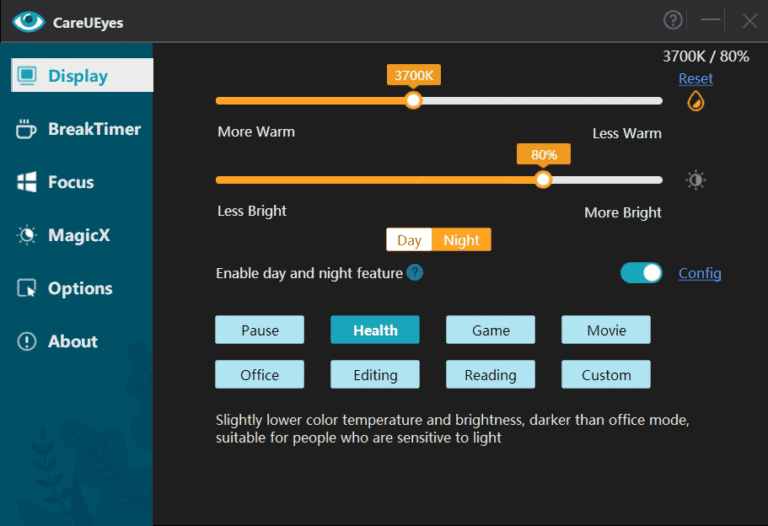
CareUEyes This program helps adjust computer screen brightness for people who have to sit in front of a screen for long periods. You can choose the color temperature and brightness to suit the room or time of day, reducing blue light and excessive brightness as needed. The control window is simple and can be accessed directly from the system tray icon, making it suitable for documents, browsing the web, watching videos, and working at night when you want a more comfortable screen experience.
CareUEyes Pro features a Break Reminder for setting breaks and reminders at your desired intervals, as well as different modes for reading, working, gaming, and watching movies, depending on the task. You can manually adjust the brightness or have the color temperature change over time, and save your favorite settings for later use. When connecting multiple monitors, you can easily manage the brightness and color tone of each screen, eliminating the need to open the menu for each separate monitor every time.
The Pro version also features a Focus Mode that focuses on the current window and reduces distractions on the screen, as well as Reading Focus and Spotlight Focus, which can be quickly accessed from the system tray. We can create app-specific rules, such as setting one mode for reading documents, switching to another mode when opening image editing work, and reading articles when needing to continue graphic design work. Adobe Photoshop 2026 It's easy to use and ideal for those who want to customize their screen layout to suit different tasks without having to repeatedly adjust settings. You can even schedule the screen mode to change automatically throughout the day. This allows you to seamlessly adjust your screen for work in the morning, reading documents at night, or watching videos during breaks, without having to open the settings window every time.
Key Features
- Automatic color temperature adjustment: Change the screen color tone according to the set time and environment.
- Reduce blue light: Choose the Blue Light Filter level that best suits the time of use.
- Adjust brightness: Set manually or automatically at a specified time.
- Reading mode: Use color tones that are suitable for reading documents and websites for extended periods of time.
- Work, game, and movie modes: Switch screen settings to suit different activities.
- Break Reminder: Set break times and receive notifications based on your selected schedule.
- Focus Mode: Focus on the currently active window and minimize distractions from other parts of the screen.
- Reading Focus: Invoke the quick read mode from the system tray.
- Spotlight Focus: Highlight the area or window you are currently using to make it more visible.
- Supports multiple monitors: Manage the color temperature, brightness, and screensaver text to be consistent.
- App-specific rules: Specify the desired mode to switch to when certain programs are opened.
- Dark Mode and screensaver message: Customize the look and feel of the lock screen to match your usage style.
What's new?
version 2.6.3.0
Sep 13 2026
- New: Added a “Use standard color temperature and brightness adjustment” option under Options > Display. Enable this option if color temperature adjustment stops working after the PC resumes from sleep.
- New: Added hotkeys for individual eye protection modes under Options > Hotkeys.
- New: Added full-screen rules.
- Improve: Changed the unlock button on the break lock screen back to “Skip Break”.
- Improve: On multi-monitor setups, lock screen wallpapers are now randomized independently instead of using the same wallpaper on all displays.
- Fix: Fixed an issue where scrolling the mouse wheel over a list box could unintentionally change settings.
- New: Added device management and a “Deactivate” button to the About page.
- Improve: Further refined the Dark Mode theme for better visual consistency.
File Information
- Operating System: Windows 11 / 10 / 8.1 / 7
- Risk Level: Medium
- Language: English
- Size: 14.76 MB
- File type: *rar
- Password: mawto
- Updated: 15/9/2026
- Required Reading: Download Guide