

Download WinMerge 2 for free. This Windows file comparison and merging program provides detailed analysis of documents, folders, and code, supporting two- or three-way merging. This is the latest version.
What is WinMerge?
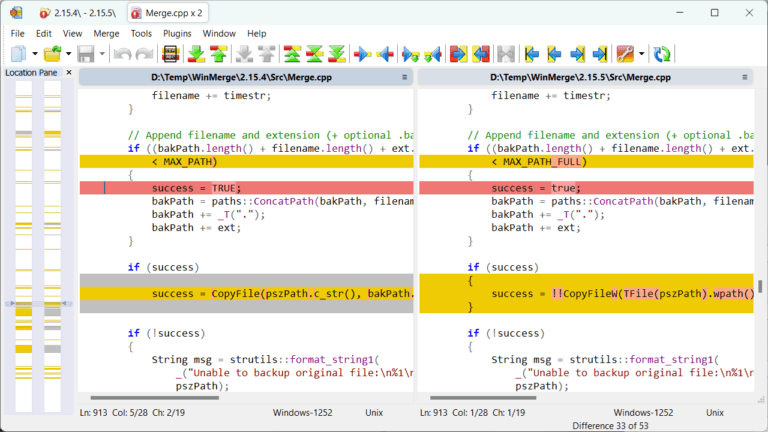
WinMerge This program helps compare and merge files or folders, showing the differences between files in a single window. It can be used to check for changes in text, lines, or files between two documents, and allows for three-way comparison to combine edits from multiple sets. It's ideal for document review, managing backup files, and software development where code needs to be checked before deployment.
WinMerge's comparison covers text files, tables, folders, and images, highlighting added, deleted, or modified sections, making it faster to review key points than opening files one by one. The editing window allows you to copy changes to the other side, selectively synchronize lines, and save results as an HTML report, making it useful for developers, translators, documentation teams, and anyone needing to organize multiple file versions.
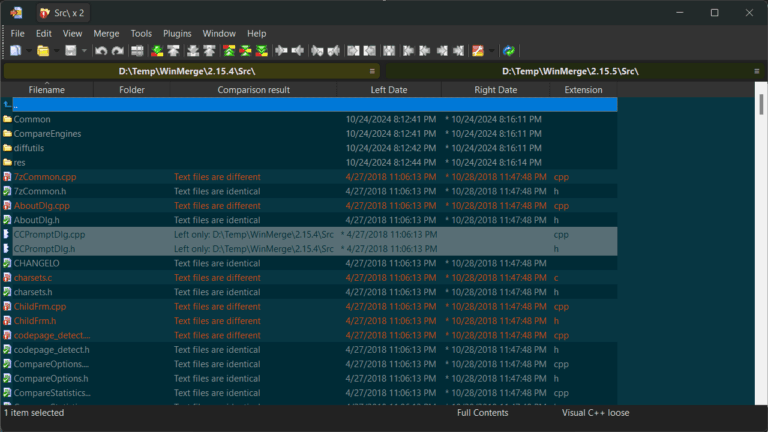
In addition to individual files, it can inspect two folders for added, deleted, or mismatched files, and open files from compressed archives via plugins. File name filtering, filter expressions, and encoding settings help reduce irrelevant entries, while Shell Integration provides direct access to comparison commands from the right-click menu. This makes it ideal for inspecting files before submission or for integrating code into a central repository and managing tasks more easily. If you need a commercial tool that focuses on inspecting documentation and data within folders, another option is available. IDM UltraCompare Pro There are similar patterns of comparison.
Key Features
- Compare two-way and three-way text files, clearly showing the different lines of text.
- Edit and merge changes directly in the comparison window.
- Compare folders to see files that have been added, deleted, or have mismatched information.
- Supports comparing image files and displaying image-by-image differences.
- Create a comparison report as an HTML file for sharing or saving as evidence.
- Create patches from file differences for application to other datasets.
- Open and compare files from the ZIP archive and the formats supported by the plugin.
- Filter files and folders using Filter expressions to remove unwanted items.
- Optimize the display format, colors, and panel layout for document review work.
- Supports selection of encoding and checking of text files in multiple languages.
- Access the comparison command from the right-click menu via Windows Shell Integration.
- Manage recently opened files and save comparison sessions.
What's new in WinMerge 2.16.58.2?
- Fix the spacing of icons on the toolbar that are crowded when using a high-density display.
- Fixed word diff calculations for hidden lines and resolved some word selection issues.
- Speed up the drawing of the diff window when there are many consecutive hidden line segments.
- Fixes the temporary incorrect file sorting error in the `compare` folder during processing.
- Adjust the Filter expressions to ignore 'none' when the text is followed by a plus sign.
- Added the ability to create archive files by comparing files with data from only one side.
- Fixes the BUFFER_PACK_UNPACK plugin buffer issue that is causing the last byte to be missing.
- Fixed a display error involving marked characters in the French language installer.
- Updated translations into Brazilian Portuguese, Simplified Chinese, Traditional Chinese, Hungarian, Polish, Russian, and Turkish.
- Corrected grammatical errors in the Spanish version of the Filters guide page.
File Information
- Operating System: Windows 11 / 10 / 8.1 / 7
- License: Freeware
- Developer: WinMerge Project
- Version: 2.16.58.2
- Language: English and additional language packs.
- Size: 17.2 MB
- File type: EXE
- Updated: 28/8/2026
- Required Reading: Download Guide





