What is vMix?
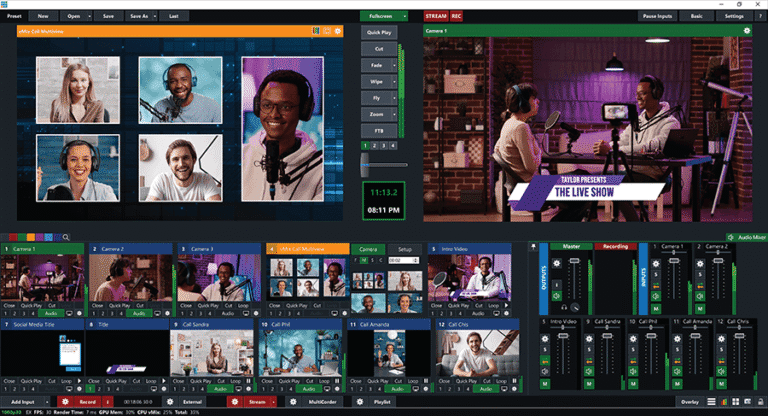
vMix Pro This is a high-performance streaming program that is very popular in the streaming and live broadcasting industry. It is used to control and switch video signals from multiple sources, such as video cameras, video files, still images, PowerPoint slides, or even computer screens. It also supports professional-level effects, graphics, text, logos, and overlays. We can manage streams to popular platforms such as YouTube, Facebook Live, Twitch, and simultaneously record high-quality video files to the device.
Furthermore, it offers advanced functions such as virtual sets for virtual studios, remote connectivity via vMix Call for online guest interviews, a replay system for sports broadcasts, and detailed audio control. This makes vMix 26 a suitable tool for users ranging from beginners to professional producers, whether for live concerts, online seminars, online classes, or even television broadcasts.
Core Competencies
- Inputs in One PlaceSupports cameras (4K/HD/SD), NDI™, video/audio files, DVDs, playlists, PowerPoint, web browsers, photos, and more.
- Streaming & RecordingStream simultaneously to Facebook, YouTube, and Twitch while recording Full HD/4K video and exporting via AJA, Blackmagic, and Bluefish memory cards.
- TransitionsThere are 13 image transition effects, such as Cut, Fade, Zoom, Slide, and Cube.
- Virtual Sets & Chroma Key3D virtual scene, camera positioning adjustment, high-quality green key.
- Remote Desktop SourcesTransfer screen image from PC/Mac on the network, including sound.
- vMix CallYou can invite up to 8 guests via your browser.
- Titles & ScoreboardsReady-made templates for live graphics, with real-time customization.
- Replay & Slow MotionSupports Instant Replay, slow motion 5–400%, and simultaneous use of 4 cameras (Pro).
- Web Browser InputYou can open HTML5 websites or videos directly in vMix.
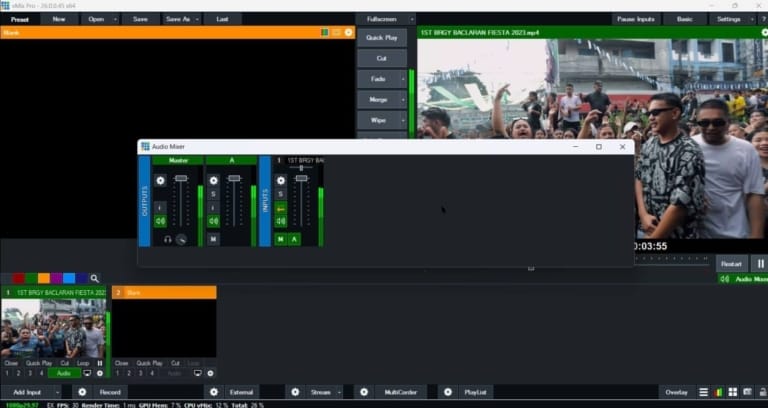
- Audio MixerAudio mixing, EQ, Compressor, Noise Gate, Auto Mix
- Video EffectsAdjust color, sharpness, rotate, zoom, and crop in real-time.
- Multi View & OverlaysIt combines multiple inputs simultaneously and has 4 independent overlay channels.
- NDI IntegrationSending/receiving video and audio via NDI with other devices or software.
- Touch Screen Web ControlControlled via mobile/tablet using a web interface.
What's new in vMix Pro 26?
- Effects on inputGaussian Blur and LUT (PNG/CUBE)
- Vertical manufacturingVertical HD preset, GT vertical templates, 90° rotation button, automatic vertical video detection.
- SRTInstant Replay via SRT, supporting multitrack audio and CBR.
- Mix Inputs: Up to 15 channels (For 4K/Pro/Max)
- Supports NDI 5.5. Inside
- Web Browser InputUse Chromium 103.
- Stream DelayYou can set a delay for streaming.
- Additional features:
- PTZ for Insta360 Link, Bluefish444 Key+Fill & multi-audio
- Audio Matrix presets, supports 1440p/4320p, improved GT, supports Intel ARC/12th Gen.
- New Replay shortcut keys, Facebook Stream Key manual, Legacy XAML templates
- New preview input, highlight transition buttons, copy/paste, X-Keys T-Bar LED support.
File Information
- Operating System: Windows 11 / 10 / 8.1 (x64)
- Risk Level: Medium
- License: Full
- Language: English
- Size: 505 MB
- File type: *rar
- Password: mawto
- Updated: 7/9/2025
- Required Reading: Download Guide
You can still download vMix Pro 28 New arrivals, free of charge!