Download the full version of Paragon Hard Disk Manager 18 Business Workstation with WinPE ISO. This program manages partitions, backs up/restores, clones HDD/SSD, migrates Windows, wipes data, and creates recovery media for workstations.
What is Paragon Hard Disk Manager?
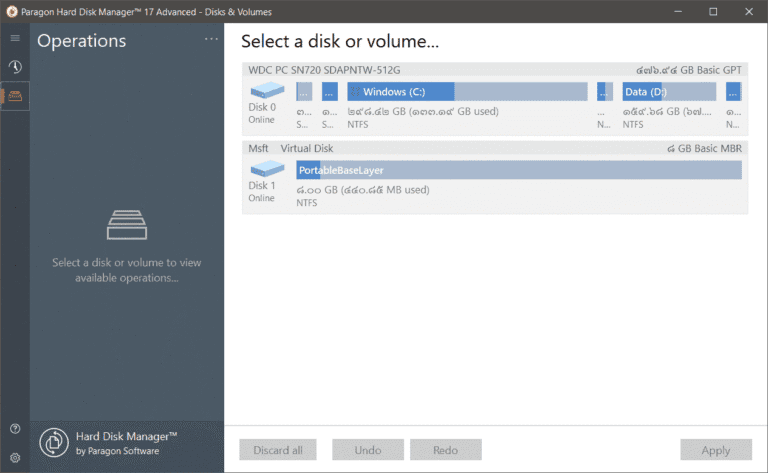
Paragon Hard Disk Manager This is a disk management program for partitioning, backing up, restoring, and migrating systems all in one package. It allows you to create, delete, shrink, resize, split, merge, or move partitions from a single screen, and includes GPT/MBR conversion tools and disk diagnostics for various tasks. The Business Workstation version is designed for workstations requiring more structured data and system management than just simple drive partitioning, and therefore includes Backup, Restore, Clone, and Recovery Media.
The backup side supports storing the entire disk or selected data, and uses incremental/differential backups to avoid creating a full set every time. Daily, weekly, or monthly schedules can be set, and the archive can be mounted to retrieve only the files needed. If migrating Windows to a new SSD, Disk Clone or a system migration tool can simplify the process. In case of boot failure, a Recovery Media Builder is available to create WinPE or Linux USB/ISO drives for restoring the system outside of Windows.
The storage management tasks include moving partitions, redistributing free space, merging/splitting, and resizing clusters. Data wiping supports Secure Erase for HDDs and TRIM/NVMe SSDs, depending on the device used. Additionally, it can connect virtual disks and convert files such as VMDK to VHD/VHDX for Hyper-V related tasks. If the primary requirement is simply partitioning drives, migrating the OS, or resizing partitions without needing a full backup system, this is suitable. MiniTool Partition Wizard This would be a more suitable option and make it easier to choose the right program for the actual work.
Key Features
- Create, delete, minimize, resize, move, merge, and split partitions to the desired area.
- Convert disk formats between GPT and MBR for disk migration or restructuring tasks.
- Perform Full, Incremental, and Differential backups to reduce the time for subsequent tasks.
- Set up daily, weekly, or monthly backups to run automatically.
- Clone the disk and migrate the operating system to a new HDD/SSD.
- Data or partitions can be restored to a disk of a different size than the original, subject to supported conditions.
- Mount the backup archive to view and recover only the files you need.
- Create WinPE or Linux Recovery Media for booting and recovering the system outside of Windows.
- Secure Erase, TRIM, and data wipe tools are available for HDD/SSD/NVMe depending on the device.
- Connect and convert virtual disks such as VMDK, VHD, and VHDX for virtualization purposes.
- Supports backup protection with AES-256 encryption.
- P2P Adjust helps optimize the system when recovering or migrating to hardware different from the original.
What's new in Hard Disk Manager 18?
Paragon's Hard Disk Manager for Business integrates disk management, backup, and recovery tools into a single suite. The overview of version 18 extends beyond partitioning, covering system migration, creating recovery media, data wiping, and connecting virtual disks for workstations.
- Combine Partition Manager, Backup & Recovery, and Disk Clone into a single workflow.
- Recovery Media supports WinPE/Linux and can work with systems that cannot boot Windows.
- Added Secure Erase option for SSD/NVMe and data wiping based on media type.
- Supports virtual disk operations and VMDK/VHD/VHDX conversion for virtual environments.
- There are P2P Adjust and system recovery tools available for migrating to different hardware models.
File Information
- Operating System: Windows 11 / 7 / Windows 8.1 / Windows 10
- Risk Level: Medium
- Developer: Paragon-software
- License: Shareware
- Version: 18.19.0
- Language: English
- Size: 235.10 MB / 1.04 GB / 462 MB
- File type: *.rar
- Password: mawto
- Updated: 1/9/2026
- Required Reading: Download Guide
==== Download Paragon Hard Disk Manager 18.19.0 Business Workstation ====
==== Download Paragon Hard Disk Manager 18.19.0 WinPE ====
==== Download Paragon Hard Disk Manager 17.63.0 Advanced ====
==== Download Paragon Hard Disk Manager 17.64.0 Business ====