Download IObit Smart Defrag Pro 12 full version. This program defragments HDDs and optimizes SSDs with TRIM, featuring Auto Defrag, Boot Time Defrag, and Game Optimize. It includes Thai language support and is easy to use.
What is IObit Smart Defrag Pro?
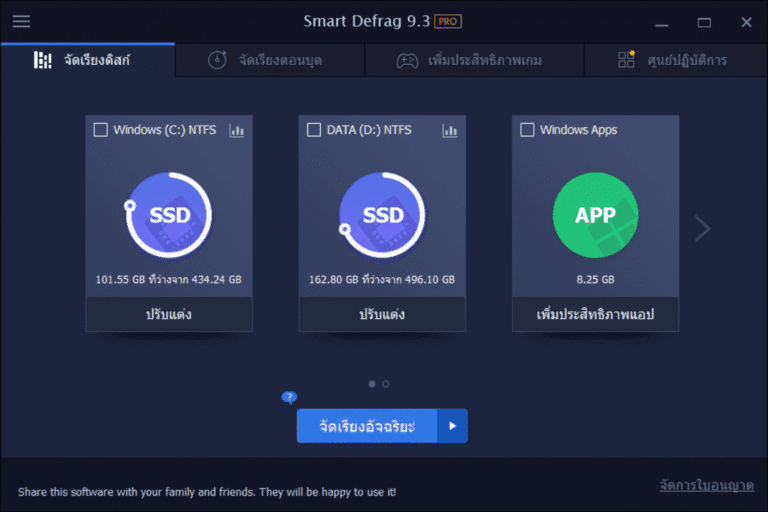
IObit Smart Defrag Pro Smart Defrag is a hard disk defragmentation program used to solve the problem of files being scattered across different locations, causing the read head to constantly move back and forth. You can choose to scan the entire drive or specifically target files and folders. The program will then rearrange the data for easier access. It's important to note that SSDs don't use the same defragmentation method as HDDs because frequent data movement is detrimental to the drive's lifespan. Smart Defrag uses the TRIM command specifically for SSDs, and provides a separate interface for different drive types to select the appropriate program for your installed device.
If you don't want to remember the last time you defragmented your disk, you can enable Auto Defrag or schedule a Scheduled Defrag to run at a set time. The program chooses to run during idle time to minimize interference with open tasks. Boot Time Defrag is used to defragment certain system files that cannot be moved while the system is running, such as files related to startup. These tasks don't need to be done daily; it's easier to set a schedule and let them handle it periodically. Additionally, there's Large File Defrag for large files and Game Optimize to defragment selected game files without having to defragment the entire drive.
The Pro version offers deeper customization than the free version, such as Intelligent Defrag, organizing large files, and a full Boot Time Defrag. It also provides more detailed disk status monitoring and automatic scheduling. If your machine has both an HDD and an SSD, you can choose separate management methods for each drive, eliminating the need to treat all drives in the same way. Tasks like deleting temporary files or cleaning up unused files are handled separately. CCleaner Pro It's more convenient to use them together, but don't confuse a junk file cleaning program with a disk defragmentation program, as Smart Defrag focuses primarily on the structure and access to data on the drive.
Key Features
- The new Defrag Engine helps to organize data on the HDD faster and more stably.
- Intelligent Defrag selects the disk defragmentation method that best suits the type of drive.
- Auto Defrag runs automatically when the engine is idle.
- Scheduled Defrag allows you to set the desired date and time to start the process.
- Boot Time Defrag organizes system files that cannot be moved during normal boot.
- Large File Defrag focuses on organizing large files to reduce read and write times.
- Game Optimize allows you to selectively organize game files without touching the entire drive.
- Use TRIM for SSDs instead of defragmenting like with hard drives.
- Disk Cleanup helps remove unnecessary files and free up space before defragmenting the disk.
- You can choose to scan and sort only the files or folders you want.
- Displays the status and information of the drive to help you choose the appropriate care method.
- There are 42 languages to choose from, including Thai.
What's new?
Smart Defrag 12.0.0.536 — 2026-08-25 - Revamped the defrag engine for more efficient and stable optimization. - Redesigned Large File Defrag to improve disk read/write performance and drive longevity. - Improved Disk Cleanup to reclaim more storage space. - Updated localization support to 42 languages.
File Information
- Operating System: Windows XP/ Vista / 7 / 8 and 8.1 / Windows 11/10
- Risk Level: 🟡 Low Risk
- Developer: IObit.
- License: Shareware
- Version: 12.0.0.536
- Language: English/Thai
- Size: 16.66 MB
- File type: *.rar
- Password: mawto
- Installation Method: Available
- Updated: 1/9/2026
- Required Reading: Download Guide