Download the full version of Macrium Reflect X, a system backup program that creates disk images, clones HDD/SSD, and restores Windows. It supports Incremental/Differential Backup, Rescue Media, ReDeploy, and viBoot. Use it to move disks and recover your system.
What is Macrium Reflect?
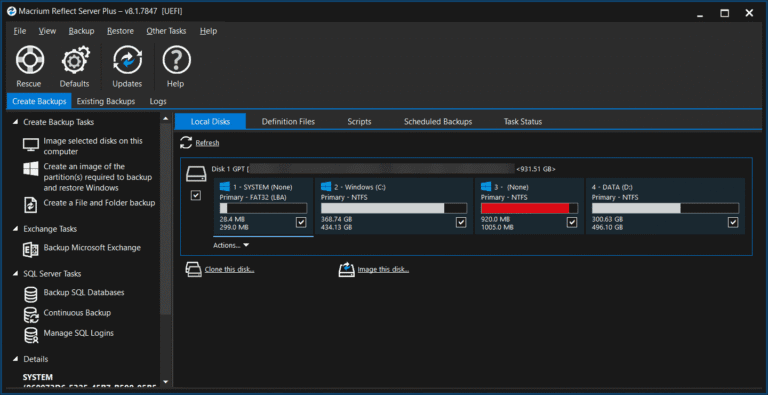
Macrium Reflect This is a system backup and recovery program that focuses on serious disk image creation and cloning. It can back up entire disks, partitions, or selected files and folders, creating backup sets for reverting to in case of Windows problems, SSD upgrades, or boot failures. Backups can be performed in Full, Incremental, and Differential modes, with the option to schedule automatic backups. If you need to migrate to a new disk, cloning can be used instead of reinstalling Windows and all programs from scratch.
A useful feature in real-world situations is Rescue Media, which allows you to boot from a USB or recovery media to restore an image even if the main Windows system is inaccessible. ReDeploy helps adjust the recovered system to boot on different hardware than the original machine in case you need to migrate to a new computer. Backup images can be encrypted and verified before use, and images can be mounted to be viewed in Windows Explorer. If you need another type of program with a wizard for backup, cloning, and creating WinPE, similar options are available. AOMEI Backupper They are comparable alternatives.
Reflect X adopts the primary file formats .mrimgx and .mrbakx and adds a Resumable Images system to allow backups to be resumed even if interrupted by reboots, network issues, or file writing, instead of starting from scratch every time. viBoot can be used to open backup images as a virtual machine for testing or temporarily restoring the system. For long-term restoration, a Definition File, Scheduler, and backup retention policies help control the number of files to prevent the destination from becoming too full too quickly. When performing a real recovery, you can choose to restore the entire disk or specific partitions depending on the situation.
Key Features
- Create full, incremental, and differential disk images for a disk or partition.
- You can back up and restore individual files or folders separately from a full system backup.
- Clone an HDD/SSD to move the system and data to a new disk.
- Create rescue media for booting and restoring the system when Windows fails.
- ReDeploy helps restore the system to hardware different from the source machine.
- viBoot opens a backup image as a virtual machine for testing or temporary use.
- Supports AES-256 encryption and image integrity verification.
- There are schedulers, definition files, and policies for storing backup sets for automated tasks.
- Mount an image in Windows Explorer to open and copy the file.
- Supports UEFI/GPT and system recovery on newer models.
- Resumable images allow backup work that is interrupted midway to be resumed.
- Reflect X uses the .mrimgx and .mrbakx formats for its new set of image and file backups.
What's new in Macrium Reflect X?
Reflect X introduces several core backup changes, including a new file format, improved backup/restore/clone performance, and enhanced resilience for extended workloads. This is an overview of version 10 based on official information, not specific release notes for build 10.0.8944.
- Speed up Backup, Restore, and Clone operations to handle large amounts of data more quickly.
- Use the newer .mrimgx and .mrbakx files, with more detailed data filtering options in the backup image.
- Add resumable images for backup jobs that were interrupted by reboots or connection issues.
- Added support for Windows on ARM for CoPilot+ devices using the ARM64 architecture.
- Improvements to image mounting, security, and performance are included in the Reflect X update.
File Information
- Operating System: Windows 11 / Windows 10 / 8.1 / 7 (x64)
- Risk Level: 🔴High Risk
- Developer: Paramount Software
- License: Shareware
- Version: 10.0.8944
- Language: Multilingual
- Size: 257.05 MB / 1.03 GB
- File type: *.rar
- Password: mawto
- Updated: 1/9/2026
- Required Reading: Download Guide
==== Download Macrium Reflect 10 ====
==== Download v10 WinPE/WinRE ====
==== Download Macrium Reflect 8.1.8854 ====
==== Download v8 WinPE/WinRE ====