Download Parted Magic 2026 Bootable ISO for free. This emergency boot disk manages hard drives, partitions, clones drives, safely erases data, and recovers computer systems. It works directly from a flash drive. Latest version.
What is Parted Magic?
Parted Magic It is a small, standalone Linux operating system designed specifically for hard disk management and data recovery. Users can boot the system directly from a USB flash drive using the program. Rufus It can access CDs/DVDs without relying on the main operating system installed on the machine. It includes a professional partition management tool called GParted, which supports resizing, copying, moving, and creating new partitions on various file systems, including ext3, ext4, FAT, exFAT, HFS+, and NTFS. The system runs on a Live OS architecture, allowing access to the data structure of drives experiencing file system problems or drives that cannot boot into Windows normally, enabling the safe copying of important files.
In addition to its storage partitioning capabilities, the boot disk includes deep hardware analysis and repair tools such as TestDisk for recovering lost partition tables and smartmontools for SMART hard disk status monitoring. It also features Clonezilla for creating images and cloning entire disks or specific partitions, supporting bit-to-bit backups and a Wipe Free Space function that uses the standard DoD algorithm to permanently delete files, preventing the recovery of important data before the device is discarded or sent for repair. The system supports and detects all current storage hardware standards, including NVMe SSDs, SATA, IDE, and external USB drives.
Features of Parted Magic
- Disk Partitioning - Manage partitioning, moving, or copying data primarily using the GParted engine.
- Data Rescue – Includes TestDisk and PhotoRec tools for recovering lost or corrupted files and partition tables.
- Disk Cloning - Use Clonezilla to create images of entire drives or specific partitions for data backup and recovery.
- Secure Erase - Supports DoD Wipe (DoD Deep Data Wipe) and Secure Erase (Deleting data on the SSD) to prevent file recovery.
- Benchmarking – Includes hardware performance testing suites such as Bonnie++, IOzone, Hard Info, and System Stability Tester.
- File System Support – Supports reading and writing data on all standard file systems, including ext3, ext4, FAT32, exFAT, HFS+, and NTFS.
- Network Access - Includes basic network management tools for transferring files through a server using FTP, SSH, and Samba protocols.
- Hardware Diagnostics - There are tools like smartmontools for reading disk health status and checking for bad sectors on the hard disk.
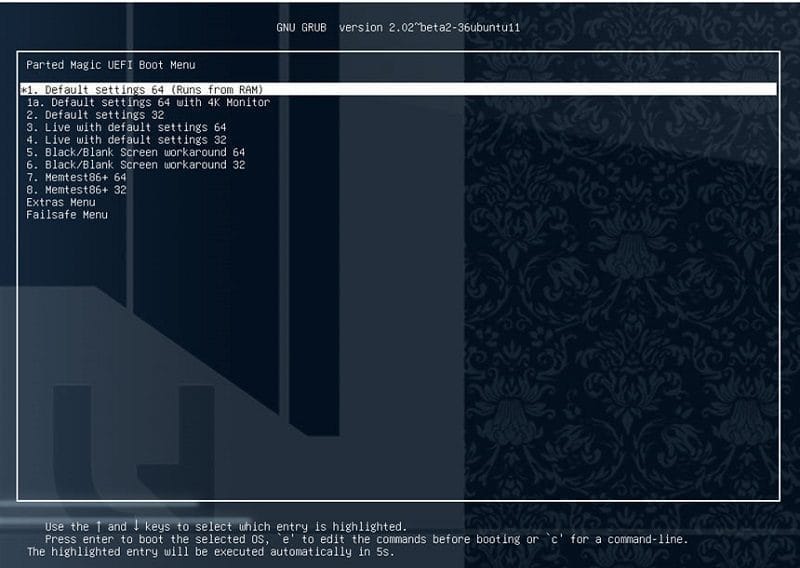
- Standalone Environment – It is an independent operating system that runs entirely on RAM without needing to be installed on the hard disk.
- Boot Options - The system can boot from various sources, including USB flash drives, CDs/DVDs, and network booting via PXE.
Supported hardware:
– PartedMagic requires a minimum of a 686 processor with 1GB of RAM.
– 512 MB in Live mode
– Compatible with devices that support Secure Boot Windows
– Works well on Intel Macs
What's new?
- The system's infrastructure has been upgraded by switching to Slackware Current to ensure the software packages are up-to-date.
- Introducing a new disk cloning tool (Disk Cloner) that sets the source device to read-only mode, preventing data loss.
- We rebuilt the system for removing wasted space (Wipe Free Space) entirely, without relying on external programs.
- Upgrade your desktop environment to Xfce 4.20 with the latest kernel and hardware driver updates.

File Information
- Operating System: Windows XP/ Vista / 7 / 8 and 8.1 / Windows 10 / Linux / MacOS
- License: Shareware
- Language: Multilingual
- Size: 2.15 GB
- File Type: ISO
- Password: mawto
- Updated: 25/09/2026
- Required Reading: Download Guide