Download Directory Opus 13 (x64) Full Program for free. This file and folder manager is fast, easy to use, and offers better performance than the latest version of Windows Explorer. Installation instructions are included.
What is the Opus directory?
Directory Opus Windows Explorer is a file management program for Windows that has been developed for a long time to replace the old Windows Explorer. The program is designed to prioritize speed and maximum efficiency. Its key distinguishing feature is its support for multi-threaded operation, meaning you can copy large files while simultaneously searching for files or modifying other folders without the program freezing or lagging.
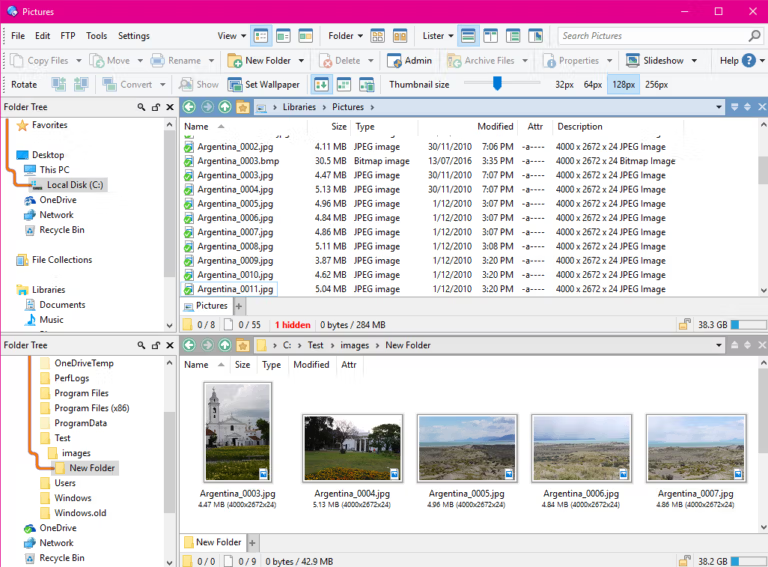
This program is ideal for power users, or those who handle massive amounts of data daily. This includes photographers who need to sort through numerous images, software developers, or even office workers frustrated by the limitations of Windows Explorer. It allows you to open multiple File Lister windows simultaneously in tabbed format or as a dual-pane window, making moving files and comparing data between folders much easier and more accurate.
Beyond speed, the core of Directory Opus is its virtually limitless customization capabilities. We can personalize every aspect of the interface to suit our own workflow, from creating custom hotkeys and writing scripts to handle repetitive tasks to completely altering the user interface. It's a tool that transforms tedious and chaotic file management into something easily controlled and organized exactly as we want it. For an alternative comparison to other file managers, read... OneCommander Pro More can be added.
Key Features
- Dual-pane File Display: A split-screen interface that makes copying or moving files between the source and destination easy with just drag and drop.
- Tabbed Browsing: The tab system allows you to keep multiple folders open in a single window, avoiding the need to open multiple program windows that fill the entire screen.
- Integrated Viewer Pane: The file preview panel supports instant preview of image files, videos, or even PDF documents without needing to open any additional programs.
- Powerful Search and Filtering: A search and filtering system that allows you to find files by name, type, size, properties, or specified criteria in detail.
- Built-in Archive Support: It supports managing compressed files such as Zip, 7z, and RAR just like using a regular folder.
- Batch Renaming: It can rename multiple files simultaneously and supports the use of metadata and regular expressions.
- Full Customization: The toolbar, menu, and command set can be customized to your liking, and it also supports extending capabilities through scripting (VBScript, JScript).
- Everything Integration: Integrate index search and folder size calculation with Everything for faster results.
- Folder Tabs and Listers: Open multiple tabs and windows with Lister, and customize the view or folder format to suit each task.
- Synchronize: Compare and synchronize files between folders or storage devices, with the option to select the working direction.
- Metadata Editor: View and edit file information such as tags, descriptions, and image or media data from the file manager window.
- Script IDE and Evaluator: Create scripts, custom columns, and expressions to repeat tasks or customize data views to match your workflow.
What's new in Directory Opus 13?
Directory Opus 13 focuses on multi-window file management, searching, copying, previewing, and customizing commands for seamless operation.
1. Dark Mode and flexible theme system.
- Native Dark Mode: Dark Mode is fully supported throughout the entire program, including all settings windows.
- Color adjustment: There are various themes to choose from, and you can customize the colors of each part of the UI as needed. The color changes are instant and do not require restarting the program.
- Scrollbars: You can customize the scrollbar to look like the Windows 11 style.
2. Integration with Everything.
- Indexed Search: Integrating the search power of Everything as a built-in feature makes searching for files across your entire device incredibly fast and instant.
- Instant Folder Size: The program can retrieve and display folder size information in real-time from Everything's database, eliminating the need to wait for the program to scan files.
3. Improved file copying system.
- New Queue UI: The progress display and queue management windows have been improved to be cleaner and easier to manage.
- Destination Placeholders: There is a system for displaying transparent files in the destination folder so you can see which files are about to be copied.
- Performance: Improved copying speed and support for server-side copy offload, which reduces bandwidth usage when moving files between folders on the same server.
4. Folder Tree and File Display
- Expandable Folders: You can directly click to expand subfolders in the File Display window, similar to branching out in a tree structure.
- Thumbnails: You can set the size and cropping of thumbnails separately for each folder.
5. Improve your Find As You Type (FAYT) skills.
- Added new keyboard shortcuts for quick searches, such as typing a symbol.
'To quickly search the current folder using the Opus engine, or type...+To find the entire device through Everything.
6. Viewer and Metadata Editor
- Video Player: Switch to a more modern video engine that supports full-screen video viewing directly from the Preview Pane.
- Microsoft Edge Integration: Edge can be used to display web pages and PDF files in the Preview Pane.
- Metadata: Improved file editing, especially for multi-value fields. You can now add values to the end without deleting the original data entirely.
7. Evaluator
- A new expression coding system that processes data faster, designed to help create custom columns, filter files, and write specialized scripts more intelligently.
File Information
- Operating System: Windows 11 / 10 / 8.1 (x64)
- Risk Level: 🟡 Low Risk
- Developer: GPSoftware
- Language: English
- Size: 64.29 MB
- File type: *.rar
- Password: mawto
- Updated: 22/8/2026
- Required Reading: Download Guide